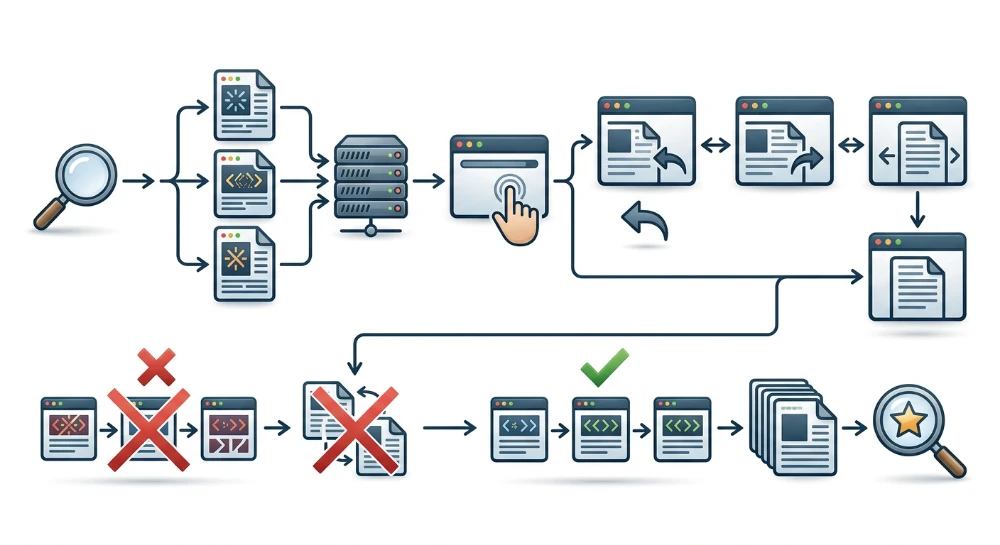
A Service Worker acts as a programmable client-side network proxy in the browser, intercepting outgoing HTTP requests via the
fetch
event and serving local responses through the Cache Storage API. While this architecture improves repeat-visit speed and offline resilience, misconfigured caching strategies or stalled update lifecycles are a common reason Service Workers serve stale pages. When HTML documents, dynamic API payloads, or JavaScript bundles are cached without proper revalidation, returning visitors and site editors can remain trapped on outdated content, metadata, or pricing long after the origin server has been updated.
Diagnosing these issues requires separating how a cached response affects returning human visitors from how it interacts with search engine crawlers. Because crawlers like Googlebot typically fetch pages statelessly without an existing cache or active Service Worker registration, a stale local cache on a user's device does not prevent the crawler from receiving fresh server HTML on an initial request. However, a Service Worker can still alter how a crawler renders a page if the script claims control immediately during installation and intercepts subsequent dynamic data requests or Single Page Application (SPA) routing with faulty logic.
Preventing stuck content depends on aligning Service Worker scope and lifecycle mechanics with explicit cache invalidation rules. By matching the right caching strategy to each resource type-such as keeping HTML navigation requests on a network-first approach while reserving aggressive caching for versioned static assets-development and SEO teams can maintain fast repeat page loads without serving obsolete documents or breaking active sessions during deployments.
How service worker scope and lifecycle govern content freshness
Whether a Service Worker serves fresh or outdated content depends on two browser specification mechanics: the registration scope that defines which URLs the worker controls, and the lifecycle state machine that dictates when an updated worker script replaces an existing one.
Registration scope and request interception
A Service Worker only intercepts requests originating from clients (such as browser tabs or windows) whose URLs fall within its registered scope. By default, a Service Worker's maximum scope is the directory location of the script file itself, extending to all subdirectories below that path.
-
A script registered at
/sw.jshas a default scope of/and can control navigation requests across the entire origin. -
A script registered at
/blog/sw.jsis restricted to URLs starting with/blog/(such as/blog/post-1) and cannot control requests made from pages at/or/products/unless the server explicitly widens the allowed scope using theService-Worker-AllowedHTTP response header.
Once a page falls within the active scope, the Service Worker intercepts two distinct categories of network traffic:
- Document navigation requests: The initial HTTP request for the HTML document itself when a user clicks a link, enters a URL, or reloads a page within the scope.
-
Subresource requests: Every subsequent request initiated by that controlled document-including JavaScript bundles, CSS stylesheets, images, fonts, and dynamic
fetch()orXMLHttpRequestAPI calls-even if those subresources are hosted on a different path or cross-origin CDN.
Interception happens inside the Service Worker's
fetch
event listener. When the browser requests a resource, it dispatches a
FetchEvent
to the active worker. If the worker calls
event.respondWith()
, it bypasses the standard browser network stack and returns a custom
Promise
that resolves to a
Response
object. Typically, the script queries the Cache Storage API using
caches.open()
or
caches.match()
to check for a stored response before deciding whether to return the local copy or forward the request to the network via
fetch(event.request)
.
self.addEventListener('fetch', (event) => {
  event.respondWith(
    caches.match(event.request).then((cachedResponse) => {
      return cachedResponse || fetch(event.request);
    })
  );
});
If
event.respondWith()
is paired with an unconditional
caches.match()
lookup as shown above, any previously stored response in Cache Storage is returned immediately without contacting the origin server, regardless of whether the live page or its metadata has changed.
The service worker lifecycle and the waiting state
Deploying a code change to a Service Worker script or updating a server template does not immediately alter how returning users load a site. The browser manages updates through a strict lifecycle designed to ensure that only one version of a Service Worker controls a site's open tabs at any given time, preventing version conflicts across shared client-side storage.
| Lifecycle Phase | Browser Operation | Impact on Content Freshness |
|---|---|---|
Install (
install
)
|
The browser downloads the script (if it is new or byte-different from the current version) and fires the
install
event, which is commonly used to populate a new cache via
cache.addAll()
.
|
The existing Service Worker remains in control of open pages. If the new worker precaches HTML or assets during installation, those files are stored in the background but are not yet served to active tabs. |
Waiting (
installed
/ waiting)
|
If a previous Service Worker is already controlling open pages within the scope, the newly installed worker enters a waiting queue instead of activating. | Returning users who keep at least one tab open continue to receive responses governed by the old Service Worker and its associated caches, even if they refresh the page or open a new tab to the same site. |
Activate (
activate
)
|
Once all tabs and windows controlled by the old worker are closed, the old worker is terminated and the waiting worker fires its
activate
event, where outdated caches are typically deleted.
|
Old Cache Storage instances can now be safely purged without breaking in-use pages. |
Active (
activated
)
|
The updated worker takes control of pages within its scope and processes subsequent
fetch
events.
|
New navigation and subresource requests are now routed through the updated caching logic and refreshed asset lists. |
The waiting phase is a frequent source of diagnostic confusion during site updates. Because a standard page refresh (or opening a new tab while an existing tab remains open) creates an overlapping client relationship before the old client fully unloads, the browser does not consider all controlled clients closed. Consequently, a user or site editor refreshing a page after a deployment will remain governed by the previous Service Worker until every tab within that scope is completely closed or the lifecycle is explicitly overridden.
Trade-Offs of lifecycle overrides: Skipwaiting and clients.claim
Developers can bypass the default waiting behavior using two methods provided by the Service Worker specification:
-
self.skipWaiting(): Instructs the newly installed Service Worker to bypass the waiting phase and move directly to theactivatestate as soon as installation completes, even while existing tabs are still being controlled by the older worker. -
clients.claim(): Called inside theactivateevent listener, this method allows an newly activated Service Worker to take immediate control of all open, uncontrolled clients within its scope without requiring a page reload.
While combining
self.skipWaiting()
and
clients.claim()
forces updates to take effect immediately, calling
self.skipWaiting()
unconditionally introduces a version-mismatch failure mode for active sessions. A page that was loaded under the old Service Worker is already running an older HTML document or Single Page Application (SPA) shell in memory. If that page relies on lazy-loaded JavaScript chunks, dynamic imports, or versioned templates, and the new Service Worker activates mid-session and deletes the old precache during its
activate
event, subsequent user interactions that request those older lazy-loaded subresources can fail with network or chunk-loading errors.
To prevent broken sessions while still avoiding indefinite staleness, production implementations should apply a clear decision rule for
self.skipWaiting()
:
-
Use unconditional
self.skipWaiting()only when the Service Worker strictly manages runtime caching or when the server retains previous versions of hashed static assets so that mid-session requests for older chunks can still fall back to the network cleanly. -
Avoid unconditional
self.skipWaiting()when the worker precaches versioned application shells and deletes previous caches immediately on activation. Instead, keep the new worker in the waiting state, prompt the user in the UI when an update is ready, and triggerself.skipWaiting()viapostMessage()right before executing a programmaticwindow.location.reload()so the document and its subresources transition to the new version together.
Run a deep technical crawl to identify 4xx errors, missing meta tags, and indexation blockers.
How stale service worker caches affect search crawlers vs. users
A common misconception in technical SEO is that a stale Service Worker cache automatically hides updated page content from search engine crawlers. In practice, the impact of a misconfigured Service Worker differs significantly between stateless automated crawlers and stateful human browsers.
Stateless crawling vs. stateful browser sessions
Major search engine crawlers, including Googlebot, generally crawl statelessly across separate page fetches. When Googlebot requests a URL, the rendering environment typically starts with an empty Cache Storage instance and no active Service Worker registration from previous crawl sessions. Because no Service Worker controls the page at the moment of the initial navigation request, the crawler fetches the document directly from the origin server or CDN.
Consequently, a stale HTML response or outdated JavaScript bundle trapped in Cache Storage on a returning user's device does not prevent a stateless crawler from receiving the live server response on its initial load. Search engines do not apply a direct ranking penalty simply because a site registers a Service Worker or utilizes client-side caching.
Conditional scenarios where service workers affect crawler rendering
Although a crawler starts without a pre-existing cache, Web Rendering Services (such as Google's evergreen Chromium renderer) execute JavaScript and support the Service Worker API. A Service Worker can still interfere with how a crawler renders and indexes a page if the worker intercepts network activity during that initial visit's rendering window.
Two specific architectural patterns can cause a Service Worker to alter crawler rendering:
-
Immediate client claiming paired with flawed interception: If the page registers a Service Worker during the initial load and the worker script calls
self.skipWaiting()andclients.claim(), the worker takes control of the page immediately while the renderer is still executing JavaScript. If the página fetches primary content, metadata, or structured data asynchronously viafetch()orXMLHttpRequestafter the worker claims the client, those requests pass through the Service Worker'sfetchevent handler. If that handler contains flawed routing logic, returns an empty fallback payload, or responds with a generic precached error state when a condition fails, the renderer may index an incomplete or empty page. -
SPA shell rewrites during the rendering window: In Single Page Application (SPA) architectures, a Service Worker is frequently configured to precache an application shell (such as
/index.html) during theinstallphase and serve it for navigation requests. If the application triggers client-side route transitions or reloads during the initial rendering window after the worker has claimed the client, an improperly scoped navigation fallback can rewrite the request to the generic shell without properly resolving the route-specific content or canonical metadata.
Returning users and diagnostic confusion
While crawler rendering issues require specific first-load interception conditions, the primary operational risk of a stale Service Worker cache affects returning human visitors and internal site teams. Human users browse statefully; once a Service Worker is installed and activated on their device, it persists across sessions and intercepts subsequent visits.
| Attribute | Stateless Search Crawler | Returning Human User / Site Editor |
|---|---|---|
| Initial Service Worker State | No active registration; empty Cache Storage. | Active Service Worker from prior visit; populated Cache Storage. |
| Source of HTML Navigation Response | Origin server or CDN. |
Service Worker
fetch
handler (often served from local Cache Storage).
|
| Primary Risk from Misconfiguration |
Broken async API requests or shell rewrites if
clients.claim()
runs during initial rendering.
|
Persistent stale HTML, outdated prices, old canonicals, or broken UI until cache invalidation. |
When a Service Worker serves stale HTML or cached API payloads on repeat visits, returning organic visitors may see out-of-stock products, outdated pricing, or old editorial content even after the CMS and CDN have been updated. At the same time, SEO specialists, developers, and content editors who regularly visit the site in their own browsers will also be served the cached version from their local Service Worker.
This discrepancy frequently causes diagnostic confusion during site audits and deployments. An SEO practitioner inspecting the page in a standard browser tab may see an outdated
<title>
tag, an old
rel="canonical"
target, or missing internal links, and mistakenly conclude that a recent deployment failed or that the CDN is serving stale assets. Meanwhile, a stateless crawler-or a user visiting in a fresh incognito window-receives the updated markup directly from the origin server. Isolating whether a defect exists on the server or strictly inside a local Service Worker cache requires verifying whether the response originated from the network or from the browser's
ServiceWorker
execution context before attempting server-side fixes.
Common failure modes that trap pages in a stale state
Pages become stuck in a stale state when a Service Worker's request routing, asset revisioning, or script update mechanics prevent the browser from fetching or exposing fresh server responses. These defects typically originate from four implementation errors in how the worker script and server headers are configured.
Applying Cache-First logic to HTML documents and dynamic APIs
A frequent cause of persistent staleness is routing document navigation requests (
event.request.mode === 'navigate'
) or dynamic JSON/API endpoints through a Cache-First handler without a background revalidation or expiration mechanism. In a strict Cache-First flow, the worker checks Cache Storage before attempting a network request:
// Flawed pattern for HTML navigation requests
self.addEventListener('fetch', (event) => {
  if (event.request.mode === 'navigate') {
    event.respondWith(
      caches.match(event.request).then((cachedResponse) => {
        return cachedResponse || fetch(event.request);
      })
    );
  }
});
Once a URL is stored in Cache Storage under this pattern, every subsequent visit to that URL resolves immediately from the local cache. The origin server is never contacted for that document again unless the Service Worker script itself is updated and explicitly deletes the cache entry. Any server-side changes to the HTML-including updated
<title>
elements, revised
rel="canonical"
tags, modified structured data, or fresh body copy-remain invisible to returning visitors. The same failure occurs in client-rendered architectures when the API payloads that hydrate page content and metadata are cached indefinitely using Cache-First logic.
Uncoupled SPA application shell precaching
Single Page Applications often precache an application shell (such as
/index.html
or
/app-shell.html
) during the Service Worker
install
phase and serve that cached HTML document for all navigation requests within the worker's scope. Staleness and rendering failures occur when the revision hash or invalidation trigger for that HTML shell is not coupled to the build hashes of the JavaScript bundles and content payloads it references.
This misconfiguration produces two distinct failure states:
-
If the build pipeline generates new content-hashed JavaScript bundles (for example, replacing
main.a1b2.jswithmain.c3d4.js) and deletes the old bundles from the server or CDN, a Service Worker serving a stale precachedindex.htmlwill continue requestingmain.a1b2.js. If those lazy-loaded chunks were not precached, the requests fail with404 Not Founderrors, leaving the page unable to render its primary content or execute client-side metadata updates. - If the initial HTML shell contains server-injected SEO metadata, route manifests, or preloaded state data that changes independently of the JavaScript code, failing to regenerate the precache manifest revision when backend content changes locks returning users into the initial metadata and state captured when the worker was first installed.
Caching or renaming the service worker script itself
Browsers check for Service Worker updates by fetching the registered worker script URL and performing a byte-for-byte comparison against the currently installed script. Two deployment mistakes can sever this update mechanism:
-
Serving the Service Worker file (such as
/sw.js) with restrictive, long-lived HTTP caching headers (for example,Cache-Control: public, max-age=31536000, immutable). Although modern browsers typically cap the effective HTTP cache lifetime when checking for Service Worker script updates (often enforcing a maximum of 24 hours by default unless configured otherwise viaupdateViaCacheduring registration), aggressive CDN or browser caching ofsw.jsstill delays the detection of bug fixes, updated precache manifests, and cache-busting logic during that window. -
Appending a content hash to the Service Worker filename during build deployments (such as changing
sw.v1.jstosw.v2.js) while the page itself is trapped in a Cache-First HTML state. Because the browser checks for updates at the exact script URL currently registered, a client serving cached HTML that still registers/sw.v1.jswill never discover/sw.v2.js. If/sw.v1.jsis removed from the server and returns a404status, the browser keeps the existingsw.v1.jsregistration active indefinitely, permanently stranding the client on the old worker and its cached pages.
Unscoped cache lookups without purging old cache versions
When developers update a cache version name in a new Service Worker deployment (for instance, incrementing
pages-v1
to
pages-v2
), the previous cache instance remains stored on the user's device until it is explicitly deleted via
caches.delete()
during the
activate
event. Even when the new worker activates properly, stale content will continue to be served if the
fetch
handler queries the global
CacheStorage
object without scoping the lookup to the current cache name.
// Flawed lookup: searches across all existing caches, including outdated versions
self.addEventListener('fetch', (event) => {
  event.respondWith(
    caches.match(event.request).then((response) => {
      return response || fetch(event.request);
    })
  );
});
Because top-level
caches.match(event.request)
iterates through all open caches in creation order unless a specific
cacheName
option is passed or
cache.match()
is called on a specific opened cache instance, the browser matches and returns the outdated response sitting in the unpurged
pages-v1
cache before ever checking
pages-v2
or falling back to the network.
| Failure Mode | Root Technical Cause | Observed Symptom on Affected Pages |
|---|---|---|
| Cache-First on HTML or Dynamic APIs |
caches.match()
resolves navigation or API requests without network revalidation.
|
HTML document, metadata, and body content remain frozen at the version from the user's first visit. |
| Uncoupled SPA Shell Precaching |
index.html
precache revision does not update when JS chunk hashes or initial state change.
|
Broken page rendering due to
404
chunk errors, or outdated initial metadata and route state.
|
| Cached or Renamed Worker Script |
Long
Cache-Control
on
sw.js
, or changing the worker filename while HTML is cached.
|
Deployed fixes and new precache manifests fail to install; old worker remains active indefinitely if the old script URL returns
404
.
|
Unpurged Caches with Global
caches.match()
|
Old cache storage instances are not deleted in
activate
, and fetch handlers query all caches across the origin.
|
New Service Worker activates, but requests still resolve with stale responses from earlier cache versions. |
Detect stealthy content rewrites, relevance drops, and injected spam links.
Selecting caching strategies for HTML documents vs. static assets
Preventing stale content without sacrificing repeat-visit speed requires separating requests by their mutability and role in page assembly. A single global caching rule inside a
fetch
handler treats an HTML document whose metadata and pricing change hourly the same as a compiled JavaScript bundle whose URL changes on every build. Mapping each request type to one of four standard Service Worker caching patterns isolates dynamic content from aggressive local storage while keeping static subresources fast.
Network-First for HTML navigations and dynamic content APIs
Under a Network-First strategy, the Service Worker forwards the intercepted request directly to the origin server. If the network returns a valid response, the worker clones the response, updates the designated cache entry, and delivers the fresh payload to the browser. It only falls back to a cached response if the network request fails or exceeds a configured timeout.
For SEO-relevant pages, Network-First is the recommended default for HTML document navigation requests (identified via
event.request.mode === 'navigate'
) and for dynamic JSON or GraphQL API endpoints that populate primary body content, product availability, or client-side metadata. This pattern guarantees that any online user or editor loads the live server response-including updated
<title>
elements, canonical tags, robots directives, structured data, and internal links-while preserving a cached copy for offline resilience or degraded network conditions.
When implementing Network-First for navigation requests, include a network timeout threshold (for example, 3 to 5 seconds) using an
AbortController
or a library equivalent before falling back to the cache. Without a timeout, users on "lie-fi" connections-where the device reports network connectivity but packets stall-wait until the browser's default socket timeout expires before the Service Worker serves the cached fallback.
self.addEventListener('fetch', (event) => {
  if (event.request.mode === 'navigate') {
    event.respondWith(
      fetch(event.request)
        .then((networkResponse) => {
          if (networkResponse && networkResponse.status === 200) {
            const responseClone = networkResponse.clone();
            caches.open('pages-v2').then((cache) => {
              cache.put(event.request, responseClone);
            });
          }
          return networkResponse;
        })
        .catch(() => caches.match(event.request))
    );
  }
});
Notice the check for
networkResponse.status === 200
before writing to Cache Storage. Because the Fetch API only rejects its promise on network failure (such as DNS lookup failure or complete loss of connectivity), an origin returning an HTTP
404
or
500
status still resolves the
fetch()
promise. Guarding
cache.put()
by status code prevents the Service Worker from overwriting a valid cached page with an error document during a temporary server outage.
Stale-While-Revalidate and the One-Visit-Behind Trade-Off
Stale-While-Revalidate checks Cache Storage first and immediately returns the cached response if one exists, eliminating network latency on repeat visits. Simultaneously, the Service Worker dispatches a background network request and overwrites the cached entry with the fresh response for future requests.
Applying Stale-While-Revalidate to HTML documents or content APIs introduces a specific operational trade-off: a returning visitor always views content that is one visit behind the live server state. If an editorial team updates a canonical tag, corrects a factual error, or modifies an article's headline, a user with a primed cache receives the outdated version on their initial return visit and only sees the updated document if they reload or navigate to that URL a second time.
This one-visit lag makes Stale-While-Revalidate unsuitable for time-sensitive pages such as e-commerce product listings with fluctuating inventory and pricing, live event coverage, or breaking news. It remains an acceptable compromise for evergreen documentation, relatively static editorial articles, or non-critical UI subresources (such as author avatars or non-hashed CSS enhancements) where near-instant repeat rendering outweighs immediate consistency.
Cache-First for immutable, Content-Hashed static assets
A Cache-First strategy queries Cache Storage and returns the matching response immediately without contacting the network. The Service Worker only performs a network fetch if the requested URL is absent from the cache, caching the newly fetched asset for subsequent visits.
Reserve Cache-First strictly for immutable static subresources whose filenames contain a content hash generated at build time-such as
app.8f9d2a.js
,
vendor.4c1b7e.css
, or versioned web font files. Because any modification to the file's source code produces a new hash and a distinct URL, a cached entry at an existing URL never becomes outdated relative to its intended content. Pairing Network-First HTML with Cache-First hashed assets ensures that the browser always fetches the latest HTML document, discovers the newest asset URLs inside that markup, and loads unchanged bundles directly from local storage.
Never apply Cache-First to unhashed asset paths (such as
/assets/main.js
or
/styles/global.css
) unless the Service Worker cache name itself is versioned and purged on every deployment. Without URL finger-printing or cache invalidation, the worker will continue serving the original script or stylesheet even after the HTML updates to expect new functions or class names.
Network-Only for Non-Cacheable and mutating requests
Network-Only bypasses Cache Storage entirely, either by letting the browser handle the request natively (returning early from the
fetch
listener without calling
event.respondWith()
) or by passing the request directly to
fetch(event.request)
. Use Network-Only for requests that must reflect real-time state or cannot be safely replayed from local storage:
-
Non-
GETrequests (POST,PUT,DELETE), which the Cache Storage API does not support by default and which represent state-mutating operations such as form submissions or checkout actions. - Real-time stock, pricing, or cart verification endpoints where serving a cached fallback during a network drop could mislead the user into transacting on invalid data.
- Analytics beacons, error-logging endpoints, and authentication or session-validation routes.
| Resource Type | Recommended Strategy | Freshness vs. Performance Behavior |
|---|---|---|
HTML Document Navigations (
mode === 'navigate'
)
|
Network-First (with timeout fallback) | Always serves live server HTML, metadata, and canonicals when online; falls back to cache only when offline or on stalled connections. |
| Dynamic Content APIs (Product JSON, Search Results) | Network-First | Ensures client-rendered content matches current database state; provides offline access to previously viewed views. |
| Evergreen Editorial HTML or Non-Hashed UI Assets | Stale-While-Revalidate | Delivers instant repeat loads from cache while updating in the background; returning users see updates on their subsequent visit. |
Content-Hashed Static Subresources (
app.[hash].js
, Fonts)
|
Cache-First | Eliminates network requests for repeat loads; safe because asset content never changes without a corresponding URL change. |
Checkout, Auth, Analytics, and Non-
GET
Requests
|
Network-Only | Never reads from or writes to local cache; prevents stale transactional state and duplicate or lost tracking payloads. |
Cache invalidation, versioning, and emergency recovery patterns
Selecting appropriate caching strategies prevents new staleness issues, but maintaining content freshness over time requires explicit cache invalidation, strict HTTP header configuration for the worker script, and a tested recovery mechanism for faulty deployments.
Manual cache versioning in the activate event
Because the Cache Storage API does not expire entries automatically based on HTTP caching headers, custom Service Worker implementations must manage cache lifecycles manually. The standard pattern is to embed a version identifier in the cache name and purge outdated caches during the
activate
event-the point in the lifecycle when the previous Service Worker has released control of open clients.
const STATIC_CACHE = 'static-assets-v4';
constPAGES_CACHE = 'html-pages-v2';
const ACTIVE_CACHES = [STATIC_CACHE, PAGES_CACHE];

self.addEventListener('activate', (event) => {
  event.waitUntil(
    caches.keys().then((cacheNames) => {
      return Promise.all(
        cacheNames.map((cacheName) => {
          if (!ACTIVE_CACHES.includes(cacheName)) {
            return caches.delete(cacheName);
          }
        })
      );
    })
  );
});
When implementing manual versioning, pair the cleanup logic with scoped cache lookups. If a
fetch
handler calls
caches.match(event.request)
without specifying a cache name in the options object, the browser searches all open caches in origin storage in creation order. If an older cache failed to delete or a new worker activated before cleanup completed, an unscoped lookup can return a stale response from a deprecated cache. Passing the current cache constant explicitly-or opening the specific versioned cache before matching-prevents cross-version collisions.
Automated revisioning and expiration with workbox
Managing cache versions manually across dozens of routes and build artifacts is error-prone. Production applications frequently use libraries such as Workbox to automate asset revisioning and runtime cache eviction.
For build-time precaching, Workbox generates a precache manifest containing URL and revision pairs. If a file name already contains a bundler-generated content hash (such as
main.8f9d2a.js
), Workbox sets its revision field to
null
and relies on the URL itself for versioning. For unhashed files (such as an offline fallback page or an application shell), the build tool calculates a file hash and injects it into the manifest as a revision string. During the
install
phase, Workbox compares the incoming manifest against its internal IndexedDB metadata and downloads only the specific files whose revision strings have changed, avoiding a full cache wipe on every deployment.
For runtime caches that store dynamic responses, automated expiration rules prevent unbounded storage growth and limit how long an outdated resource can persist. In Workbox, the
ExpirationPlugin
enforces two primary constraints:
-
maxEntries: Caps the total number of responses stored in a specific runtime cache, evicting the least-recently-used entries once the limit is reached. -
maxAgeSeconds: Defines a maximum time-to-live for cached responses, ensuring that entries older than the specified duration are treated as expired and evicted during subsequent cache operations.
import { registerRoute } from 'workbox-routing';
import { StaleWhileRevalidate } from 'workbox-strategies';
import { ExpirationPlugin } from 'workbox-expiration';

registerRoute(
  ({ request }) => request.destination === 'image',
  new StaleWhileRevalidate({
    cacheName: 'editorial-images',
    plugins: [
      new ExpirationPlugin({
        maxEntries: 100,
        maxAgeSeconds: 7 * 24 * 60 * 60, // 7 days
      }),
    ],
  })
);
Server-Side HTTP headers for the service worker script
Any cache invalidation or update logic inside a Service Worker depends on the browser detecting that the worker file on the server has changed. While modern browsers typically ignore long-lived HTTP
Cache-Control
headers when checking for updates to the registered Service Worker script-capping the effective HTTP cache lifetime at 24 hours by default-relying on browser heuristics can still delay urgent fixes for up to a day, and intermediate CDN layers can serve stale worker scripts if edge caching is misconfigured.
Configure the origin server and CDN to return strict anti-caching headers specifically for the Service Worker file (for example,
/sw.js
or
/service-worker.js
):
Cache-Control: no-cache, no-store, must-revalidate
Pragma: no-cache
Expires: 0
Setting
Cache-Control: no-cache
(or
max-age=0, must-revalidate
) ensures that every update check triggered by a page navigation reaches the origin or validated edge without waiting for a local HTTP cache timer to expire. Do not apply content hashing to the Service Worker file name itself; the registration URL must remain constant so existing clients know where to poll for updates.
Emergency recovery: Deploying a Kill-Switch service worker
When a flawed deployment traps returning users in a Cache-First HTML loop or breaks client-side rendering, fixing the application code on the server will not resolve the issue if the active Service Worker continues to intercept navigations and serve cached responses. Removing the
navigator.serviceWorker.register()
call from the live HTML is also ineffective: an already-installed Service Worker remains registered in the user's browser and continues to intercept requests even if the registration snippet disappears from the document.
To recover affected browsers, deploy a replacement "kill-switch" Service Worker at the exact same URL path and filename as the broken worker. Because the browser checks the script URL for byte differences during navigation or periodic update checks, it will download and install the replacement script even when the page HTML itself is served from the local Service Worker cache.
// Emergency replacement deployed at the existing /sw.js path
self.addEventListener('install', () => {
  // Bypass the waiting lifecycle phase immediately
  self.skipWaiting();
});

self.addEventListener('activate', (event) => {
  event.waitUntil(
    caches.keys()
      .then((cacheNames) => {
        // Delete all Cache Storage instances for this origin
        return Promise.all(
          cacheNames.map((cacheName) => caches.delete(cacheName))
        );
      })
      .then(() => {
        // Unregister this Service Worker once activation completes
        return self.registration.unregister();
      })
      .then(() => {
        // Locate all open tab clients and force a clean network reload
        return self.clients.matchAll({ type: 'window' });
      })
      .then((windowClients) => {
        windowClients.forEach((client) => {
          if ('navigate' in client) {
            client.navigate(client.url);
          }
        });
      })
  );
});
This script contains no
fetch
event listener, so it immediately stops intercepting network requests once active. Calling
self.skipWaiting()
ensures the kill-switch replaces the broken worker without waiting for the user to close all open tabs. During activation, it purges every cache bucket on the origin, unregisters itself so subsequent visits bypass Service Worker initialization entirely, and triggers
client.navigate(client.url)
on open window clients to reload the current URLs directly from the network. Keep the kill-switch file deployed at the worker URL long enough for returning users to cycle through the site and receive the update check.
Detect stealthy removals, nofollow tag injections, and altered anchors instantly.
Diagnosing and verifying service worker caching behavior
When a page displays outdated titles, canonical tags, or body content after a deployment, the first diagnostic step is isolating whether the stale response originates from the Service Worker, the browser's HTTP cache, or an upstream CDN. Because a Service Worker sits between the tab and the network layer, standard server-side cache purges will not resolve content trapped in client-side storage. Browser developer tools, such as Chrome DevTools, provide direct visibility into request interception and local cache buckets to confirm the exact source of a stale document.
Comparing standard reloads against hard reloads
The fastest way to isolate Service Worker interception from origin or CDN caching is to compare a standard reload with a hard reload on the affected URL:
-
Standard Reload (
Ctrl+RorCmd+R): The browser routes the navigation request and subresource fetches through the active Service Worker. If the worker uses a Cache-First or Stale-While-Revalidate policy for HTML, or serves an outdated SPA shell, the rendered DOM and metadata will reflect the local Cache Storage version. -
Hard Reload (
Shift+Ctrl+RorShift+Cmd+R): Per the Service Worker specification, a force-reload bypasses the active Service Worker entirely for that page load and instructs the browser to fetch resources directly from the network without using the local HTTP disk cache.
Open the Elements panel and compare the rendered
<title>
,
<link rel="canonical">
, or primary content across both reload types. If the hard reload renders the updated content while a subsequent standard reload immediately reverts to the old version, the origin server and CDN are serving fresh HTML, and the Service Worker is responsible for the stale state. If both reload types return outdated HTML, the caching issue lies upstream at the CDN or origin server.
Inspecting request interception in the network panel
To verify which individual requests the Service Worker intercepts during a standard page load, open the Network panel in Chrome DevTools, ensure the "Disable cache" checkbox is unchecked so the browser emulates a normal returning visitor, and perform a standard reload.
Examine the
Size
column for the initial document request and subsequent API or asset fetches. Browser developer tools label the fulfillment source explicitly:
| Size Column Indicator | Request Fulfillment Source | Diagnostic Interpretation |
|---|---|---|
(ServiceWorker)
|
The active Service Worker intercepted the request via its
fetch
listener and returned a response.
|
The response may have come from Cache Storage or a network fetch initiated by the worker. Look for a separate row with a gear icon or check the Timing tab to see if the worker made an outbound network call. |
(disk cache)
or
(memory cache)
|
The browser's standard HTTP cache fulfilled the request without Service Worker interception, or fulfilled a fetch request made inside the Service Worker. |
Staleness here is governed by standard HTTP
Cache-Control
and
Expires
headers rather than the Cache Storage API.
|
Byte size (e.g.,
14.2 kB
)
|
The request reached the network (CDN or origin server) and transferred bytes over the wire. |
If the content is still stale when bytes are transferred directly from the network, check the response headers for CDN cache hits (such as
X-Cache: HIT
or
CF-Cache-Status: HIT
).
|
Auditing lifecycle state in the application panel
When the Network panel confirms that the Service Worker is fulfilling requests with stale content, open the Application panel and select the Service Workers view. This interface exposes the registration scope, active script URL, and current lifecycle state.
Check whether a newly deployed script appears alongside the active worker with the status "waiting to activate". This confirms that the browser has detected the updated
sw.js
file on the server, but the old worker remains in control because open tabs are still using it and
self.skipWaiting()
was not called. Clicking the
skipWaiting
link in DevTools forces the waiting worker to activate immediately, allowing you to verify whether the new script resolves the stale content once it takes control.
The Service Workers view also provides two diagnostic checkboxes for isolating behavior during development and QA:
-
Bypass for network: Forces the browser to ignore the active Service Worker and fetch all requests directly from the network, allowing you to test live site behavior without unregistering the worker or clearing existing caches. -
Update on reload: Forces the browser to check the network for a byte-for-byte update to the Service Worker script on every page reload and immediately activates any updated worker, bypassing the waiting phase. Leave this unchecked when attempting to reproduce the exact experience of a returning organic visitor.
Examining cached payloads in cache storage
To inspect the exact HTML or JSON payloads stored on the client device, expand the Cache Storage section in the Application panel. Each named cache bucket created by the Service Worker is listed beneath the origin.
Select a cache bucket to view its stored request URLs, response types, and cached timestamps. Clicking an HTML navigation entry or API endpoint opens a preview pane below the table:
- Open the Preview or Response tab to inspect the raw cached HTML source or JSON data. Search the response body for the outdated metadata, canonical URL, or page copy to confirm that the stale markup is physically stored in that bucket.
-
Open the Headers tab on the cached entry to inspect the original HTTP response headers, including
Date,ETag, andCache-Control. ADateheader from an earlier deployment confirms when the Service Worker wrote that response into Cache Storage. -
If multiple versioned cache buckets exist in the list (for example, both
pages-v1andpages-v2), check whether the outdated URL exists in the older bucket. Finding the stale entry in a previous cache version indicates that the Service Worker'sactivateevent failed to purge deprecated caches, and an unscopedcaches.match()call is matching the older entry first.