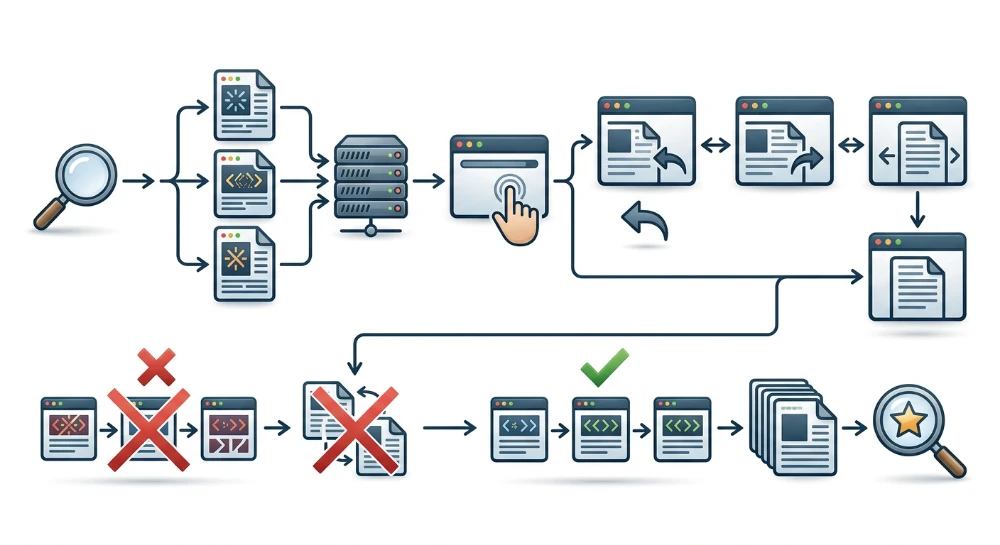
Understanding how client-side routing works for SEO starts with how Single-Page Applications (SPAs) handle navigation compared to traditional server-rendered websites. In a traditional architecture, clicking a link triggers a round-trip request to the web server, which returns a complete HTML document and an HTTP status code for the new URL. Client-side routing intercepts those browser navigation events using JavaScript and updates the Document Object Model (DOM) dynamically in the browser without requesting a new full HTML document from the server.
This architectural difference creates a fundamental disconnect between how users experience an application and how search engines process it. While a person can click through interactive views seamlessly within a single browser session, search engine crawlers rely on distinct, addressable URLs to discover, fetch, and index individual pieces of content. If an SPA changes the visible content on the screen without updating the browser URL, or if it relies on JavaScript events that crawlers do not follow, search engines may only ever see the application's initial entry page.
To make a client-side routed application crawlable and indexable, every view intended for search visibility needs a stable, unique URL. In practice, this means the routing architecture must expose standard HTML anchor links in the DOM for discovery, update the document metadata as views change, and be backed by a server configuration that resolves direct requests to deep URLs without returning false error codes.
URL architecture: HTML5 history API vs. Hash-Based routing
Client-side routers manage browser URLs using one of two mechanisms: hash-based routing or the HTML5 History API (alongside the newer Navigation API in modern browsers). The choice between these two models determines whether search engines can treat individual application views as separate, indexable pages.
Why Hash-Based routing prevents separate indexing
Hash-based routing uses the URL fragment identifier (the
#
symbol and everything following it, such as
example.com/#/products/shoes
) to track application state. Historically, developers used hash routing because changing the fragment does not trigger a browser page reload, and it works without special server configuration. When the fragment changes, the browser fires a
hashchange
event, and the client-side router swaps the visible component in the DOM.
From an HTTP and search engine perspective, however, URL fragments are not separate web pages:
-
By HTTP specification, the fragment portion of a URL is processed strictly within the client browser and is never sent to the server in an HTTP request. A request for
example.com/#/productsand a request forexample.com/#/contactboth ask the server for the exact same root resource:example.com/. - Because fragments are meant to point to anchor positions within a single document rather than distinct documents, Googlebot generally ignores URL fragments when crawling and indexing.
-
Legacy hashbang URLs (
#!), which belonged to Google's long-deprecated AJAX crawling scheme, are no longer supported as a dedicated indexing protocol.
This leads to a common failure mode in SPA SEO: an application renders dozens of unique product or article views via hash routes (
#/item-1
,
#/item-2
), and users can navigate and bookmark them normally. However, when Googlebot crawls the site, it strips the fragments, consolidates all discovered hash links back to the root URL, and indexes only the initial entry view while leaving every interior view unindexed.
Clean URL paths via the HTML5 history API
To make individual views separately addressable by search engines, client-side routers rely on the HTML5 History API. Methods such as
history.pushState()
and
history.replaceState()
allow JavaScript to update the browser's URL path (for example, changing
/
to
/products/shoes
) and manipulate the session history stack without triggering a full document reload, while the
popstate
event handles back and forward browser navigation. Newer implementations may also use the modern Navigation API, which provides a centralized way to intercept and manage same-origin path navigations on top of standard URL paths.
Because these APIs modify the actual URL path and query string rather than the fragment, each view corresponds to a standard URL that is transmitted in full during an HTTP request and evaluated by search engine crawlers as a distinct document.
| Routing Mechanism | Example URL Structure | Browser API Used | Sent in HTTP Request | Crawler Indexing Behavior |
|---|---|---|---|---|
| HTML5 History / Navigation API |
https://example.com/products/shoes
|
pushState
,
replaceState
,
popstate
, or Navigation API
|
Full path (
/products/shoes
) is sent to the server
|
Treated as a unique, separately indexable URL |
| Hash-Based Routing |
https://example.com/#/products/shoes
|
location.hash
,
hashchange
|
Fragment is stripped; only
/
is sent to the server
|
Fragment is ignored; consolidated with the base URL |
Decision rule and framework configuration
The architectural rule for search visibility is straightforward: any distinct content view in an SPA that needs to be indexed as its own page in search results must use clean URL paths managed via the History API rather than URL fragments.
Major frontend routing libraries support both modes, so developers must explicitly select the History API implementation when configuring the router:
-
In React Router, use
createBrowserRouter(or theBrowserRoutercomponent) rather thancreateHashRouterorHashRouter. -
In Vue Router, configure the history option with
createWebHistory()rather thancreateWebHashHistory(). -
In Angular, stick to the default HTML5
PathLocationStrategyrather than enablingHashLocationStrategyviauseHash: true.
Hash fragments remain appropriate only for non-indexable in-page states, such as jumping to a section heading within the same article or opening a transient UI modal that should not have its own search listing.
Run a deep technical crawl to identify 4xx errors, missing meta tags, and indexation blockers.
Crawlable link architecture in Client-Side routers
Assigning clean History API paths to application views makes those URLs addressable, but search engines still need a mechanism to discover them during a crawl. In a Single-Page Application, route discovery depends on how navigation elements are rendered in the DOM.
How crawlers discover links in the DOM
According to Google's search documentation, Googlebot discovers internal URLs primarily by extracting the
href
attribute from standard HTML anchor tags (
<a href="...">
) present in either the initial HTML response or the rendered DOM after JavaScript execution. When Googlebot parses a page, it looks for valid anchor elements with resolvable URLs and adds those destinations to its crawl queue.
Search engine crawlers generally do not simulate arbitrary user interactions to discover pages. Specifically, crawlers do not reliably trigger generic JavaScript click events-such as
onClick
or
addEventListener('click', ...)
-attached to non-anchor elements like
<div>
,
<span>
,
<li>
, or
<button>
tags. Even if clicking a
<button>
executes a programmatic route change such as
router.push('/products')
or
navigate('/products')
in a user's browser, a crawler inspecting the DOM sees only a button element without a destination URL.
Using framework router link components
Modern client-side routing libraries provide dedicated link components that reconcile client-side transitions with standard HTML link semantics. Instead of triggering navigation through custom click handlers on generic elements, developers should use the router's built-in link component:
-
React Router:
<Link to="/products/shoes">Shoes</Link>(or<NavLink>) -
Vue Router:
<router-link to="/products/shoes">Shoes</router-link> -
Angular Router:
<a routerLink="/products/shoes">Shoes</a>
When rendered into the DOM, each of these components outputs a standard
<a href="/products/shoes">Shoes</a>
element. This structure satisfies two requirements simultaneously:
-
When a human user clicks the link in a browser, the router intercepts the click event, calls
event.preventDefault()to stop the browser from requesting a full document from the server, updates the URL via the History API, and renders the new component view client-side. -
When a search engine crawler parses the rendered DOM, it finds a standard
<a>tag with a valid, resolvablehrefattribute that it can extract and crawl directly.
Common failure modes and orphaned routes
When navigation relies on JavaScript event handlers without underlying
<a href>
markup, interior views frequently become orphaned routes-pages that exist within the application's routing configuration but have no crawlable internal links pointing to them. Unless those URLs are discovered through an external link or an XML sitemap, crawlers traversing the site structure cannot find them.
Common implementation patterns that prevent link discovery include:
// Uncrawlable: Programmatic navigation on a non-anchor element
<div onClick={() => navigate('/category/mens')}>Men's Apparel</div>

// Uncrawlable: Anchor tag missing a valid href attribute
<a onClick={() => router.push('/category/mens')}>Men's Apparel</a>

// Uncrawlable: Pseudo-protocol or empty fragment used as a placeholder
<a href="javascript:void(0)" onClick={() => navigate('/category/mens')}>Men's Apparel</a>
<a href="#" onClick={() => navigate('/category/mens')}>Men's Apparel</a>

// Crawlable: Framework Link component rendering a real href in the DOM
<Link to="/category/mens">Men's Apparel</Link>
Programmatic navigation via methods like
router.push()
or
navigate()
should be reserved for post-interaction workflows that do not represent crawlable site architecture, such as redirecting a user to a dashboard after a form submission or login event. Any navigation element intended to connect indexable views-including primary menus, category cards, breadcrumbs, and pagination controls-must render in the DOM as an
<a>
tag with a populated, resolvable
href
path.
Server-Side fallback configuration and hybrid rendering
Discovering an internal link is only the first step in the indexing pipeline. Once a crawler extracts a URL such as
/category/mens
from an anchor tag, it does not click the link in a persistent browser session; instead, it queues that URL and issues an independent HTTP
GET
request directly to the origin server. The same direct request occurs when a user refreshes the browser on an interior view or follows an external link pointing deep into the application.
Direct requests and the Server-Level 404 failure mode
In a purely client-side rendered (CSR) architecture, the build output typically consists of a single entry HTML file-
index.html
-alongside static JavaScript, CSS, and media bundles. Virtual routes defined in React Router or Vue Router exist only within the JavaScript bundle. There is no physical
/category/mens/index.html
directory or file on the server's filesystem.
When a web server or static file host uses default file-matching rules, a direct HTTP request to
/category/mens
prompts the server to look for a matching resource on disk. Finding none, the server immediately responds with an HTTP
404 Not Found
status code and its default error page. During internal testing, developers often miss this failure mode because they start at the root URL (
/
) and navigate to interior views via in-app links, which the client-side router intercepts before any server request is made. However, because search engine crawlers request every discovered URL directly from the server, an unconfigured server causes every interior route to fail with a hard HTTP 404 error, preventing indexation of those pages.
Configuring the history API fallback rewrite
To support direct requests in a CSR application, the web server, CDN, or hosting platform must be configured with a fallback rewrite rule. This rule instructs the server to check whether the requested path corresponds to an existing static asset (such as a JavaScript bundle, stylesheet, or image). If no physical file matches the path, the server rewrites the request internally to serve the application's entry shell (
index.html
) with an HTTP
200 OK
status code, without altering the URL in the browser address bar.
For example, an Nginx configuration handles this using the
try_files
directive:
location / {
    try_files $uri $uri/ /index.html;
}
When this rule is active, the resolution lifecycle for a direct request to
/category/mens
proceeds in four stages:
-
The crawler or browser sends an HTTP
GETrequest for/category/mensto the server. -
The server checks the filesystem for
/category/mens, finds no matching static file, and returns the contents of/index.htmlwith an HTTP200 OKstatus. - The client (browser or search engine rendering service) downloads the HTML shell and executes the referenced JavaScript bundles.
-
The client-side router initializes, reads
window.location.pathname(/category/mens), matches the path against its route definitions, fetches any required API data, and renders the corresponding component tree into the DOM.
Notice that the server must execute an internal rewrite rather than an external HTTP redirect (
301
or
302
) to
/index.html
. Redirecting the request changes the requested URL to the root path, which strips the original route context and causes both users and crawlers to land on the home page instead of the target view.
Pure CSR fallbacks vs. hybrid rendering architectures
While a server-side fallback makes deep routes accessible in a pure CSR setup, every direct request still returns an identical, largely empty HTML shell on the initial response. The crawler receives no route-specific body content or metadata until the page completes JavaScript execution in the search engine's rendering pipeline.
Hybrid rendering frameworks-such as Next.js for React or Nuxt for Vue-handle routing across both the server and the client through Server-Side Rendering (SSR) or Static Site Generation (SSG). Instead of relying on a single blank shell for all routes, these architectures pre-render a distinct HTML payload for each valid URL path:
-
Server-Side Rendering (SSR): A Node.js or edge runtime intercepts the incoming request for
/category/mens, matches the route on the server, fetches the required data, and returns a fully populated HTML document containing the route's specific content and metadata. -
Static Site Generation (SSG): The build process generates individual HTML files (such as
/category/mens/index.html) ahead of time for known routes, allowing the web server or CDN to serve route-specific HTML directly from storage without runtime computation.
Once the browser loads the initial pre-rendered HTML from an SSR or SSG response, the framework hydrates the DOM-attaching JavaScript event listeners to the existing HTML markup-and hands subsequent in-app navigation over to the client-side router. This hybrid model preserves fast client-side transitions for users while delivering complete, route-specific HTML and metadata in the initial HTTP response for crawlers.
| Architectural Dimension | Pure CSR with Server Fallback | Hybrid Rendering (SSR / SSG) |
|---|---|---|
| Initial HTTP Response Body |
Generic application shell (
index.html
) identical across all routes
|
Route-specific HTML containing rendered content and head metadata |
| Primary Content Delivery | Requires client-side JavaScript execution and API data fetching after initial load | Delivered in the initial HTTP payload prior to client-side hydration |
| Server Routing Mechanism |
Catch-all rewrite rule mapping non-asset paths to
/index.html
|
Server-side route matching (SSR) or pre-built path-specific HTML files (SSG) |
| Subsequent Navigation | Handled by the client-side router via History API | Handled by the client-side router via History API after hydration |
For public-facing, indexable content views, hybrid rendering eliminates the delay between the initial HTTP crawl and JavaScript rendering, ensuring that crawlers receive complete HTML immediately upon requesting any deep URL. When architectural constraints require a pure CSR deployment, configuring the server rewrite rule is mandatory so that direct requests resolve with an HTTP
200
status and allow the client-side router to mount the view.
SEO structure and reciprocal link analyzer
Detect orphan pages, deep click depths, and toxic reciprocal links built by careless agencies.
Updating metadata and canonical tags across route transitions
When a client-side router transitions between views, it swaps components inside the application mount node within the
<body>
while leaving the outer HTML document intact. Because the browser does not request a new document from the server, the elements inside the document
<head>
from the initial page load persist across subsequent route changes unless JavaScript explicitly updates or removes them.
In both pure CSR architectures and hybrid applications that hydrate into an SPA after the first load, the routing layer or view components must synchronize the
<head>
with the active route. Specifically, four core elements require route-level management:
-
<title>: Must update to reflect the specific topic or entity of the active view rather than retaining a generic site-wide title or the title of the previously visited route. -
<meta name="description">: Should be updated or replaced with a summary relevant to the current route's content. -
<link rel="canonical">: Must update itshrefattribute to point to the canonical URL of the active view. -
<meta name="robots">: Must be dynamically added, updated, or removed when transitioning between indexable views and restricted views (such as internal search results, user account screens, or filtered states that require anoindexdirective).
Preventing stale metadata and canonical mismatches
Failing to manage
<head>
elements dynamically introduces two common failure modes in the rendered DOM. The first occurs when the static
index.html
shell contains hardcoded metadata-most dangerously, a hardcoded canonical tag pointing to the root URL (
https://example.com/
). When a crawler requests a deep route such as
https://example.com/products/widget
, the server returns the fallback shell, the client-side router renders the product content in the
<body>
, and the unmodified
<head>
still declares the homepage as the canonical URL. If search engines process that canonical signal, they may fold the interior routes into the entry page as duplicates and exclude the deep URLs from the index.
A related issue occurs when a component injects a new tag into the
<head>
during a route transition without removing or overwriting the existing one. If the initial HTML shell contains a default
<link rel="canonical">
or
<meta name="robots">
tag and the client-side script appends a second tag at the bottom of the
<head>
, the rendered DOM contains conflicting directives. In the case of multiple robots meta tags, search engines generally apply the most restrictive directive (such as
noindex
), whereas multiple canonical tags create ambiguous signals that search engines may ignore entirely.
A secondary failure mode involves state persistence across transitions. If a user or rendering environment navigates from a non-indexable route that injected
<meta name="robots" content="noindex">
to a standard indexable route, that
noindex
tag remains in the DOM unless the head management logic cleans up route-specific tags upon component unmount.
Aligning initial loads and route transitions
Search engine crawlers primarily evaluate each discovered URL as an independent request rather than clicking sequentially through an application's navigation states. However, tying
<head>
updates directly to the router lifecycle or route-level components is still necessary. In a pure CSR setup, the same client-side JavaScript logic that updates the
<head>
during in-app navigation is the exact mechanism that populates the
<head>
when a crawler requests a deep URL directly and executes the bundle. Furthermore, in hybrid SSR or SSG frameworks, using the framework's built-in head manager ensures that the server-rendered
<head>
and the client-side DOM state remain synchronized, preventing hydration mismatches and ensuring the rendered DOM accurately reflects the active URL in all rendering environments.
To prevent tag duplication or stale attributes, avoid hardcoding route-specific
<link rel="canonical">
or
<meta name="description">
tags inside a shared static
index.html
template unless the client-side head manager is explicitly configured to target and overwrite those exact DOM nodes. When using dedicated head management libraries or built-in framework head APIs, define a single source of truth per route so that mounting a new view deterministically replaces the previous route's title, description, canonical URL, and robots directives.
Handling nonexistent routes and preventing soft 404s
A core architectural limitation of pure client-side routing is that JavaScript running in the browser cannot alter the HTTP status code of a response that the server has already sent. When a web server uses a catch-all rewrite rule to serve
index.html
for all URL paths, it responds with an HTTP
200 OK
status code before the client-side application even loads. Consequently, requests for mistyped URLs, deleted content, or invalid route parameters receive the exact same HTTP
200 OK
response as valid pages.
When the client-side router evaluates an invalid URL, it typically falls back to a wildcard or catch-all route definition (such as
path="*"
) and renders a visual "Page Not Found" component in the DOM. However, because the initial HTTP response status was
200 OK
, search engine crawlers receive conflicting signals: the network response indicates a valid page, while the rendered DOM contains little or no main content and an error message. This mismatch produces a Soft 404 failure mode. Depending on how the crawler evaluates the rendered page, it may flag the URL as a Soft 404 error in search console diagnostics or mistakenly index the error view for arbitrary URLs.
Remediation strategies for pure Client-Side applications
When server-side rendering is not available to set response headers dynamically, pure CSR applications must use explicit client-side signals or server-configured error routes to prevent nonexistent URLs from being indexed. Two primary patterns address this limitation:
-
Inject a
noindexrobots meta tag on the error route: Configure the client-side router's catch-all component to dynamically insert<meta name="robots" content="noindex">into the document<head>whenever the not-found view mounts. Once the search engine's rendering engine executes the JavaScript bundle, it reads thenoindexdirective in the rendered DOM and excludes the invalid URL from the index despite the initial HTTP200 OKstatus. -
Redirect to a dedicated server-level 404 path: Configure the web server with an explicit exception to the catch-all fallback rule for a dedicated path, such as
/404or/not-found, so that requests to that specific path return an actual HTTP404 Not Foundstatus code alongside the error HTML shell. When the client-side router encounters an unrecognized route or an empty response from a data API, it executes a client-side redirect (such aswindow.location.replace('/404')) to that path, allowing the crawler to follow the redirect and encounter a standard HTTP404response.
These client-side patterns must also account for dynamic routes where the URL structure matches a valid route pattern-such as
/products/:id
-but the requested record does not exist in the database. In this scenario, the router initially matches the product component rather than the wildcard route. The component's data-fetching logic must handle the API's 404 response by either rendering the not-found state and injecting the
<meta name="robots" content="noindex">
tag into the
<head>
, or triggering the redirect to the server-configured
/404
URL.
// Example: React Router catch-all component injecting a noindex directive
import { useEffect } from 'react';

export function NotFoundView() {
  useEffect(() => {
    let metaRobots = document.querySelector('meta[name="robots"]');
    if (!metaRobots) {
      metaRobots = document.createElement('meta');
      metaRobots.name = 'robots';
      document.head.appendChild(metaRobots);
    }
    metaRobots.content = 'noindex';

    return () => {
      // Clean up or reset directive when navigating away to a valid route
      if (metaRobots) {
        metaRobots.content = 'index, follow';
      }
    };
  }, []);

  return (
    <main>
      <h1>Page Not Found</h1>
      <p>The requested URL does not exist.</p>
    </main>
  );
}
Native HTTP 404 handling in SSR architectures
Server-side rendering (SSR) frameworks eliminate the need for client-side workarounds by resolving the route and its required data on the server before transmitting the HTTP response headers. If an incoming request does not match a defined route file, or if the server-side data-fetching function determines that a dynamic parameter does not correspond to a valid entity, the framework's server runtime can immediately return an HTTP
404 Not Found
(or
410 Gone
) status code along with the rendered error page.
| Handling Pattern | Initial HTTP Status | Crawler Signal Mechanism | Primary Trade-off |
|---|---|---|---|
| Unconfigured CSR Catch-All |
200 OK
|
None (relies on crawler heuristics to detect error text) | Causes Soft 404 errors and risks indexing error views under invalid URLs. |
CSR Dynamic
noindex
Injection
|
200 OK
|
<meta name="robots" content="noindex">
in rendered DOM
|
Preserves the requested URL in the browser address bar for users, but requires JavaScript execution for crawlers to see the directive. |
CSR Redirect to Dedicated
/404
Path
|
200 OK
followed by
404 Not Found
|
Client-side redirect to a server path configured to return HTTP
404
|
Provides an explicit HTTP status code on the destination URL, but overwrites the user's mistyped URL in the address bar. |
| SSR Route and Data Validation |
404 Not Found
|
Standard HTTP response header on initial request | Communicates nonexistence immediately at the network layer without requiring client-side rendering workarounds. |
Even within an SSR application, developers must ensure that dynamic routes explicitly invoke the framework's server-side not-found handler (such as calling
notFound()
in Next.js or throwing a 404 error in Nuxt) when an upstream API query returns no data. If the server-side code catches the missing data error and renders an empty template without setting the response status, an SSR framework will still serve an HTTP
200 OK
and produce a Soft 404.
Bulk Google and Yandex index checker
Verify agency reports and track live SERP status in Google and Yandex to protect your SEO ROI.
Auditing and verifying Client-Side routes
Validating a client-side routing implementation requires testing both how the browser updates the DOM during interactive navigation and how the server responds to isolated HTTP requests. A complete verification workflow checks four distinct layers: link markup in the rendered DOM, server-level HTTP responses on direct route requests, metadata updates across route states, and final rendering inside Google Search Console.
1. Inspecting navigation markup in the rendered DOM
Because visual behavior in a browser does not reveal whether a link is crawlable, verification starts in the browser's Developer Tools (DevTools) Elements panel rather than the rendered viewport.
- Open the application in a browser, right-click primary navigation menus, pagination controls, and product or article cards, and select Inspect.
-
Verify that each interactive element resolves to an
<a>tag containing an explicithrefattribute pointing to a clean path (such as<a href="/products/shoes">). -
Flag any navigation elements built with
<div>,<span>, or<button>tags, as well as anchor tags that omit thehrefattribute or set it to#,javascript:void(0), or an empty string.
If an element transitions the view when clicked but lacks a valid
href
path in the Elements panel, crawlers that do not execute arbitrary click handlers will not discover the destination URL through that element.
2. Testing direct URL resolution and HTTP status codes
Navigating from the homepage to an interior view in a standard browser session only tests client-side state transitions; it does not test how the web server handles a fresh request from a crawler. Every route pattern must be tested via direct HTTP requests.
-
Copy the full URL of a deep client-side route (for example,
https://example.com/category/item-name) and open it directly in a new incognito window, or perform a hard refresh while on that route. - Open the DevTools Network panel, reload the page, and inspect the first document request, or check the response headers directly from the command line:
curl -I https://example.com/category/item-name
Confirm that the server returns an HTTP
200 OK
status code for valid routes. If the server returns an HTTP
404 Not Found
on a direct request even though the view worked when navigating from the homepage, the web server is missing its fallback rewrite rule or server-side route handler.
Repeat the same check against a known invalid URL (such as
https://example.com/nonexistent-route-test-123
):
curl -I https://example.com/nonexistent-route-test-123
In an SSR architecture, this request should return an HTTP
404 Not Found
header immediately. In a pure CSR architecture where the server returns
200 OK
for all paths, proceed to the DOM inspection steps to verify that client-side Soft 404 mitigation is active.
3. Verifying head metadata on direct loads and route transitions
Inspect the
<head>
element in the DevTools Elements panel under two conditions: when loading a deep route directly, and after clicking through multiple client-side routes in sequence.
-
Confirm that
<title>,<meta name="description">, and<link rel="canonical">match the current URL upon a direct page load. -
Navigate to a second and third route via internal links and observe the
<head>in the Elements panel. Verify that the previous route's canonical tag and title are replaced rather than duplicated or left pointing to the initial entry URL. -
Check that only a single
<link rel="canonical">tag exists in the DOM after navigation. Multiple conflicting canonical tags injected by uncoordinated head management scripts can cause search engines to ignore the declared canonical preference. -
Navigate to a nonexistent route and inspect the rendered
<head>to confirm that a<meta name="robots" content="noindex">tag is present (if using CSR dynamic injection) or that the router redirects to a dedicated path returning an HTTP404.
4. Comparing raw and rendered HTML in Google search console
Browser DevTools reflect local execution in a user session, whereas the URL Inspection Tool in Google Search Console shows how Google's Web Rendering Service (WRS) processes the route.
- Enter a valid deep route URL into the Google Search Console URL Inspection Tool and run a live test (Test Live URL).
-
Open View Tested Page and compare the HTML tab against the raw source returned by the server. In a pure CSR setup, the initial HTML will contain the application shell, while the rendered HTML in Search Console should contain the route-specific body content, internal
<a href>links, updated<title>, and self-referencingrel="canonical"tag. - Check the More Info tab in the test results to review page resources and JavaScript console messages. Blocked JavaScript bundles or unhandled runtime exceptions during rendering can prevent the client-side router from mounting, leaving WRS with an empty shell.
-
Run a live test on a nonexistent URL under the same domain. Verify that the URL Inspection Tool either reports a
404HTTP response or shows the injectednoindexdirective in the rendered HTML rather than treating the error template as a valid, indexable page.