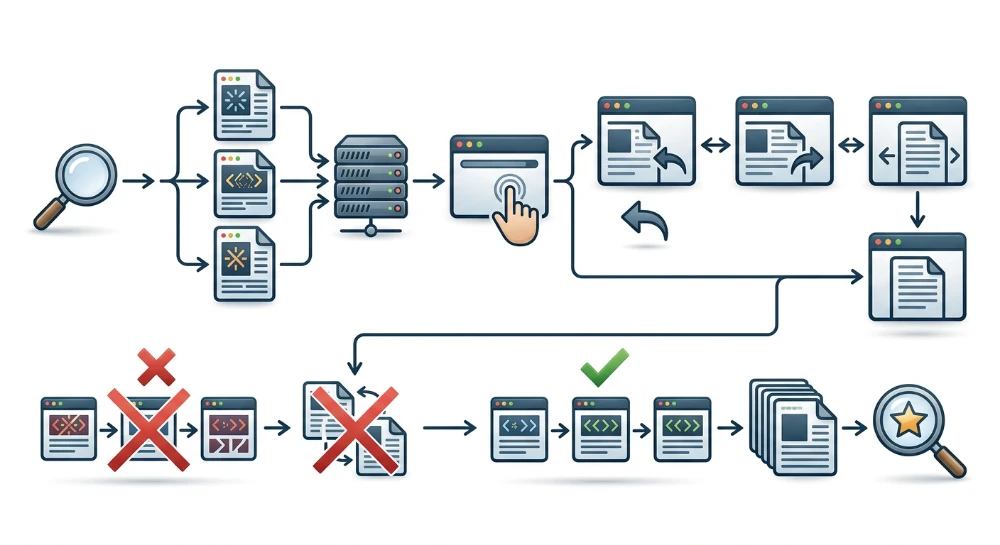
Auditing Angular rendering for SEO starts with examining what the server actually sends before any browser JavaScript runs. By default, Angular builds Single-Page Applications (SPAs) that rely on Client-Side Rendering (CSR), delivering an initial HTML document that contains little more than an empty
<app-root>
shell and script references. For search engine crawlers, social media scrapers, and AI bots, this creates immediate architectural friction: unless the crawler downloads, parses, and executes the application's JavaScript bundles-and waits for asynchronous API calls to resolve-it cannot see the page's text, metadata, or internal links.
Even when a search engine executes JavaScript, relying entirely on client-side execution introduces avoidable points of failure, including network timeouts, unhandled runtime errors, and delayed link discovery. Resolving these issues in modern Angular typically involves configuring the
@angular/ssr
package to shift rendering to the server (SSR) or build time (prerendering/SSG), or combining both through hybrid route configurations. However, enabling server rendering is only part of the technical implementation; if components reference browser-only globals like
window
or
document
without environment guards, the Node.js server can crash during rendering and return error responses or fall back to an empty client shell.
A thorough technical audit must therefore evaluate the entire rendering and routing lifecycle rather than just checking whether SSR is installed. Ensuring consistent crawler accessibility requires verifying that server-rendered HTML hydrates cleanly without duplicate network requests, routes compile to standard HTML anchor tags with
href
attributes, dynamic metadata and canonical tags resolve before the server serializes the response, and missing pages return true HTTP 404 status codes instead of client-side soft 404s.
How search crawlers process Client-Side rendered angular apps
When a web server delivers a default client-side rendered (CSR) Angular application, the initial HTTP response contains only the static
index.html
scaffold. Rather than delivering route-specific text, headings, or navigation links, the server returns an empty root element alongside script references that bootstrap the framework on the client:
<!doctype html>
<html lang="en">
<head>
  <meta charset="utf-8">
  <title>FrontendApp</title>
  <base href="/">
</head>
<body>
  <app-root></app-root>
  <script src="polyfills.js" type="module"></script>
  <script src="main.js" type="module"></script>
</body>
</html>
The actual page content exists only in the rendered Document Object Model (DOM), which is constructed in memory after the browser downloads the JavaScript bundles, initializes the Angular runtime, evaluates route guards, fetches external data via
HttpClient
, and populates the
<app-root>
container. Because search engine bots begin by fetching the raw HTTP response, a crawler's ability to index a CSR application depends entirely on whether its pipeline includes a browser rendering environment.
Google's web rendering service and deferred rendering
Google processes JavaScript applications by separating initial HTML crawling from JavaScript execution-a pipeline architecture commonly referred to as two-wave indexing or deferred rendering. When Googlebot requests a URL, it first parses the raw HTML response headers and source code. In a server-rendered site, Googlebot extracts page content and queues discovered
<a href>
links immediately during this initial pass. In a default CSR Angular app, the raw HTML contains only the generic
<title>
tag and an empty
<app-root>
, so no route-specific content or internal links can be extracted at this stage.
Unless the page is blocked by a
noindex
directive in the initial HTML or HTTP headers, Google places the URL into a rendering queue for the Web Rendering Service (WRS), which runs a headless Chromium browser. Once compute resources are available, WRS loads the page, executes the Angular JavaScript bundles, and captures a snapshot of the rendered DOM. Google then parses this rendered HTML to index the visible text, updated metadata, and newly generated anchor tags.
While WRS is capable of rendering modern Angular applications, relying exclusively on client-side execution introduces several conditional failure modes:
- Delayed link discovery: Because internal navigation links inside Angular components do not exist in the initial HTTP payload, Googlebot cannot discover deeper routes until WRS finishes rendering the parent page. On large sites with deep link hierarchies, queueing delays at each depth level can slow down the discovery of new or updated URLs.
-
Blocked JavaScript or API endpoints: WRS respects
robots.txtrules when fetching sub-resources. If a site'srobots.txtdisallows access to script bundles or the backend API directories that return page data, WRS cannot populate the components and will index an incomplete or blank DOM. - Network timeouts and uncached requests: Headless Chromium in WRS operates under strict resource and time constraints without a persistent local cache. If an Angular component waits on slow third-party scripts or high-latency API calls before rendering its template, WRS may capture the DOM snapshot before the asynchronous data resolves.
-
Early overrides from raw metadata: If a developer places a
<meta name="robots" content="noindex">tag in the staticindex.htmlintending to remove it dynamically via JavaScript on valid routes, Googlebot will read thenoindexdirective from the raw HTML response and skip rendering the page altogether.
Non-Rendering crawlers, social scrapers, and AI bots
Unlike Googlebot, a large segment of automated user agents do not run a headless browser or execute JavaScript at all. When these crawlers request a CSR Angular URL, they read only the initial raw HTML payload and terminate the connection.
| Crawler Category | Examples | JavaScript Execution Capability | Result on CSR Angular Apps |
|---|---|---|---|
| Full Rendering Search Bots | Googlebot, Bingbot | Executes JS via headless Chromium (often deferred) | Indexes rendered DOM if scripts and APIs resolve without errors or timeouts |
| AI Retrieval and Training Bots | GPTBot, OAI-SearchBot, ClaudeBot, PerplexityBot | Generally fetches raw HTML only; does not execute client-side JS |
Receives the empty
<app-root>
shell; fails to extract page text
|
| Social Media and Link Preview Scrapers | facebookexternalhit, Twitterbot, LinkedInBot, Slackbot | Parses static HTML only |
Reads default
index.html
head tags; displays broken or generic Open Graph previews
|
Because AI crawlers and social link preview scrapers rely on fast, low-cost HTTP fetches rather than full browser rendering, client-side updates via Angular's
Meta
service or asynchronous data bindings are invisible to them. If an application requires visibility in AI search citations, accurate Open Graph cards when shared on social platforms, or immediate link extraction during the initial crawl pass, the HTML must be assembled before it leaves the server or CDN via server-side rendering (SSR) or build-time prerendering.
Run a deep technical crawl to identify 4xx errors, missing meta tags, and indexation blockers.
Choosing an angular rendering strategy: SSR, SSG, and hybrid routing
Modern Angular manages server-side and build-time rendering through the official
@angular/ssr
package, which replaced the older Angular Universal integration. Instead of forcing an entire application into a single execution model, Angular allows developers to choose between Server-Side Rendering (SSR), Static Site Generation (SSG, also referred to as prerendering), and Client-Side Rendering (CSR), or combine all three across different routes within the same build.
Selecting the appropriate strategy depends on three architectural variables: whether the URL must be indexed by search engines or read by non-rendering bots, whether all route parameters are known at build time, and how frequently the underlying data changes.
| Rendering Mode | HTML Generation Timing | Infrastructure Requirement | Primary Use Cases |
|---|---|---|---|
| Static Site Generation (SSG / Prerender) | At build time | Static file hosting or CDN | Marketing pages, documentation, blog posts, and stable product or category pages with known URLs |
| Server-Side Rendering (SSR) | On demand per HTTP request (often paired with CDN caching) | Node.js server or serverless edge runtime | Pages with frequently changing inventory or pricing, high-cardinality catalogs, and search or filter URLs |
| Client-Side Rendering (CSR) | In the browser after JavaScript execution | Static file hosting | Authenticated user dashboards, account settings, checkout flows, and internal admin tools |
Static site generation (prerendering) for predictable routes
Prerendering executes the Angular application during the build process, resolves asynchronous data requests, and writes complete HTML documents to disk for each specified route. Because the HTML is already compiled before a user or crawler requests the URL, the server or CDN returns the document immediately without running Node.js compute per request.
SSG is well suited for public, indexable routes where the content updates on a predictable publishing schedule rather than every few seconds. However, prerendering has two operational constraints:
-
All parameterized URLs (such as
/products/:id) must be enumerable at build time, either through static route discovery or by supplying a list of parameters during the build configuration. - Every content update requires rebuilding and redeploying the affected static files, which can create build-time bottlenecks if an application contains tens of thousands of dynamic routes.
Server-Side rendering for dynamic and High-Volume content
When a route relies on data that changes continuously, depends on request-level context, or belongs to a database too large to prerender at build time, runtime SSR is the standard choice. With SSR, the Node.js server intercepts the incoming request, runs the Angular route on the server, populates the HTML template with live API data and metadata, and sends the complete document to the client.
While SSR ensures crawlers receive up-to-date HTML on the initial request, executing the Angular application on the server for every visit increases Time to First Byte (TTFB) and server load compared to static files. In production environments, teams typically place a CDN or reverse proxy in front of the Angular SSR server and configure
Cache-Control
headers (such as
s-maxage
and
stale-while-revalidate
) so repeated requests from users and crawlers are served from the edge cache rather than triggering a fresh server render every time.
Configuring hybrid route rendering
Most production applications contain a mix of static marketing pages, dynamic catalog views, and private user areas. Rendering authenticated dashboards on the server wastes compute resources and complicates session handling, while prerendering a ten-thousand-item inventory can stall CI/CD pipelines.
Modern Angular solves this through hybrid routing, configured via server routes using the
RenderMode
API in
@angular/ssr
. Developers can assign a distinct rendering behavior to each path pattern in the server routing configuration:
import { RenderMode, ServerRoute } from '@angular/ssr';

export const serverRoutes: ServerRoute[] = [
  {
    path: '',
    renderMode: RenderMode.Prerender,
  },
  {
    path: 'about',
    renderMode: RenderMode.Prerender,
  },
  {
    path: 'catalog/:category',
    renderMode: RenderMode.Server,
  },
  {
    path: 'account/**',
    renderMode: RenderMode.Client,
  },
  {
    path: '**',
    renderMode: RenderMode.Server,
  }
];
In this configuration, the home and about pages are generated once as static HTML during the build. The
catalog/:category
route executes on the Node.js server per request so inventory changes are reflected immediately. Everything under
account/**
falls back to a client-side SPA shell, bypassing server execution entirely since those routes are blocked from crawlers by authentication and do not require indexability. Routing the wildcard (
**
) path through
RenderMode.Server
ensures that unmatched URLs are evaluated by the server, which is necessary to return proper HTTP 404 status codes rather than a static 200 OK shell.
Dynamic rendering as a legacy workaround
In older Angular architectures where refactoring the codebase for
@angular/ssr
or deploying a Node.js runtime is not immediately feasible, teams sometimes use dynamic rendering middleware (such as Prerender.io or custom headless browser proxies). Dynamic rendering inspects the incoming
User-Agent
header at the reverse proxy or CDN level: human users receive the standard CSR application shell, while recognized bot user agents are routed to a headless browser service that renders the page and returns static HTML.
Search engines, including Google, explicitly classify dynamic rendering as a temporary workaround rather than a recommended long-term architecture. Maintaining separate rendering paths for users and crawlers introduces operational complexity, often serves stale cached snapshots to search bots, and can fail silently when new AI or search crawlers visit with unrecognized user-agent strings. If an Angular application can be upgraded or architected to support native SSR or hybrid prerendering, native rendering is more reliable and easier to debug.
Server-Side rendering stability: Hydration, TransferState, and browser API guards
Enabling server-side rendering or prerendering requires components and services to execute inside a Node.js runtime before running in the user's browser. Code written purely for client-side execution often assumes browser globals are always present or manipulates the DOM outside Angular's change detection. Under SSR, these patterns can cause the server process to throw unhandled runtime exceptions-returning HTTP 500 errors or falling back to an empty client-side shell-or trigger hydration failures when the browser attempts to attach to the server-generated HTML.
Guarding Browser-Only globals and APIs
The Node.js server environment does not provide browser global objects such as
window
,
document
,
navigator
,
localStorage
, or
IntersectionObserver
. Referencing these objects directly inside component constructors, field initializers, or standard lifecycle hooks like
ngOnInit
causes a
ReferenceError
on the server when a crawler or user requests the route.
Two primary patterns prevent browser API crashes during server execution:
-
afterNextRenderandafterRendercallbacks: Introduced in modern Angular, these lifecycle hooks execute exclusively in the browser after the DOM has finished rendering. They are the preferred location for initializing third-party client libraries, measuring DOM elements, or accessing browser storage. -
PLATFORM_IDandisPlatformBrowser: When conditional logic is needed inside a shared service or standard lifecycle hook, injectingPLATFORM_IDand checkingisPlatformBrowser(this.platformId)restricts execution of browser-specific code to the client environment. When interacting with the DOM in an SSR-compatible way, injecting Angular'sDOCUMENTtoken provides access to the server-side Domino document implementation rather than referencing the globaldocumentobject directly.
import { Component, Inject, PLATFORM_ID, afterNextRender } from '@angular/core';
import { isPlatformBrowser, DOCUMENT } from '@angular/common';

@Component({
  selector: 'app-product-view',
  template: `<div>{{ productTitle }}</div>`
})
export class ProductViewComponent {
  productTitle = 'Sample Product';

  constructor(@Inject(PLATFORM_ID) private platformId: Object,
              @Inject(DOCUMENT) private document: Document) {
    // Runs only in the browser after the next render cycle
    afterNextRender(() => {
      const savedPreference = window.localStorage.getItem('viewMode');
      // Initialize browser-only analytics or layout logic here
    });
  }

  ngOnInit(): void {
    // Conditional guard for logic inside standard lifecycle hooks
    if (isPlatformBrowser(this.platformId)) {
      console.log('Viewport width:', window.innerWidth);
    }
  }
}
Third-party libraries that access
window
immediately upon import will fail before component guards can run. If a library cannot be replaced with an SSR-compatible equivalent, dynamically importing it using
import()
inside an
afterNextRender
callback prevents the module from evaluating on the server.
DOM hydration, event replay, and mismatch prevention
Prior to Angular 16, Angular Universal used destructive hydration: the browser displayed the server-rendered HTML, downloaded the JavaScript bundles, destroyed the entire server-generated DOM tree, and re-rendered the application from scratch. This process caused visible screen flickering and negatively impacted Core Web Vitals, particularly Largest Contentful Paint (LCP) and Cumulative Layout Shift (CLS).
Modern Angular uses non-destructive hydration via
provideClientHydration()
. During hydration, Angular traverses the existing server-rendered DOM nodes in the browser, matches them against the component tree structure, attaches event listeners, and preserves the DOM without destroying and recreating elements.
Depending on the application's complexity and Angular version, hydration can be extended with two capabilities:
-
Event Replay (
withEventReplay()): When a user interacts with server-rendered buttons or inputs before the client JavaScript bundles have finished downloading and hydrating, Angular captures those early browser events and replays them once hydration completes. -
Incremental Hydration (
withIncrementalHydration()): For pages using@deferblocks, incremental hydration allows the server to render the initial HTML of deferred sections while keeping those subtrees dehydrated on the client until a specific trigger condition (such as viewport entry or user interaction) occurs. This delivers complete HTML to search crawlers in the initial response while reducing main-thread JavaScript execution during initial page load.
Non-destructive hydration requires the DOM structure generated on the server to match the DOM structure expected by the client during initialization. When a mismatch occurs-signaled in the browser console by Angular error
NG0500
-Angular cannot cleanly attach to the existing nodes and may fall back to destructive re-rendering for that component subtree.
| Hydration Failure Cause | Underlying Mechanism | Resolution |
|---|---|---|
| Invalid HTML nesting |
Browsers automatically repair invalid HTML structures (such as placing a
<div>
inside a
<p>
or omitting
<tbody>
in a
<table>
) when parsing the server response. The repaired browser DOM no longer matches Angular's component template tree.
|
Validate component templates against HTML5 nesting specifications and explicitly include
<tbody>
and
<thead>
elements in tables.
|
| Direct DOM manipulation |
Using native methods like
ElementRef.nativeElement.appendChild()
or third-party scripts that insert/remove nodes during initialization alters the DOM structure outside Angular's awareness.
|
Use Angular template bindings instead of direct DOM mutation, or mark containers managed by external libraries with the
ngSkipHydration
attribute.
|
| Environment-divergent rendering |
Rendering different template blocks via
@if (isPlatformBrowser)
during the initial pass causes the server HTML and initial client tree to differ.
|
Render a consistent initial DOM structure on both server and client, and apply browser-specific state updates inside
afterNextRender
.
|
| Non-deterministic data | Generating timestamps, random IDs, or locale-dependent strings without synchronization produces different text or attribute values on the server and client. |
Pass server-generated values to the client using
TransferState
so both environments render identical initial values.
|
Preventing duplicate API requests with HttpClient and TransferState
When an SSR application renders a route that depends on external data, the server fetches the API response, populates the component templates, and serializes the rendered HTML. Once the client bundle boots in the browser, components initialize again. Without state synchronization, the client application will fire the exact same HTTP requests a second time. Duplicate client fetches waste bandwidth and can cause transient content flashing or overwrite server-rendered content if the client request fails or times out during crawler rendering.
Angular solves this through
TransferState
, which serializes key-value data collected during the server render into an inline
<script id="ng-state" type="application/json">
tag appended to the HTML document. When the client application initializes, it reads this inline JSON payload before making network calls.
When
provideClientHydration()
is configured in the application's root providers, Angular automatically enables HTTP transfer caching for
HttpClient
. Standard
GET
and
HEAD
requests executed via
HttpClient
on the server are automatically stored in
TransferState
and reused by the client during initialization without requiring manual state keys.
import { ApplicationConfig } from '@angular/core';
import { provideHttpClient, withFetch } from '@angular/common/http';
import { provideClientHydration, withEventReplay, withHttpTransferCacheOptions } from '@angular/platform-browser';

export const appConfig: ApplicationConfig = {
  providers: [
    provideHttpClient(withFetch()),
    provideClientHydration(
      withEventReplay(),
      withHttpTransferCacheOptions({
        includePostRequests: false,
        includeHeaders: ['x-total-count']
      })
    )
  ]
};
Two implementation details govern whether HTTP transfer caching works reliably:
-
Relative vs. Absolute URLs: On the server, Node.js has no implicit origin host unless Angular's server request context is provided. If the application makes API requests using relative paths (e.g.,
/api/products), ensure the server configuration passes the incoming request URL to the Angular rendering engine, or configure an HTTP interceptor to prepend the base API origin during server execution. -
Custom Data Fetching Clients: Automatic transfer caching only intercepts requests made through Angular's built-in
HttpClient. If an application fetches data using the nativefetchAPI directly, Axios, or a GraphQL client that bypassesHttpClient, developers must manually inject theTransferStateservice and usemakeStateKeyto store the payload on the server and retrieve it on the client.
SEO structure and reciprocal link analyzer
Detect orphan pages, deep click depths, and toxic reciprocal links built by careless agencies.
Angular router configuration and internal link crawlability
Even when an Angular application renders complete HTML on the server, search engine crawlers can only discover internal pages if the router outputs standard URLs and the component templates render crawlable link elements. Angular router configurations and template patterns directly determine whether crawlers can extract URLs from the DOM and add them to their crawl queue.
PathLocationStrategy vs. HashLocationStrategy
Search engine crawlers identify distinct pages by their full path and query string, ignoring URL fragments (everything following the
#
symbol). In accordance with RFC 3986, the fragment identifier is processed purely on the client side and is never sent to the server in an HTTP request. Consequently, crawlers do not index distinct application states located behind hash fragments.
Angular supports two location strategies for client-side routing:
-
PathLocationStrategy: Uses the HTML5 History API (history.pushState) to produce standard, clean URLs such as/products/electronics. This is Angular's default mode and is necessary for indexable pages. -
HashLocationStrategy: Places the route path after a hash symbol, such as/#/products/electronics. To a search crawler,https://example.com/#/productsandhttps://example.com/#/aboutresolve to the exact same root URL (https://example.com/).
If an application has explicitly enabled hash routing via
withHashLocation()
in its router configuration, remove it so the router defaults to
PathLocationStrategy
:
import { ApplicationConfig } from '@angular/core';
import { provideRouter } from '@angular/router';
import { routes } from './app.routes';

export const appConfig: ApplicationConfig = {
  providers: [
    // Uses PathLocationStrategy by default.
    // Do not include withHashLocation() on public, indexable apps.
    provideRouter(routes)
  ]
};
When using
PathLocationStrategy
without full SSR or prerendering on every route, the web server (such as Nginx, Apache, or Express) must be configured to rewrite unknown route requests back to
index.html
so direct navigation does not trigger a server-level 404 before Angular boots.
Rendering crawlable anchor tags with RouterLink
Search engine crawlers discover internal links primarily by parsing the DOM for standard
<a>
tags containing a resolved
href
attribute. Crawlers do not systematically click arbitrary DOM elements or execute imperative JavaScript navigation handlers to discover new URLs.
A frequent SEO failure mode in Angular templates occurs when developers attach
(click)
event bindings to non-anchor elements (such as
<div>
,
<span>
,
<button>
, or custom card components) and trigger navigation programmatically in the component class using
this.router.navigate()
or
this.router.navigateByUrl()
. Similarly, applying the
[routerLink]
directive to a
<button>
or
<div>
enables click navigation for users in a browser, but Angular only generates an
href
attribute when
routerLink
is applied to an actual
<a>
element.
| Template Pattern | Rendered DOM Output | Crawler Link Discovery |
|---|---|---|
<div (click)="goToProduct(item.id)">View</div>
|
<div>View</div>
|
Not crawlable (no anchor tag or
href
)
|
<button [routerLink]="['/products', item.id]">View</button>
|
<button tabindex="0">View</button>
|
Not crawlable (
routerLink
on non-anchor omits
href
)
|
<a (click)="goToProduct(item.id)">View</a>
|
<a>View</a>
|
Not crawlable (missing
href
attribute)
|
<a [routerLink]="['/products', item.id]">View</a>
|
<a href="/products/42">View</a>
|
Crawlable (standard anchor with resolved
href
)
|
For any internal navigation path that should be discovered by crawlers, bind
routerLink
directly to an
<a>
tag. If a link requires query parameters, pair
[routerLink]
with
[queryParams]
so Angular serializes the complete URL into the rendered
href
attribute during server rendering and hydration:
<!-- Component Template -->
<a [routerLink]="['/catalog', category.slug]" [queryParams]="{ page: 2, sort: 'price' }">
  Next Page
</a>

<!-- Rendered HTML Output -->
<a href="/catalog/shoes?page=2&sort=price">Next Page</a>
Reserve imperative navigation (
router.navigate
) for non-indexable user workflows, such as redirecting a user after a form submission, completing an authentication step, or closing a modal dialog.
Lazy-Loaded routes and deferred views (
@defer
)
Code-splitting features in Angular-specifically route-level lazy loading via
loadComponent
/
loadChildren
and template-level deferred blocks via
@defer
-affect rendering differently depending on whether SSR is enabled and how triggers are configured.
When using
@angular/ssr
, route-level lazy loading (
loadComponent
) does not obstruct crawlers. During server-side rendering or build-time prerendering, the Node.js server resolves the lazy chunk, executes the component, and returns the fully populated HTML in the initial response.
Template-level
@defer
blocks require closer attention. By default, when Angular renders a
@defer
block on the server (without incremental hydration configured), the server renders the
@placeholder
block-or nothing if no placeholder is defined-into the initial HTML payload. The actual deferred component chunk is only fetched and rendered on the client when its trigger condition is met.
-
Interaction and Timer Triggers: A
@defer (on interaction)or@defer (on hover)block will never be triggered by a search crawler, meaning any text or internal<a href>links inside the main@deferblock will remain absent from the indexed DOM unless the content is also present in the@placeholder. -
Viewport Triggers: A
@defer (on viewport)block relies on anIntersectionObserverfiring when the element enters the browser viewport. Search engine rendering engines such as Google's WRS typically render pages using a tall virtual viewport rather than simulating user scrolling events. If a deferred block sits below the virtual viewport height, or if a non-rendering crawler requests the page, the deferred content will not load.
To prevent hiding index-critical content or internal navigation links inside deferred views, apply three rules:
-
Do not place primary page copy, heading structures, or crawlable internal link modules (such as related product links, category breadcrumbs, or pagination links) inside
@deferblocks unless those exact elements are rendered within the@placeholderblock on the server. -
Use
@deferfreely for heavy, non-indexable UI components-such as interactive charts, third-party comment widgets, video players, or account management controls-where delaying client-side JavaScript downloading improves page load performance without removing indexable text or links. -
If using Angular's incremental hydration (
withIncrementalHydration()) alongside@defer (hydrate on ...)triggers, verify in the raw HTTP response that the server outputs the actual component markup rather than a skeleton placeholder, since incremental hydration instructs the server to render the main@deferblock content upfront while deferring only the client-side JavaScript hydration step.
Managing dynamic metadata, canonical tags, and JSON-LD across routes
In an Angular application, every route loads within the same root
index.html
document. Because Angular only swaps component views inside
<app-root>
during navigation, the
<head>
section remains static unless explicitly modified in TypeScript. If route transitions do not update the document head, search engine crawlers and social media scrapers will receive identical, boilerplate titles and meta descriptions across every URL on the site.
Updating titles and meta tags with angular services
Angular provides built-in abstractions in
@angular/platform-browser
and
@angular/router
to mutate the document head safely in both browser and server-side rendering environments without touching global DOM objects directly.
For route titles, Angular Router supports a native
title
property directly on each
Route
definition. This property accepts either a static string for fixed pages or a functional
ResolveFn<string>
for dynamic routes:
import { Routes } from '@angular/router';
import { inject } from '@angular/core';
import { ProductService } from './product.service';
import { map } from 'rxjs/operators';

export const routes: Routes = [
  {
    path: 'pricing',
    title: 'Pricing Plans | Example SaaS',
    loadComponent: () => import('./pricing.component').then(m => m.PricingComponent)
  },
  {
    path: 'products/:slug',
    title: (route) => {
      const productService = inject(ProductService);
      return productService.getProduct(route.paramMap.get('slug')!).pipe(
        map(product => `${product.name} - Specifications & Reviews`)
      );
    },
    loadComponent: () => import('./product.component').then(m => m.ProductComponent)
  }
];
For
<meta>
elements-including
description
,
robots
, Open Graph (
og:*
), and X Card tags-inject the
Meta
service (alongside
Title
when managing both inside a component or shared SEO service). When updating metadata across SPA route transitions, always call
updateTag()
rather than
addTag()
.
import { Injectable, inject } from '@angular/core';
import { Meta, Title } from '@angular/platform-browser';

@Injectable({ providedIn: 'root' })
export class SeoService {
  private title = inject(Title);
  private meta = inject(Meta);

  updateMetadata(config: { title: string; description: string; robots?: string }): void {
    this.title.setTitle(config.title);

    this.meta.updateTag({ name: 'description', content: config.description });
    this.meta.updateTag({ property: 'og:title', content: config.title });
    this.meta.updateTag({ property: 'og:description', content: config.description });
    this.meta.updateTag({
      name: 'robots',
      content: config.robots ?? 'index, follow'
    });
  }
}
Calling
addTag()
appends a new
<meta>
node without checking whether one already exists. Over multiple client-side route transitions, or when a default tag already exists in
index.html
,
addTag()
produces multiple conflicting
<meta name="description">
or
<meta name="robots">
tags in the rendered DOM. By contrast,
updateTag()
locates the existing tag matching the selector attribute (such as
name="description"
or
property="og:title"
) and replaces it, creating a new tag only if none is present.
Pay special attention to the
robots
meta tag across transitions. If a user or crawler rendering a session visits a search filter or staging route that sets
<meta name="robots" content="noindex">
, and then navigates to an indexable product route that forgets to reset the
robots
tag, the
noindex
directive remains in the DOM for the subsequent page. Explicitly reset
name="robots"
to
index, follow
on every indexable route transition.
Injecting canonical links and JSON-LD via the DOCUMENT token
Angular's
Meta
service only manages
<meta>
elements; it cannot create or modify
<link rel="canonical">
tags or
<script type="application/ld+json">
blocks. To manipulate these head elements without breaking server-side rendering, inject the
DOCUMENT
token from
@angular/common
. During SSR,
DOCUMENT
provides a server-side Domino DOM representation that serializes directly into the outgoing HTML response.
import { Injectable, inject } from '@angular/core';
import { DOCUMENT } from '@angular/common';

@Injectable({ providedIn: 'root' })
export class HeadDomService {
  private doc = inject(DOCUMENT);

  setCanonicalUrl(url: string): void {
    let link: HTMLLinkElement | null = this.doc.querySelector('link[rel="canonical"]');
    if (!link) {
      link = this.doc.createElement('link');
      link.setAttribute('rel', 'canonical');
      this.doc.head.appendChild(link);
    }
    link.setAttribute('href', url);
  }

  setJsonLd(schemaObject: Record<string, unknown>, scriptId = 'app-ld-json'): void {
    let script: HTMLScriptElement | null = this.doc.getElementById(scriptId) as HTMLScriptElement | null;
    if (!script) {
      script = this.doc.createElement('script');
      script.id = scriptId;
      script.type = 'application/ld+json';
      this.doc.head.appendChild(script);
    }
    script.textContent = JSON.stringify(schemaObject);
  }

  removeJsonLd(scriptId = 'app-ld-json'): void {
    const existing = this.doc.getElementById(scriptId);
    if (existing) {
      existing.remove();
    }
  }
}
When implementing canonical tags and JSON-LD in Angular, guard against three frequent implementation errors:
-
Do not construct canonical URLs by reading
window.location.hrefor passing the raw router URL unfiltered. Readingwindowcrashes the Node.js server unless guarded, and echoing the raw requested URL into the canonical tag causes tracking parameters (such as?utm_source=...or?gclid=...) or alternate capitalization to become self-referencing canonicals for duplicate URLs. Build the canonical URL from a configured base origin string combined with the normalized route path. -
Assign a deterministic
idattribute to dynamically injected JSON-LD<script>elements and remove or overwrite them when the component is destroyed or the route changes. Without cleanup, navigating from a Product page to an FAQ page leaves the previous product's structured data in the DOM alongside the new page content. -
Assign the serialized JSON string to
script.textContentrather than attempting to render JSON-LD inside an Angular component template using curly-brace interpolation. Angular's template sanitizer strips<script>tags from component HTML templates by default.
Asynchronous timing constraints: Ensuring SSR awaits metadata
Updating head tags only solves crawler accessibility if those updates execute before the server serializes and sends the HTML response. In dynamic applications, page titles, descriptions, canonical URLs, and structured data usually depend on an asynchronous API payload (such as fetching product details by slug).
Before serializing the DOM,
@angular/ssr
waits for the Angular application to reach a stable state via
ApplicationRef.isStable
. Angular tracks macrotasks and HTTP requests made through Angular's
HttpClient
. However, two common coding patterns cause the server to serialize the HTML response before metadata is populated, resulting in empty or fallback head tags in the initial HTTP payload:
-
Fetching data using the native browser
fetch()API,axios, or unpatched third-party SDKs outside Angular's zone/task tracking. Because Angular is unaware of the pending external promise, it considers the application stable immediately and returns the HTML response before the promise resolves and callsSeoService.updateMetadata(). -
Deferring metadata updates inside timers (
setTimeout), browser-only lifecycle hooks (afterNextRender), or unsubscribed streams that do not complete or resolve during the initial render pass.
The most reliable pattern to guarantee that both the page content and the
<head>
metadata are populated before the server flushes the response is a functional Route Resolver (
ResolveFn
). The Angular Router pauses route activation-and holds the SSR render-until the resolver's Observable or Promise completes.
import { ResolveFn, ActivatedRouteSnapshot } from '@angular/router';
import { inject } from '@angular/core';
import { tap } from 'rxjs/operators';
import { ProductService, Product } from './product.service';
import { SeoService } from './seo.service';
import { HeadDomService } from './head-dom.service';

export const productResolver: ResolveFn<Product> = (route: ActivatedRouteSnapshot) => {
  const productService = inject(ProductService);
  const seoService = inject(SeoService);
  const headDom = inject(HeadDomService);
  const slug = route.paramMap.get('slug')!;

  return productService.getProduct(slug).pipe(
    tap(product => {
      seoService.updateMetadata({
        title: `${product.name} | Store`,
        description: product.shortDescription
      });
      headDom.setCanonicalUrl(`https://example.com/products/${product.canonicalSlug}`);
      headDom.setJsonLd({
        '@context': 'https://schema.org',
        '@type': 'Product',
        name: product.name,
        description: product.shortDescription,
        sku: product.sku
      });
    })
  );
};
Attach the resolver to the route configuration under the
resolve
property:
{
  path: 'products/:slug',
  resolve: { product: productResolver },
  loadComponent: () => import('./product.component').then(m => m.ProductComponent)
}
When a crawler requests
/products/wireless-keyboard
, the server executes
productResolver
via
HttpClient
, caches the response in
TransferState
, updates the
<title>
,
<meta>
,
<link rel="canonical">
, and
<script type="application/ld+json">
elements in the server DOM, and only then serializes the complete HTML document over the network.
Visualize anchor distribution to prevent algorithmic penalties caused by agency over-optimization.
Preventing soft 404s and configuring server HTTP status codes
A common failure mode in Angular applications is returning an
HTTP 200 OK
status code for nonexistent routes or failed API lookups. In a purely client-side rendered application, the web server is typically configured with a fallback rule that serves
index.html
with a
200 OK
status for every unknown path so the client-side router can initialize. Even when Server-Side Rendering (SSR) is enabled, the Angular Router handles unknown URLs inside the application layer rather than at the HTTP transport layer. Unless explicitly configured otherwise, the SSR server renders the error view and sends it to the client with a default
200 OK
status header.
When a crawler receives a
200 OK
response containing "Page Not Found" text or an empty layout, two problems can occur:
- Search engines may classify the URL as a Soft 404 in diagnostic reports (such as Google Search Console) and exclude it from the index, while continuing to spend requests recrawling these ambiguous URLs.
- If the rendered error component lacks clear error signals or shares substantial boilerplate content with valid pages, the search engine may index the nonexistent URL as a legitimate page, creating duplicate or thin entries in the search index.
Why the angular wildcard route alone does not set HTTP 404
In standard Angular routing, developers capture unmapped URLs by placing a wildcard route at the end of the route configuration array:
export const routes: Routes = [
  { path: 'products/:slug', component: ProductComponent },
  { path: '**', component: NotFoundComponent }
];
While this configuration displays the
NotFoundComponent
template in the browser, the Angular Router only manipulates the component tree and browser URL state. During SSR, the Node.js server executes this route match, serializes the
NotFoundComponent
HTML, and returns a normal
200 OK
HTTP status because no exception occurred during rendering. To return an actual
HTTP 404 Not Found
header, the component or resolver must communicate with the underlying server response object before the HTML stream is sent.
Setting HTTP 404 status codes during Server-Side rendering
When using
@angular/ssr
with an Express or Node HTTP server, the server response context can be accessed via dependency injection. Angular provides response tokens that are populated only during server execution, requiring the
optional: true
flag so the component does not fail when instantiated in the browser.
In the
NotFoundComponent
, inject the server response token and set the HTTP status code to
404
during component initialization:
import { Component, inject, OnInit } from '@angular/core';
import { RESPONSE } from '@angular/ssr/tokens';

@Component({
  selector: 'app-not-found',
  standalone: true,
  template: `<h1>404 - Page Not Found</h1>
             <p>The requested URL does not exist.</p>`
})
export class NotFoundComponent implements OnInit {
  private response = inject(RESPONSE, { optional: true });

  ngOnInit(): void {
    if (this.response) {
      this.response.status(404);
    }
  }
}
Note: In Express-based setups generated in earlier versions of
@angular/ssr
or Angular Universal, the token is imported from
@nguniversal/express-engine/tokens
or defined as a custom Express
Response
provider in
server.ts
(where the method is
this.response.status(404)
or
this.response.statusCode = 404
depending on the underlying Node HTTP interface).
Handling missing database entities on dynamic routes
Wildcard routes only catch URLs that fail pattern matching. A separate Soft 404 risk occurs on valid route patterns when the requested entity does not exist in the backend database-for example, when a crawler requests
/products/discontinued-item-999
. That URL matches
products/:slug
, so the wildcard route is bypassed.
If the API returns a
404
error for that slug, the application must prevent the route from rendering an empty product template with an
HTTP 200
status. In the route resolver introduced earlier, catch the failed HTTP lookup, set the server status code to
404
, and either redirect without altering the URL or render a not-found state:
import { inject } from '@angular/core';
import { ResolveFn, ActivatedRouteSnapshot, Router } from '@angular/router';
import { RESPONSE } from '@angular/ssr/tokens';
import { catchError, of } from 'rxjs';
import { ProductService, Product } from './product.service';

export const productResolver: ResolveFn<Product | null> = (route: ActivatedRouteSnapshot) => {
  const productService = inject(ProductService);
  const router = inject(Router);
  const response = inject(RESPONSE, { optional: true });
  const slug = route.paramMap.get('slug')!;

  return productService.getProduct(slug).pipe(
    catchError(() => {
      if (response) {
        response.status(404);
      }
      // Navigate to the 404 view without changing the browser URL
      router.navigateByUrl('/not-found', { skipLocationChange: true });
      return of(null);
    })
  );
};
Using
skipLocationChange: true
renders the
NotFoundComponent
at the requested URL (
/products/discontinued-item-999
) while emitting the
HTTP 404
status header. Avoid redirecting missing pages to a generic
/404
URL via a standard
302
or client-side URL change; when a crawler is redirected to
/404
, the original broken URL is seen as a redirect rather than a dead link, which can obscure the actual missing URL in diagnostic reports and prevent proper deindexing if the target page accidentally returns
200 OK
.
Server-Level 301 and 308 redirects vs. router redirects
Angular routes often use the
redirectTo
property to map legacy paths to new paths:
{ path: 'old-catalog', redirectTo: '/products', pathMatch: 'full' }
In a client-side context,
redirectTo
updates the browser URL via the History API after JavaScript loads. In an SSR context, depending on how the server engine and Express handler are wired in
server.ts
, an internal router redirect may either resolve on the server and return the destination HTML with a
200 OK
status or emit a temporary
302 Found
redirect.
For permanent URL migrations, search engines rely on explicit
301 Moved Permanently
or
308 Permanent Redirect
HTTP status codes coupled with a
Location
header to consolidate indexing signals to the destination URL. Handle permanent redirects directly in the server middleware (such as
server.ts
or the reverse proxy/CDN layer) before the request invokes the Angular SSR rendering engine:
// Inside server.ts (Express configuration before the Angular handler)
const permanentRedirects: Record<string, string> = {
  '/old-catalog': '/products',
  '/about-us-legacy': '/about'
};

app.use((req, res, next) => {
  const target = permanentRedirects[req.path];
  if (target) {
    return res.redirect(301, target);
  }
  next();
});
Handling redirects at the Express or edge proxy layer also avoids initializing the Angular application and running component lifecycle hooks for requests that only need an HTTP header response.
| Scenario | Default CSR / Unconfigured SSR Behavior | Target Server Implementation |
|---|---|---|
Unmatched URL path (e.g.,
/random-typo
)
|
Wildcard route renders
NotFoundComponent
with
HTTP 200 OK
|
Wildcard route renders
NotFoundComponent
and sets
HTTP 404
on the server response token
|
Valid route pattern, missing database record (e.g.,
/products/invalid-id
)
|
Component renders empty template or client-side redirect with
HTTP 200 OK
|
Resolver catches API error, sets
HTTP 404
on server response, and displays error view with
skipLocationChange: true
|
| Permanent URL migration |
Router
redirectTo
swaps view client-side or issues default temporary redirect
|
Express middleware in
server.ts
or CDN edge rule returns
HTTP 301
or
308
before Angular bootstraps
|
Verifying and debugging angular rendering and indexability
Validating an Angular application requires testing both the initial server payload and the final state after JavaScript execution. A page that looks complete in a standard browser tab can still return an empty shell, fallback metadata, or an incorrect HTTP status code to automated crawlers. Following a structured verification sequence isolates whether failures occur during server-side rendering, network transport, or headless browser execution.
Step 1: Compare raw HTML responses against the Client-Rendered DOM
The first diagnostic check confirms whether the server or prerender build outputs complete HTML before client-side JavaScript runs. In a browser, opening the Chrome DevTools Elements panel shows the live, hydrated DOM after Angular has bootstrapped in the client. To see the raw payload delivered to non-rendering crawlers and the initial fetch wave of search engines, inspect the response using
View Page Source
in the browser or request the URL via the command line:
curl -s https://example.com/products/angular-guide | grep -E "<title>|meta name=\"description\"|<h1|<a "Compare the raw HTML response against the live Elements panel across four specific elements:
-
Route-specific
<title>,<meta name="description">, and<link rel="canonical">tags must contain the resolved values for that URL rather than the default placeholders fromindex.html. -
Primary body copy and headings should appear inside the
<app-root>element in the raw source. If<app-root></app-root>is empty in the raw response on a route configured for SSR or SSG, the server render failed or the route fell back to client-side rendering. -
Navigation and contextual links must be present in the raw source as standard
<a href="...">attributes. -
A
<script id="ng-state" type="application/json">block should appear at the bottom of the raw HTML whenTransferStateis active. If the raw HTML contains rendered content but lacks the state transfer script, or if the client briefly flashes blank content during load, the browser may be re-fetching API data and overwriting the DOM during hydration.
Step 2: Verify HTTP status codes and redirect headers
Because the Angular router can display an error template inside the browser viewport without altering the network response, visual inspection cannot confirm whether soft 404s have been resolved. Test how the server responds to invalid routes and migrated URLs by fetching only the HTTP headers with
curl -I
or by recording the initial document request in the Chrome DevTools Network tab with the
Preserve log
option enabled.
# Test an unmatched route pattern
curl -I https://example.com/non-existent-route-xyz

# Test a valid route pattern with a missing database ID
curl -I https://example.com/products/invalid-sku-99999
Both requests must return an
HTTP/1.1 404 Not Found
(or
HTTP/2 404
) status line. If the unmatched route returns
404
but the invalid product SKU returns
200 OK
, the Express wildcard or Angular
NotFoundComponent
is wired to the server response token, but the data resolver or component error handler for the product route is swallowing the API failure without updating the server status code.
For redirected routes, verify that the initial request returns a
301
or
308
status code alongside a
Location
header pointing to the destination URL. If the initial request returns
200 OK
and the URL only changes after JavaScript bundles finish downloading in the browser, the redirect is still executing client-side inside the Angular router configuration.
Step 3: Inspect WRS execution in Google search console
Even when local
curl
tests pass, network constraints or environment differences can alter how Googlebot processes the page. Use the URL Inspection Tool in Google Search Console and run a live test (
Test Live URL
) to evaluate how Google's Web Rendering Service (WRS) handles the deployed application.
Open
View Tested Page
in the inspection results and examine three areas:
-
HTML Tab:
Search this rendered HTML for route-specific text, structured data scripts, and internal anchor tags. If content appears in the local browser Elements panel but is missing in the Search Console HTML tab, an asynchronous API request may be timing out before WRS takes its DOM snapshot, or the content may be trapped behind an interaction or scroll trigger such as an unhydrated
@defer (on viewport)block. -
More Info - Page Resources:
Check for scripts, stylesheets, or XHR/fetch API endpoints that failed to load. If an internal API subdomain or CDN path is disallowed by
robots.txt, WRS cannot fetch the data needed to populate client-rendered components. -
More Info - JavaScript Console Messages:
Review the console log for uncaught exceptions, hydration mismatch warnings (such as Angular error
NG0500), or rejected promises. A fatal JavaScript error during execution can halt component rendering and leave the DOM incomplete.
Step 4: Audit raw versus rendered output at scale
Spot-checking individual URLs can miss templates or lazy-loaded modules that fail under specific data conditions. Run a full site crawl using a technical SEO crawler configured for JavaScript rendering, such as Screaming Frog SEO Spider with the rendering mode set to
JavaScript
.
Configure the crawler to store both the raw HTML and the rendered HTML, then compare the two datasets across all discovered URLs:
| Audit Comparison | What Discrepancies Indicate | Angular Remediation Target |
|---|---|---|
| Metadata present in Rendered HTML but missing or generic in Raw HTML |
Title
and
Meta
services are running only in the browser or firing after the server serializes the response
|
Move data fetching into a route resolver or ensure the asynchronous operation completes before SSR serialization |
| Internal links discovered only via Rendered HTML |
Links are inside client-only components, unrendered
@defer
blocks, or routes excluded from SSR
|
Enable SSR/prerendering for the parent route or add the
hydrate on
/ eager rendering triggers for index-critical navigation
|
| Known application routes missing from both Raw and Rendered crawls |
Navigation relies on
(click)
handlers calling
router.navigate()
instead of crawlable
<a [routerLink]>
elements
|
Replace imperative click navigation in templates with standard anchor elements bound to
routerLink
|
| Rendered HTML contains hydration error logs or duplicate DOM nodes | Invalid HTML nesting, direct third-party DOM manipulation, or diverging server/client logic |
Fix invalid HTML structure in component templates and wrap browser-only DOM scripts in
afterNextRender
|
Running this comparison in a staging environment before deploying routing or rendering updates catches regressions early, ensuring that both non-executing crawlers and rendering search engines receive complete, indexable HTML documents with accurate HTTP status codes.