Auditing canonical tags across a website is the primary method for controlling how search engines consolidate duplicate or highly similar content. When canonical declarations are implemented incorrectly, left unmonitored, or omitted entirely, crawlers may index parameterized URLs, tracking codes, or incorrect page variants. A systematic audit identifies where the site's canonical configuration breaks down, preventing unexpected indexing behaviors that can interfere with how core pages appear in search results.
A technical canonical audit requires crawling the site to extract both HTML link elements and HTTP Canonical headers at scale. This data is used to isolate missing tags, malformed syntax, and conflicting directives that can cause search engines to ignore the implementation. Crucially, the audit must also verify the health of the destination URLs, ensuring that all canonical declarations point to valid, indexable pages rather than redirect chains, broken links, or destinations blocked by a noindex directive.
Because canonical tags function as strong signals rather than absolute rules, the audit process must also compare the site’s declared preferences against actual search engine behavior. Search engines can override canonical declarations if they detect contradictory signals, such as inconsistent internal links or mismatches with XML sitemaps. Reconciling crawler extraction data with search engine indexing reports allows webmasters and developers to diagnose ignored tags, align technical signals, and enforce a clear URL structure.
Extracting canonical data at scale
Auditing canonical configurations across thousands of pages requires an SEO crawler configured to parse specific document elements and server responses. The extraction process must capture the exact destination URL specified in the canonical declaration, rather than just confirming the presence of a tag. Recording the explicit URL allows for detailed comparison and validation during the analysis phase.
A complete extraction requires configuring the crawler to evaluate two distinct locations where canonical directives can be declared: HTML link elements and HTTP response headers.
- HTML declarations: The crawler parses the document head for the standard link element containing the rel="canonical" attribute.
- HTTP headers: The crawler reads the server response headers for the Link field specifying rel="canonical". This implementation is frequently used for non-HTML files like PDFs or applied globally via server configuration files.
Relying solely on HTML extraction leaves blind spots if HTTP headers contain conflicting directives. A crawler must capture data from both sources simultaneously so that overlapping or contradictory canonicals on a single URL can be isolated.
Crawling the rendered DOM for JavaScript canonicals
When websites use client-side rendering frameworks or inject tags via JavaScript, extracting canonical data from the raw HTML source code is insufficient. In these environments, the initial server response may contain no canonical tag, or it may contain a default placeholder tag that JavaScript later modifies in the browser.
To capture the actual canonical signal that search engine renderers process, the SEO crawler must be configured to execute JavaScript. This setting forces the crawler to load the page resources, execute the scripts, and build the rendered Document Object Model (DOM). The crawler then extracts the canonical URL from this final rendered state.
A standard diagnostic practice involves running a dual extraction that records canonical data from both the raw HTML and the rendered DOM. Comparing the two datasets reveals discrepancies where JavaScript overwrites the original server-side canonical declaration or introduces a second, conflicting tag. Because search engines process raw HTML immediately but queue JavaScript rendering for a later pass, mismatches between the raw source and the rendered DOM can result in temporary indexing inconsistencies or cause search engines to ignore the dynamically inserted tag.
Run a deep technical crawl to identify 4xx errors, missing meta tags, and indexation blockers.
Identifying invalid syntax and placement errors
After extracting canonical data, the audit must validate the syntax and structural placement of the directives. Search engines parse standard HTML elements strictly; a canonical tag that is malformed or positioned incorrectly is typically ignored, leaving the page vulnerable to duplicate content evaluation.
Verifying placement within the document head
An HTML canonical link element must reside entirely within the document's head section. If a search engine encounters a canonical tag within the body element, the directive is disregarded. This rule exists primarily to prevent user-generated content, such as blog comments or forum posts, from inadvertently or maliciously dictating the canonical status of a page.
Beyond explicit misplacement in the template, parsing errors can also cause structural failures. An unclosed tag, an invalid element, or an unexpected script early in the head can prematurely terminate the head section during crawler parsing. When this occurs, the resulting DOM structure pushes subsequent tags, including the canonical link, into the body. Crawl reports that flag canonicals outside the head section are necessary for detecting both template errors and underlying HTML validation issues.
Checking for absolute URLs
A valid canonical declaration uses an absolute URL. The href attribute must specify the entire path, including the protocol and the fully qualified domain name.
Implementing relative URLs creates ambiguity. If a page uses a relative path and is accessible via multiple variants-such as HTTP versus HTTPS, or with and without a subdomain prefix-the relative canonical simply resolves to whichever URL variant the crawler is currently requesting. This behavior fails to consolidate the duplicates. While search engines may attempt to resolve relative URLs using a document's base URL, the standard diagnostic procedure is to flag any canonical declaration lacking a fully qualified path as a critical formatting error.
Detecting multiple and conflicting directives
A URL should declare a single, unambiguous canonical destination. When a crawler detects multiple canonical directives pointing to different targets on the same page, search engines generally drop all of them to avoid processing contradictory signals.
Conflicting canonicals typically emerge from overlapping systems. The audit should isolate two primary conflict types:
- Multiple HTML tags: This condition often occurs when a core content management system generates a default canonical tag, and a secondary plugin or script injects an additional tag into the same template without suppressing the default.
- HTML versus HTTP Header conflicts: A page might feature a valid canonical link element in its HTML source while the server simultaneously outputs a different HTTP Canonical header. This frequently happens when server-level directives apply broad canonical headers across a directory, clashing with page-specific HTML tags generated by the frontend application.
Auditing tools must report the total count of canonical declarations per URL and explicitly compare the value found in the HTML source against the value returned in the HTTP headers. Any discrepancy requires investigating the server configuration and the application layer to determine which system is generating the incorrect directive.
Auditing canonical destination URLs for indexability
A canonical declaration consolidates indexing signals only when the destination URL is valid, accessible, and eligible for indexing. When extracting canonical tags, the audit process must also include crawling the declared destination URLs to evaluate their HTTP status codes and on-page indexing directives.
Configure the crawling tool to request canonical targets as secondary URLs. Once the crawl completes, segment the extracted target URLs to identify destinations that fail to meet indexability requirements.
Diagnosing Non-Indexable target URLs
Search engines generally ignore canonical directives that point to invalid, broken, or restricted destinations. The crawl data should be filtered to isolate three specific conditions:
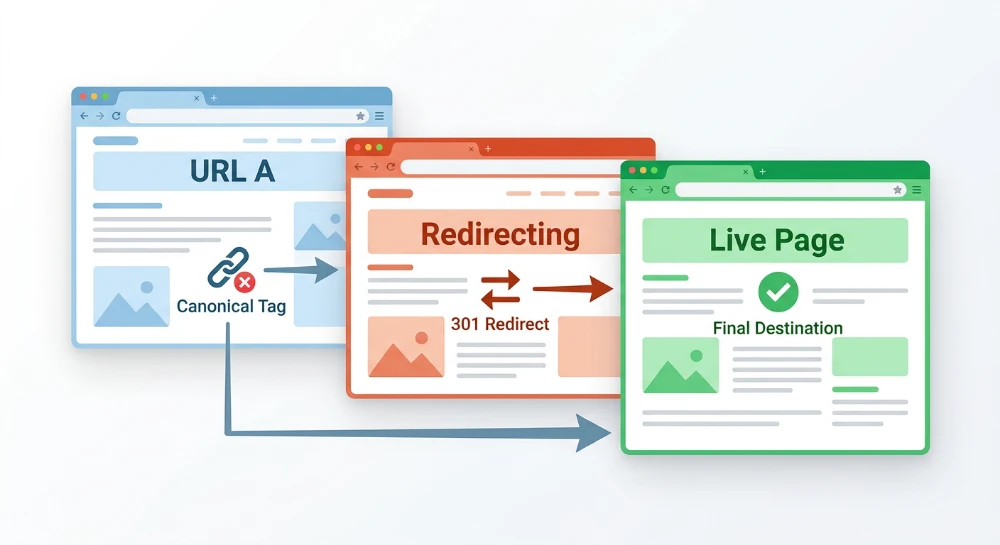
- 3XX Redirects (Canonical Chains): A canonical tag should reference the final destination URL. When a canonical target returns a 301 or 302 redirect, it creates a canonical chain that forces search engines to process multiple network hops. The audit should flag any canonical referencing a redirected URL so the tag can be updated to match the final destination.
- 4XX and 5XX Status Codes: A canonical target returning a 404 Not Found, 410 Gone, or any 5XX server error indicates that the stated preferred version is unavailable. Under these conditions, search engines reject the canonical directive and evaluate the source page on its own merits.
- Noindex Directives: Pointing a canonical to a page containing a noindex tag creates contradictory instructions. The canonical tag requests consolidation to the destination, while the noindex tag prevents that destination from appearing in search results. This conflict often results in search engines ignoring the canonical directive, or depending on the processing order, dropping both the source and target URLs from the index.
Verifying Cross-Domain canonical declarations
Cross-domain canonicals are implemented to attribute syndicated content to an original publisher on a separate website. Because this tag explicitly instructs search engines to credit an external property, implementation errors can inadvertently consolidate a site's original pages to a different domain, removing them from local search results.
Filter the extracted canonical destinations to isolate any URL pointing to a domain outside the audited property. Review this list of external targets to confirm they only apply to intentionally syndicated articles or authorized mirrored content.
This verification step is designed to detect configuration failures where an incorrect environment variable or a global template update applies a cross-domain canonical across an entire site directory. Such errors frequently point core internal pages to a staging environment, a parent company domain, or a legacy website, requiring immediate correction in the application logic.
SEO structure and reciprocal link analyzer
Detect orphan pages, deep click depths, and toxic reciprocal links built by careless agencies.
Detecting missing tags and assessing duplication risks
When reviewing the crawl dataset, isolating pages missing a canonical declaration requires filtering the extracted data for empty canonical fields. Most SEO crawlers flag this condition automatically, allowing auditors to identify specific page templates, older site directories, or application frameworks where the canonical element was omitted during development.
Although canonical declarations are frequently associated with consolidating existing duplicate content, applying a self-referencing canonical to unique pages establishes a preferred URL variant. A self-referencing canonical points directly to the exact, clean URL of the page it resides on. This explicit declaration serves as a baseline configuration, communicating the definitive address to search engines before any dynamic variations are introduced by user behavior, external linking, or internal systems.
Pages lacking self-referencing canonicals are exposed to indexation risks when dynamic URL variations are crawled. Because search engines treat URLs with different query strings or altered characters as distinct addresses, the absence of a canonical directive allows these variations to be processed as separate pages. Common duplication triggers that a missing canonical fails to mitigate include:
- Marketing campaign tracking codes and affiliate identifiers appended to the URL string.
- Session IDs generated by the server and visible in the URL path.
- Inconsistent trailing-slash implementations where both versions of a URL return a 200 OK status code.
- Altered capitalization variations resulting from manual linking errors or email clients.
- Internal site search or faceted navigation parameters that change the URL without changing the core page content.
Prioritize the remediation of missing canonicals based on how the application processes URL parameters and routing variations. Not all missing canonicals carry the same immediate risk of index duplication.
Sites that rely heavily on dynamic URL parameters require high-priority remediation. E-commerce platforms utilizing faceted navigation, websites running active marketing campaigns with tracking parameters, and applications that append session IDs to URLs can rapidly generate thousands of duplicate variations if crawled without canonical instructions. For these environments, deploying self-referencing canonicals is a necessary defense against index bloat.
Conversely, missing canonicals present a lower immediate risk on static websites or architectures that enforce strict server-level routing. If a server is configured to drop unrecognized parameters or automatically redirect trailing-slash and uppercase variations to a single clean URL path, the server configuration prevents duplication before the crawler processes the page. While implementing self-referencing canonicals remains a recommended configuration even in these strict environments, the urgency of the fix is reduced compared to parameter-driven applications.
Reconciling declared canonicals with XML sitemaps
XML sitemaps serve as a supplementary indexing signal, listing the specific URLs a site owner considers primary and indexable. Search engines expect the URLs submitted in a sitemap to perfectly match the canonical declarations found on the pages themselves. When a sitemap submits one URL variant but the page's canonical tag points to another, the site sends conflicting indexing directives.
To verify alignment, configure an SEO crawler to ingest the site's XML sitemaps alongside the standard site crawl. The objective is to map the exact URL string listed in the sitemap against the final status code of that URL and its declared canonical target.
Identifying sitemap mismatches
Filter the combined crawl data to isolate discrepancies between the sitemap submissions and the crawled canonical declarations. The audit should flag three specific mismatch conditions:
- Non-canonical URLs in the sitemap: The sitemap includes a specific URL, but upon crawling, that page contains a canonical tag pointing to a different destination. This frequently occurs when sitemap generators inadvertently include trailing-slash variants, default directory index files, or URLs containing sort parameters. Submitting non-canonical URLs forces crawlers to process the variant only to discover the canonical tag pointing elsewhere.
- Redirected URLs: The sitemap includes a URL that returns a 3XX HTTP status code. If a sitemap URL redirects, the final destination of that redirect chain is typically the intended canonical URL. The sitemap must be updated to reference the final destination directly rather than the legacy or alternate path.
- Missing canonical targets: A page correctly declares a primary canonical URL, but that target URL is entirely absent from the XML sitemap. This indicates that the sitemap is incomplete and failing to submit the site's actual preferred indexing targets, often because the sitemap generation logic differs from the page-rendering logic.
Resolving generation logic discrepancies
Sitemap mismatches rarely occur as isolated incidents; they usually stem from programmatic errors in how the content management system or sitemap plugin queries the database. For example, a CMS might generate page-level canonical tags by referencing a strict URL path field, while the sitemap generator pulls URLs from a distinct routing table that includes category subdirectories or varied casing.
When mismatches are identified, the resolution requires aligning the sitemap generation logic with the rules governing the canonical tags. Every URL included in the XML sitemap must return a 200 OK status code and contain a self-referencing canonical tag that matches the sitemap URL character for character. Any deviation requires adjusting the database query, custom script, or plugin configuration that builds the sitemap to ensure non-canonical variants are systematically excluded before the file is generated.
Bulk Google and Yandex index checker
Verify agency reports and track live SERP status in Google and Yandex to protect your SEO ROI.
Diagnosing ignored canonicals in Google search console
Because the rel="canonical" link element functions as a hint rather than a strict directive, search engines evaluate it alongside other site signals. When a crawler determines that a declared canonical URL does not accurately represent the duplicate cluster, or when competing signals point toward a different URL, it may choose to ignore the tag. Validating how search engines interpret these declarations requires reviewing actual indexation data rather than relying solely on third-party crawler output.
Using the page indexing report
Google Search Console provides direct visibility into ignored canonical tags through the Page Indexing report. Within this report, the status labeled "Duplicate, Google chose a different canonical" isolates URLs where the search engine explicitly disagreed with the site's implementation.
This status indicates that Google successfully crawled the URL and extracted the user-declared canonical tag, but its algorithms selected an alternative URL to represent the content in the index. Filtering the report by this specific reason provides a targeted list of URLs requiring diagnostic review.
Comparing signals with the URL inspection tool
To diagnose the discrepancy, run individual URLs from the affected list through the URL Inspection Tool. After retrieving the data from the Google index, expand the Indexing section of the report. This panel displays two critical data points for comparison:
- User-declared canonical: The URL explicitly specified in the page's HTML or HTTP header.
- Google-selected canonical: The URL the search engine ultimately chose to index as the primary version.
Identifying the exact URL Google preferred is the first step in diagnosing why the override occurred. The discrepancy between the two fields often reveals structural or relevance issues that contradict the declared tag.
Identifying root causes for overrides
When Google overrides a canonical declaration, it typically means the sum of other indexing signals points more strongly to the Google-selected URL. Two primary factors drive these overrides: internal linking conflicts and content relevance mismatches.
Internal linking serves as a strong indicator of URL preference. If a site declares URL A as the canonical target but consistently links to URL B in the main navigation, site map, and body content, crawlers receive conflicting instructions. When the volume of internal links pointing to the non-canonical variant outweighs the canonical tag itself, the search engine may index the heavily linked version instead. Resolving this requires updating internal navigation and in-content links to point consistently to the user-declared canonical.
Relevance issues occur when the content of the user-declared canonical diverges significantly from the originating page. For example, if a specific product variant canonicalizes to a broad category page, or if a unique article canonicalizes to a generic home page, the search engine may reject the tag because the target lacks the specific content found on the source URL. A valid canonical relationship requires the declared target to be a near-duplicate or a highly equivalent representative of the original page. When resolving overrides caused by relevance mismatches, the implementation must either be removed entirely or adjusted to point to an URL with equivalent content.