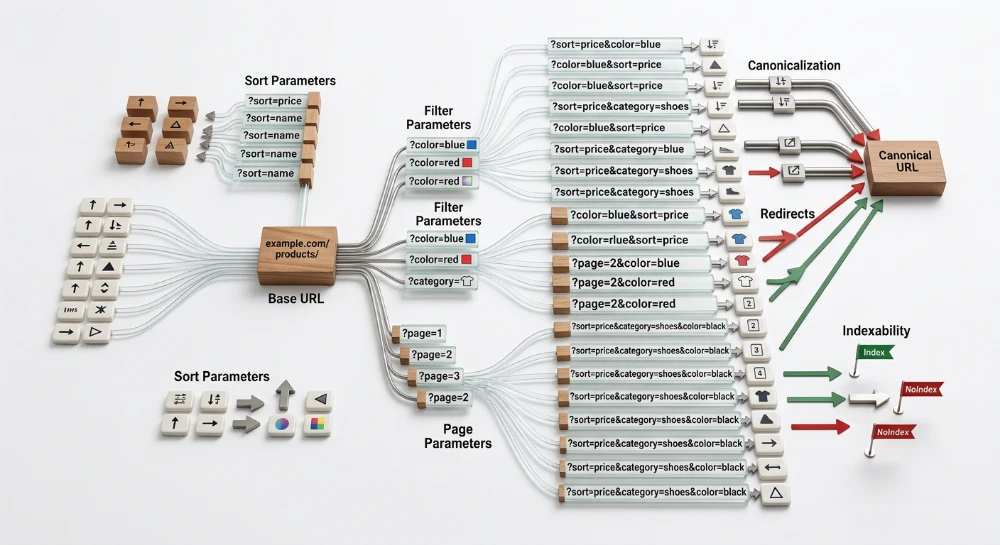
Modern websites frequently generate multiple URLs that serve identical or nearly identical content. To manage this duplicate content, search engines use a deduplication process known as canonicalization. When crawlers encounter several URLs pointing to the same page-such as versions with and without tracking parameters-they attempt to identify a single, authoritative version to index and display in search results.
This representative version is known as the canonical URL. By selecting one primary URL from a cluster of duplicates, search engines consolidate indexing signals, such as incoming links and content relevance, into a single authoritative entry rather than splitting them across multiple competing pages. Establishing a clear canonical version helps clarify site architecture and ensures the correct URL appears for users.
While site owners can strongly suggest their preferred version through a user-declared canonical, this acts as a hint rather than an absolute directive. Search engines evaluate this hint alongside other technical signals, including redirects, sitemap inclusions, and internal linking structures. If the algorithms determine that a different URL is a better representative for the content, they will assign a search-engine-selected canonical instead, which can override the site owner's explicit preference.
The Rel="Canonical" hint and signal consolidation
The rel="canonical" link element functions as a strong recommendation to search engines rather than a strict directive. While directives such as a noindex rule mandate a specific crawler behavior, a canonical tag acts as a hint indicating the site owner's preferred version of a page. Search engines weigh this preference heavily during the deduplication process, but they do not follow it blindly.
The primary function of this hint is to facilitate signal consolidation. When a website serves identical or highly similar content across multiple URLs, incoming indexing signals are naturally distributed among those variations. For example, external links might point to a clean URL, a URL with session IDs, and a URL appended with campaign parameters. By grouping these variations using a canonical tag, search engines can attribute the link equity and content relevance from the entire cluster to the single primary URL. This prevents the competing URLs from fragmenting the indexing signals.
Because the canonical element is a hint, its effectiveness depends on corroborating site signals. Search engine algorithms evaluate the rel="canonical" tag within the broader context of the website's architecture. They compare the declared canonical against internal linking patterns, XML sitemap inclusions, and server configurations like redirects. When these signals align-such as when the internal navigation links directly to the URL specified in the canonical tag-the search engine is highly likely to respect the hint.
Conversely, if the site owner's implementation sends mixed signals, the weight of the canonical hint decreases. If the content on the canonicalized page differs too significantly from the target page, or if internal links prioritize a different URL, the search engine may override the tag. In these cases, algorithms will consolidate signals toward a different search-engine-selected canonical that they determine to be the most accurate representative of the content.
Run a deep technical crawl to identify 4xx errors, missing meta tags, and indexation blockers.
Identifying scenarios that require canonicalization
Duplicate content rarely originates from manually copying text across multiple pages. Most duplication is the byproduct of content management system architecture, server configurations, or standard marketing practices. Identifying these scenarios allows site owners to apply canonical tags before competing URLs fragment indexing signals.
URL parameters and tracking tags
Marketing campaigns and analytics platforms frequently rely on URL parameters to track user behavior, assign affiliate credit, or maintain user sessions. These parameters append key-value pairs to the end of a URL string without altering the core content delivered to the browser.
A common scenario involves Urchin Tracking Module parameters used for campaign attribution. A user clicking a link in an email newsletter might land on a URL containing parameters like
?utm_source=newsletter&utm_medium=email
. If external sites link to this exact URL, or if a crawler discovers it, search engines treat the parameterized URL as a distinct address. A canonical tag pointing to the clean, parameter-free URL ensures that any indexing signals generated by the campaign are consolidated to the primary page.
Similar duplication occurs with session identifiers appended to URLs to track logged-in users, or affiliate IDs used for revenue sharing. In all these cases, the content remains identical, making canonicalization the standard mechanism for declaring the clean URL as the authoritative version.
Faceted navigation and sorting
E-commerce platforms and large directory websites rely heavily on faceted navigation to help users filter products or listings. Users might filter a category by size, color, or brand, and apply sorting preferences like price ascending or highest rated. Each applied filter or sort order dynamically generates a new URL.
For example, a primary category page might exist at
/shoes/running/
. When a user applies filters, the CMS might generate URLs such as
/shoes/running/?color=blue&size=10
or
/shoes/running/?sort=price_low_high
. Because these filtered pages display subsets or reordered versions of the identical product inventory found on the main category page, they are typically considered duplicate content by search engines.
Applying a canonical tag on these filtered and sorted pages that points back to the primary category URL prevents the search engine from evaluating hundreds of overlapping inventory combinations. A practical exception occurs when a specific filter combination represents a distinct entity with significant search demand, in which case that specific URL might warrant its own self-referencing canonical tag and optimized page elements.
Structural and Server-Level variations
Search engines treat URLs as exact strings. Minor variations in protocol, subdomains, or URL paths result in search engines identifying completely separate pages, even if the server delivers the same HTML file.
-
Protocol differences:
http://example.comandhttps://example.comare distinct URLs. -
Subdomain variations:
https://www.example.comandhttps://example.comare evaluated separately. -
Trailing slashes:
https://example.com/services/andhttps://example.com/servicesare treated as different paths, as one traditionally indicates a directory and the other a file.
While server-side configuration is the primary method for resolving these structural variations, canonical tags serve as a critical secondary signal. If a server misconfiguration temporarily exposes the HTTP or non-www version of a site, the presence of an absolute canonical tag pointing to the secure, preferred subdomain version provides search engines with a clear fallback instruction for signal consolidation.
Cross-Domain syndicated content
Canonicalization is not restricted to a single domain. When content is syndicated across different websites, search engines face the challenge of identifying the original publisher. This scenario frequently occurs when a company publishes an article on its corporate blog and subsequently republishes the identical text on industry aggregators or partner platforms.
To ensure the original publisher retains the primary indexing signals, the syndicating website can implement a cross-domain canonical tag. This tag is placed in the HTML head of the syndicated copy and specifies the absolute URL of the original article on the primary domain. This configuration allows the partner site to host the content for its audience while explicitly instructing search engines to attribute the content origination to the source domain.
Supported implementation methods
The method used to implement a canonical signal depends primarily on the file type being served and the configuration capabilities of the hosting environment. Consistent implementation across these methods ensures search engines process the deduplication hints accurately.
HTML head implementation
The most common method for specifying a canonical URL is inserting a link element into the HTML head section of a webpage. This element must be placed as early as possible within the head block to ensure search engine crawlers parse it before processing the page body or encountering conflicting scripts.
<link rel="canonical" href="https://example.com/preferred-page/" />If the link element is placed in the body of the HTML document, search engines will ignore it entirely. This restriction exists to prevent malicious injection of canonical tags via user-generated content sections, such as blog comments or forum posts.
HTTP link header for Non-HTML files
For non-HTML assets, such as PDF documents, spreadsheets, or image files, an HTML link element cannot be used because there is no HTML source code to host the tag. In these instances, the HTTP Link header serves as the correct implementation method.
By configuring the web server to return a specific response header when the file is requested, administrators can point the non-HTML asset to a corresponding HTML landing page or consolidate duplicate document versions.
Link: <https://example.com/canonical-page/>; rel="canonical"This configuration requires server-level access, typically executed through configuration files like .htaccess for Apache, server blocks for Nginx, or via edge computing rules on a Content Delivery Network (CDN).
XML sitemaps as supplementary signals
While link elements and HTTP headers act as explicit, page-level signals, an XML sitemap functions as a supplementary, site-wide canonical hint. Search engines generally interpret the URLs submitted in a sitemap as the site owner's preferred indexing candidates.
To prevent conflicting signals, XML sitemaps should only contain canonical URLs. Including alternate variations, such as parameterized URLs, tracking links, or duplicate paths, introduces ambiguity. When a sitemap URL conflicts with a page-level canonical tag, search engines must weigh the conflicting hints, which can delay or alter the intended consolidation.
Absolute versus relative URLs
When defining a canonical URL in an HTML tag or an HTTP header, the destination must be written as an absolute URL rather than a relative path. An absolute URL specifies the full web address, including the protocol (HTTP or HTTPS) and the domain name.
-
Absolute URL:
https://example.com/category/page/ -
Relative URL:
/category/page/
Using relative paths introduces a severe risk of resolution errors. If a crawler accesses a page through an unintended variation-such as a staging subdomain, an IP address, or an insecure HTTP connection-a relative canonical tag will resolve to that exact unintended variation. By using an absolute URL, the canonical signal forcefully points back to the correct protocol and domain, regardless of how the crawler arrived at the duplicate version.
Self-Referencing canonical tags
A self-referencing canonical tag is an implementation where a page specifies its own URL as the canonical version. Applying this practice across all primary indexing targets establishes a baseline signal that explicitly states the intended URL format.
This configuration acts as a preventative measure against dynamically generated URL variations. Third-party marketing platforms, social media networks, and affiliate systems frequently append tracking parameters (such as UTM codes or session identifiers) to URLs when directing traffic to a site. If a canonical tag is absent, search engines may crawl and index these parameterized variations as separate pages. A self-referencing canonical tag ensures that regardless of the parameters appended to the URL in the browser, the page consistently instructs search engines to consolidate signals back to the clean, preferred path.
Bulk Google and Yandex index checker
Verify agency reports and track live SERP status in Google and Yandex to protect your SEO ROI.
Distinguishing canonicalization from URL exclusion methods
A canonical tag manages how duplicate URLs are represented in search results, but it does not restrict access to the page. Webmasters often confuse canonicalization with crawl control or index exclusion directives. Understanding the operational differences between these mechanisms prevents implementation errors that can inadvertently block signal consolidation or leave unwanted pages in the index.
Signal consolidation vs. active forwarding
A
rel="canonical"
tag operates as a passive hint. It allows users and search engine crawlers to load and view the duplicate URL normally. The crawler reads the tag and processes the request to consolidate indexing signals to the primary URL. The duplicate remains fully accessible in the browser.
A
301
HTTP redirect acts as an active forwarding directive for permanent consolidation. When requested, the server intercepts the connection and forces both users and bots to navigate to the destination URL. The source URL ceases to serve content. A
301
redirect is the correct mechanism when a URL is deprecated, while a canonical tag is required when a duplicate URL must remain active for users, such as a faceted category page or a parameterized tracking URL.
Consolidation vs. index removal
The
noindex
robots meta tag is a strict directive that instructs search engines to exclude a URL from the index entirely. Applying a
noindex
tag drops the URL from search results but does not forward its indexing signals or link equity to another page.
Applying both a
rel="canonical"
tag and a
noindex
tag to the same page creates conflicting instructions. The canonical tag requests that the search engine forward signals to the target URL, while the
noindex
tag demands that the search engine drop the page and its signals from the index. Search engines generally prioritize the
noindex
directive in this scenario, effectively breaking the canonical relationship and preventing signal consolidation.
Crawl allowance vs. crawl blocking
The
robots.txt
file dictates crawl behavior, not indexing behavior. A
Disallow
rule prevents a search engine crawler from requesting the specified URL path. If a search engine is blocked from crawling a duplicate page, it cannot download the HTML document or evaluate the HTTP headers.
Because the crawler cannot read the page, it cannot discover any
rel="canonical"
tag implemented there. Blocking a duplicate URL in
robots.txt
actively prevents the search engine from consolidating that URL's signals to the primary version. If the blocked URL has external links pointing to it, the search engine might still index the URL based on those external references, typically displaying it in search results without a meta description. To allow a canonical tag to function, the URL containing the tag must remain fully crawlable.
Handling conflicting signals and implementation failures
Search engines evaluate canonical tags based on the consistency of the surrounding technical signals. When a canonical hint contradicts other page directives or contains structural errors, search engines typically ignore the user-declared tag and attempt to select a canonical version algorithmically.
Invalid placement in the HTML body
For an HTML
rel="canonical"
tag to function, it must reside within the document's
<head>
section. If the tag is injected into the
<body>
section, search engines will not process it. This misplacement frequently happens due to misconfigured content management system plugins, unclosed HTML tags that prematurely end the head section, or delayed JavaScript execution.
This strict placement rule is a deliberate design choice by search engines. Browsers and crawlers expect metadata in the head. Ignoring canonical tags found in the body prevents potential exploits, such as malicious users attempting to hijack a page's indexing signals by dropping a canonical tag into an unescaped comment field or forum post.
Targeting invalid or excluded URLs
A canonical tag only works when the target URL is eligible for indexing. Pointing a canonical tag to a URL that returns a 404 Not Found or a 500-level server error invalidates the signal. Because the target document cannot be accessed, the search engine cannot consolidate the duplicate page's indexing signals with it.
Conflicting indexing directives occur when a canonical tag points to a URL that contains a
noindex
tag. The canonical tag requests that the search engine index the target page as the primary version, while the
noindex
tag instructs the search engine to drop the target page from the index entirely. Search engines usually prioritize the restrictive directive, dropping the target page and breaking the intended canonical relationship. The original duplicate page may then remain indexed, or both pages may be dropped, depending on other signals.
Targeting a redirected URL also creates mixed signals. If Page A sets Page B as its canonical version, but Page B responds with a 301 redirect to Page C, it forces the crawler to resolve a multi-step sequence. The canonical target should always be the final destination URL that returns a 200 OK HTTP status code.
Canonical chains and loops
Errors in site architecture or automated tagging systems can create sequential canonicalization issues, which break the direct mapping between a duplicate and its primary version.
Canonical chains
A canonical chain occurs when Page A points its canonical tag to Page B, and Page B points its canonical tag to Page C. This configuration forces the search engine crawler to follow multiple hops to identify the representative URL. While crawlers can sometimes resolve short chains, longer sequences increase the risk that the search engine will abandon the chain before reaching the final URL. To ensure proper signal consolidation, all duplicate variants should point directly to the final primary URL.
Canonical loops
A canonical loop occurs when pages point to each other cyclically. For example, Page A points its canonical tag to Page B, but Page B points its canonical tag back to Page A. This creates an impossible instruction. Search engines cannot resolve an infinite loop and will ignore the conflicting canonical tags, relying instead on internal links, XML sitemaps, and content evaluation to determine the primary version.
SEO structure and reciprocal link analyzer
Detect orphan pages, deep click depths, and toxic reciprocal links built by careless agencies.
Validating and troubleshooting canonical status
Implementing a canonical tag does not guarantee a search engine will select the specified URL for indexing. Validating the configuration requires a two-step process: confirming the physical presence and accuracy of the tag on the server or in the source code, and verifying that search engines are actively accepting the assigned canonical signal over other competing variants.
Manual verification methods
Manual validation ensures that the basic technical implementation is correct before search engine crawlers process the page. The method of verification depends on the file type being evaluated.
Inspecting the HTML source
To confirm a canonical tag is present on a standard web page, view the raw HTML source code. The tag must reside strictly within the head section of the document. Searching the source for the canonical link element reveals the exact URL string deployed by the server or content management system. A valid implementation will return exactly one canonical link. If multiple tags are present, search engines typically ignore all of them.
Evaluating the raw source rather than the rendered Document Object Model (DOM) is necessary as a first step. If the tag is missing from the raw source but appears in the rendered DOM, it indicates that client-side JavaScript is injecting the tag. While search engines can process JavaScript-injected canonicals, this adds a rendering step that delays signal consolidation and increases the risk of discovery failures.
Validating HTTP response headers
For non-HTML files, such as PDFs or proprietary document formats, the canonical signal is passed via the HTTP response header. Verification requires inspecting the network traffic rather than the page source. This can be done using the Network tab in browser developer tools by selecting the asset and reviewing the Response Headers section, or by querying the URL with a command-line tool.
curl -I https://example.com/document.pdfThe resulting output should contain a line matching the expected Link header format for canonicalization. Confirming this header ensures the server configuration correctly applies the rule to the intended file types without relying on HTML.
Google search console verification
Once the technical implementation is confirmed, Google Search Console provides the necessary data to determine if the search engine algorithm agrees with the user-defined canonical choice.
Using the URL inspection tool
The URL Inspection tool provides direct insight into how a specific page is evaluated. After submitting a URL, the Page Indexing section displays two distinct fields related to deduplication: User-declared canonical and Google-selected canonical.
- Match condition: If the URLs in these two fields match, the search engine has accepted the canonical tag and consolidated the signals as intended.
- Mismatch condition: If the Google-selected canonical differs from the User-declared canonical, the search engine has overridden the tag. This mismatch indicates that other indexing signals, such as internal link structures, sitemap inclusion, or external links, strongly point to a different URL as the primary version.
Analyzing the page indexing report
While the URL Inspection tool handles individual pages, the Page Indexing report identifies canonicalization behavior at scale. The report categorizes URLs into specific statuses that highlight site-wide deduplication outcomes.
- Duplicate, Google chose different canonical than user: Identifies URLs where the search engine actively ignored the implemented canonical tag in favor of another URL. This often points to a systemic conflict between the canonical tags and the site's internal linking architecture.
- Duplicate without user-selected canonical: Lists pages the crawler identified as duplicates that lack any canonical tag. The primary version in this scenario is left entirely up to algorithm selection.
- Alternate page with proper canonical tag: Confirms successful implementation. The duplicate URL was crawled, the canonical tag was recognized, and the URL was properly excluded from the index while consolidating signals to the primary version.
Monitoring these specific report categories allows for the rapid detection of template errors, CMS misconfigurations, or conflicting signals that undermine the overall deduplication strategy.