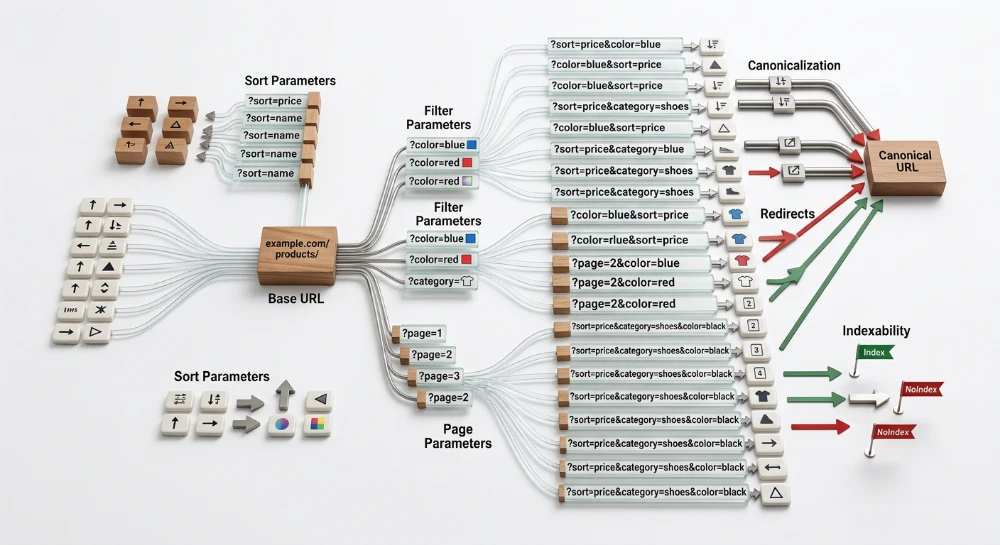
E-commerce platforms inherently generate massive amounts of duplicate or near-duplicate content through standard shopping functionality. Managing how to handle canonical URLs on e-commerce pages allows webmasters to control how search engines interpret and index a sprawling product catalog. Without explicit directives, search engines are left to determine which version of a page represents the primary entity, which can lead to fragmented ranking signals and index bloat.
This duplication is a direct byproduct of necessary site architecture. Faceted navigation creates countless parameterized URL combinations as users filter categories by price, brand, or attributes. Similarly, product variants like color and size often generate distinct URLs for items with virtually identical descriptions. Session IDs, marketing tracking parameters, and pagination sorting options further multiply the number of accessible URLs that display the exact same core content.
The rel="canonical" link element resolves these variations by identifying the definitive version of a page. Implementing this HTML directive helps consolidate ranking signals from multiple variant or parameterized URLs into a single primary target. When configured correctly, canonicalization ensures that search engines index the intended master product or category pages, rather than diluting visibility across thousands of utility URLs generated by user navigation.
Handling product page variants: Parent consolidation vs. Self-Referencing
E-commerce platforms typically handle product variants, such as different colors, sizes, or materials, by generating unique URLs for each option. Deciding whether to consolidate these URLs or allow them to index individually requires choosing between parent consolidation and self-referencing canonicals.
Parent consolidation for variant URLs
Parent consolidation involves configuring the rel="canonical" directive on all variant pages to point to a single master product URL. This approach instructs search engines to treat the primary URL as the representative version of the product, rolling up the indexing signals from the specific variants.
Consolidation is usually the correct path when the variations are minor and do not alter the core product description, images, or specifications. Size variations are a common example. Because users rarely conduct granular searches for specific apparel sizes independent of the product itself, maintaining separate indexed pages for every available dimension fragments ranking signals without addressing distinct search demand. By canonicalizing all size variants to the parent product, the platform prevents near-duplicate content from clustering in the index.
Self-Referencing variants and ProductGroup structured data
When specific product variations carry distinct search volume, a self-referencing canonical tag allows the variant URL to index independently. This approach is common for visual variants, such as specific colors or finishes, where users actively search for precise attributes.
Allowing variants to index separately requires structural support to prevent them from being evaluated as unhelpful duplicate content. The distinct variant pages must feature unique titles, meta descriptions, and distinct image assets reflecting the specific variation.
To explicitly define the relationship between these separate URLs, self-referencing variants should be implemented alongside ProductGroup structured data. This schema markup links the individual variant pages together under a shared parent product entity. By combining a self-referencing canonical with ProductGroup schema, search engines can index the specific variant for long-tail queries while understanding its exact relationship to the broader product family.
Evaluating variant handling architecture
The choice between consolidation and independent indexing depends on three primary factors: search intent, inventory architecture, and the native behavior of the content management system.
| Evaluation Factor | Indicators for Parent Consolidation | Indicators for Self-Referencing Variants |
|---|---|---|
| Search Intent | The variation attribute lacks measurable search volume. Queries focus entirely on the parent product model. | The variation attribute modifies the search query. Users actively search for the specific color, material, or configuration. |
| Inventory Architecture | Variants share identical imagery, copy, and pricing. They exist primarily as utility dropdowns on a single page template. | Variants have distinct SKUs, unique product images, varying price points, or distinct technical specifications. |
| CMS URL Generation | The platform generates dynamic query parameters for variants without updating on-page metadata. | The platform generates static, distinct URL paths and supports unique page titles and descriptions for each variant. |
When a CMS generates utility URLs for every possible combination of size, color, and fit using parameterized strings, parent consolidation provides a safeguard against index bloat. If the platform cannot update the page title or description when a user selects a variant, allowing those parameterized URLs to index via self-referencing canonicals will result in identical search results competing against one another.
Conversely, if a platform architecture supports distinct metadata and routing for variants, but search intent for those variants remains low, webmasters must weigh the maintenance cost of unique content against the potential long-tail visibility. Consolidating to a parent URL provides a centralized baseline architecture that can be selectively overridden with self-referencing tags for high-priority variations when search demand justifies independent indexing.
Run a deep technical crawl to identify 4xx errors, missing meta tags, and indexation blockers.
Controlling faceted navigation and category parameters
Faceted navigation allows users to refine broad e-commerce categories by selecting multiple overlapping filters, such as brand, price, material, and color. Content management systems typically handle these selections by appending query parameters to the category URL. As users apply and combine different filters, the platform generates unique parameter strings, resulting in URLs like category/shoes?brand=acme&color=blue&size=10. Because users can apply these filters in various sequences, a single category can dynamically generate thousands of URL combinations.
Sorting options and utility filters compound this URL generation. Parameters that change the sort order from newest to oldest, alter the display from a grid to a list, or expand the view from 24 to 48 items per page do not change the actual product inventory. They only change the presentation. If search engine crawlers follow and index these parameterized links, the result is severe index bloat. The site presents search engines with thousands of near-identical pages, diluting indexing signals across multiple URLs and forcing duplicate pages to compete in search results.
To control this duplication, parameterized URLs generated by utility filters and overlapping facets require canonical consolidation to a master category page. A parameterized URL should output a canonical link element that points back to the clean, parameter-free base URL. For example, the URL category/shoes?sort=price_low_high should canonicalize to category/shoes. This configuration instructs search engines that the filtered or sorted view is merely a variation of the primary category, consolidating the ranking signals to the master page and keeping the parameterized endpoints out of the index.
However, strict consolidation across all facets can limit a site's visibility for long-tail queries. Certain filter combinations align with specific user search intent. When a faceted view represents a distinct product type that users actively search for, consolidating it back to the parent category discards an opportunity for independent indexing.
Webmasters must evaluate category filters to determine when a specific combination justifies a self-referencing canonical instead of consolidation. A filter combination warrants independent indexing when it meets the following criteria:
- Search demand exists for the specific attribute combination, indicating that users query for the exact intersection of those features.
- The platform architecture supports unique on-page metadata for the filtered view, allowing the page title, H1, and meta description to update dynamically based on the applied parameters.
- The specific filter combination returns sufficient inventory to satisfy user intent, avoiding thin-content pages that display only one or two products.
When a parameter combination meets these conditions, the URL should utilize a self-referencing canonical tag to allow indexation. E-commerce architectures often manage these high-priority variations by converting them into static URL paths, establishing a distinct category page that handles the specific search demand, while leaving standard query parameters strictly for utility filtering and sorting.
Configuring pagination and utility parameters
E-commerce platforms use URL parameters for distinct operational functions, primarily sequential content delivery and user tracking. These functions require opposing canonicalization strategies based on whether the parameter alters the page inventory or merely passes data to the server.
Handling paginated category pages
Paginated URLs serve a unique set of products within a broader category. While the page template, title, and description often remain consistent across the series, the specific items rendered in the product grid differ entirely from the root category URL.
Paginated URLs require self-referencing canonical tags. Each distinct page in the series must declare itself as the canonical version to ensure it is eligible for crawling and indexing.
Canonicalizing a paginated sequence to the root category page instructs crawlers that the subsequent pages are exact duplicates of the first page. This configuration can cause search engines to consolidate the URLs and drop deeper paginated pages from the crawl queue. When this occurs, crawlers lose a primary discovery path for products that only appear on page two and beyond, which can lead to orphaned product pages or delayed indexation for deeper inventory.
Consolidating tracking and session IDs
Tracking parameters and session identifiers perform utility functions without modifying the visible content or inventory of the page. Marketing campaigns, affiliate networks, and internal platform systems frequently append these parameters to track user acquisition sources, measure ad performance, or maintain logged-in state across a browsing session.
Because the underlying content is identical to the clean URL, tracking and session parameters create purely duplicative pages. These URLs require strict canonicalization to the parameter-free version to prevent the fragmentation of indexing signals across multiple identical variations.
If a platform generates a URL appending a campaign identifier, the canonical tag on that page must point to the clean category or product URL. This configuration ensures that external links pointing to campaign URLs pass their consolidation signals to the primary page rather than establishing the tracking URL as an independent, indexable entity.
| Parameter Function | Common Identifiers | Content Impact | Required Canonical Target |
|---|---|---|---|
| Pagination | page, p, offset | Loads distinct product inventory | Self-referencing URL |
| Campaign Tracking | utm_source, utm_medium, gclid | None | Clean, parameter-free URL |
| Session State | sid, sessionid, phpsessid | None | Clean, parameter-free URL |
SEO structure and reciprocal link analyzer
Detect orphan pages, deep click depths, and toxic reciprocal links built by careless agencies.
Technical implementation rules for canonical tags
Search engines require exact syntax and placement to process canonical directives correctly. When implemented in HTML, the canonical link element must reside strictly within the document's head section. Crawlers ignore canonical tags found within the body to prevent parsing errors and unauthorized injection by third-party scripts. The syntax requires the rel attribute specifying the canonical relationship and the href attribute containing the target URL.
<link rel="canonical" href="https://www.example.com/category/product" />The href attribute should always use absolute URLs rather than relative paths. An absolute URL explicitly states the protocol, the domain, and the specific path. Using relative paths introduces a high risk of mapping errors, as a crawler might resolve a relative path against an incorrect base URL or associate it with the wrong protocol variation.
Canonicalizing Non-HTML assets
While the HTML link element serves standard web pages, e-commerce sites frequently host non-HTML assets like PDF product catalogs, technical spec sheets, or sizing charts. Because these files lack an HTML structure, they require an HTTP header implementation. Web servers can be configured to return a Link HTTP response header that applies the canonical directive directly to the file request.
Link: <https://www.example.com/category/product-manual>; rel="canonical"This method prevents the PDF from competing in search results with the primary HTML product page or allows multiple copies of the same PDF hosted at different URLs to consolidate to a single master file.
Aligning sitemaps with canonical directives
Canonical tags operate most effectively when aligned with other site-wide indexing signals. The URLs specified as canonical targets must match the URLs submitted in the XML sitemap. If a sitemap includes parameterized URLs, session IDs, or duplicate product variants while the on-page canonical tags point to a different master URL, search engines receive conflicting instructions.
This misalignment forces search engines to independently evaluate which signal to trust, which can result in the declared canonical tag being ignored. Submitting only the designated canonical URLs in the XML sitemap reinforces the intended consolidation path and provides consistent indexing instructions across the platform.
Identifying conflicting directives and failure modes
When canonical directives are implemented incorrectly, search engines often ignore them, forcing algorithms to independently determine which URLs to index. In e-commerce environments with large volumes of parameterized URLs, these failure modes complicate indexation control and can affect how crawling resources are allocated.
Canonical tag chains
A canonical chain occurs when a page specifies a canonical target, and that target in turn specifies a different URL as its own canonical. For example, URL A canonicalizes to URL B, while URL B canonicalizes to URL C. This condition frequently surfaces during site migrations or when CMS routing rules overlap and append new parameters sequentially.
Chains force search engine crawlers to process multiple hops to discover the final intended URL. On large sites, deep canonical chains reduce crawl efficiency, as crawlers may abandon the sequence before reaching the final destination. To resolve this, all variations of a page should point directly to the final master URL in a single step, rather than passing through intermediate redirects or canonical tags.
Circular canonicalization
Circular canonicalization creates an infinite loop between two or more URLs. This occurs when URL A declares URL B as its canonical version, but URL B declares URL A as its canonical version. In e-commerce faceted navigation, this often happens when filter combinations are applied in different sequences but generate distinct URLs that incorrectly cross-reference each other.
When search engines encounter a circular loop, they cannot determine a clear consolidation path. As a result, they typically ignore the canonical directives entirely. The search engine algorithms then rely on other signals, such as internal linking patterns or XML sitemap inclusions, to select a canonical URL. This fallback process can lead to the wrong page being indexed or duplicate pages remaining in the search results.
Conflicting directives: Rel="canonical" and noindex
A common configuration error is applying both a
rel="canonical"
tag pointing to another URL and a
noindex
robots directive on the same page. These two signals serve fundamentally different purposes and provide contradictory instructions.
The
rel="canonical"
tag requests that search engines consolidate indexing signals, such as external links, from the duplicate page to the designated master URL. Conversely, the
noindex
directive instructs the search engine to drop the page from the index entirely. When a page is marked as
noindex
, search engines gradually crawl it less frequently and eventually stop processing the links on that page.
When a page contains both directives, the search engine receives instructions to simultaneously consolidate the page's signals and delete the page from the index. This conflict leads to unpredictable indexation behavior. The search engine may honor the
noindex
directive and drop the URL without passing the intended signals to the canonical target. If the goal is to pass signals to a primary URL, only the canonical tag should be used. If a parameterized URL provides no value and should simply be removed from the index without passing signals, the
noindex
directive should be used without a cross-referencing canonical tag.
Bulk Google and Yandex index checker
Verify agency reports and track live SERP status in Google and Yandex to protect your SEO ROI.
Validating e-commerce canonical implementations
Implementing canonical tags requires verification to confirm that search engines process the directives as intended. Because canonicals function as strong hints rather than absolute directives, search engines evaluate them against other on-site signals and can override them if they detect inconsistencies.
Verifying directives with the URL inspection tool
The Google Search Console URL Inspection tool provides direct insight into how search engines evaluate individual URLs. When auditing a parameterized category page or a product variant URL, the tool's Page Indexing section displays both the "User-declared canonical" and the "Google-selected canonical".
If the implementation functions correctly, these two fields match. When they differ, the search engine has overridden the site's instruction. This override frequently occurs if the on-page content of the duplicate differs too substantially from the canonical target, or if internal linking signals point overwhelmingly to the parameterized version instead of the designated master URL. Identifying mismatches between these fields dictates whether developers need to adjust internal links, sitemap inclusions, or the canonical tag mapping.
Interpreting the page indexing report
For site-wide validation, the Page Indexing report categorizes discovered URLs based on their processing status. In an e-commerce environment, the "Alternate page with proper canonical tag" status is an indicator of a functional implementation. This status confirms that the crawler discovered the parameterized or duplicate URL, read the canonical tag, successfully excluded the duplicate from the index, and consolidated its signals into the target.
A massive volume of URLs in this category is standard for stores operating with extensive faceted navigation or session IDs. Conversely, statuses such as "Duplicate, Google chose different canonical than user" or "Duplicate without user-selected canonical" require technical review. These reports isolate instances where the platform generated duplicate variations that either lack canonical instructions entirely or contain instructions that the search engine rejected.
Diagnosing crawl traps with diagnostic tools
While Search Console confirms the final indexing status, it does not comprehensively map server-side crawl inefficiency. If canonical consolidation fails to manage the dynamic URL generation of a faceted navigation system, the site can develop a crawl trap. This occurs when a matrix of filter combinations generates an infinite number of unique URLs, causing search engine crawlers to expend significant capacity navigating combinations before any indexing consolidation occurs.
Third-party crawl diagnostic tools isolate these structural failures by simulating automated crawler behavior. When reviewing a site crawl, administrators can spot traps by monitoring URL discovery rates grouped by crawl depth. If the crawler uncovers hundreds of thousands of distinct parameterized URLs at a depth of five or more clicks from the root, the facet architecture is generating excessive variations.
In these diagnostic reports, identifying massive clusters of deep URLs that all declare the same canonical target confirms a specific failure mode: while the canonical tags are present and syntactically correct, they are failing to prevent crawl bloat. When this pattern appears, validation protocols require escalating the response, typically by implementing robots.txt disallows for specific utility parameter strings to halt the crawling of infinite filter chains before the canonical tag is even evaluated.