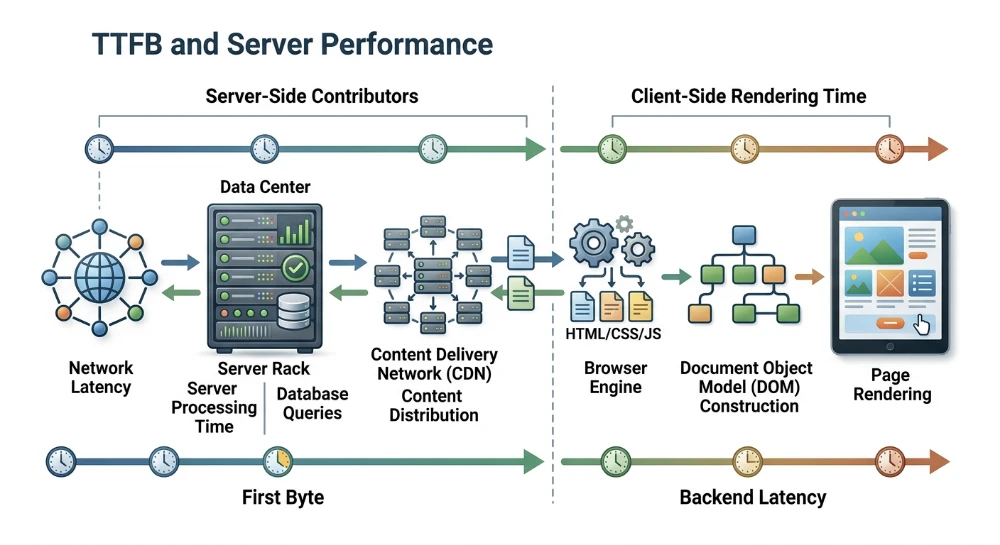
Understanding how Time to First Byte (TTFB) affects page performance requires looking directly at the initial stages of the HTTP request-response cycle. TTFB measures the duration from when a browser requests a page to when it receives the very first byte of the response from the server. Because the browser cannot begin parsing the HTML document or discovering critical sub-resources until that initial data arrives, TTFB precedes and establishes the baseline floor for visual loading metrics such as First Contentful Paint (FCP) and Largest Contentful Paint (LCP).
When diagnosing slow page loads, a common failure mode is treating a high TTFB as a simple indicator of slow backend code, or conversely, blaming frontend rendering bottlenecks when the delay actually occurred before the browser received a single byte. A single TTFB measurement encompasses both network transit overhead-including DNS lookup, TCP handshake, and TLS negotiation-and actual server processing time. Effective performance optimization depends on isolating the server's backend execution time from network latency on one side, and from client-side rendering work on the other.
Although TTFB is captured in real-user field datasets like the Chrome User Experience Report (CrUX), it functions as a foundational diagnostic metric rather than a standalone Core Web Vital ranking signal. Lowering TTFB does not by itself guarantee improved search rankings, especially if a page remains blocked by heavy client-side JavaScript or unoptimized media. However, when a slow server response consumes the majority of the time budget before rendering even begins, resolving backend and delivery latency becomes the necessary first step to improving overall page performance.
Deconstructing TTFB: Network transit vs. server processing time
According to the W3C Navigation Timing specification, Time to First Byte spans the entire interval from the moment the browser initiates a navigation request (
startTime
) to the moment it receives the first byte of the response (
responseStart
). Because this umbrella metric aggregates multiple distinct events, treating a single TTFB duration as a pure measurement of server speed often leads to misdirected engineering effort. Optimizing application code or database queries will not resolve a high TTFB if the delay occurs before the HTTP request ever reaches the origin server.
The four phases of a TTFB timeline
To isolate network overhead from backend execution, performance profiling tools break the pre-response timeline into sequential phases:
- DNS Resolution: The browser queries a DNS resolver to translate the requested hostname into an IP address. If the record is not cached locally by the browser, operating system, or router, the request must traverse the network to a recursive resolver and potentially to authoritative nameservers.
- TCP Handshake (Initial Connection): Once the IP address is known, the client and server establish a connection by exchanging synchronize (SYN) and acknowledge (ACK) packets. This requires one full network round trip before any application data can be sent.
- TLS Negotiation (SSL): For HTTPS requests, the client and server must complete a cryptographic handshake to verify certificates and agree on encryption keys. Depending on the protocol version and whether session resumption is active, this adds one to two additional network round trips.
- Server Processing and Transit (Waiting for Server Response): In Chrome DevTools and similar waterfall profilers, this phase begins the moment the browser finishes sending the HTTP request and ends when the first byte of the response arrives. It encompasses the time required for the request packet to travel to the server, the server's internal execution time (often called think time), and the transit time for the first response byte to return to the client.
How Round-Trip time (RTT) amplifies connection overhead
Physical distance and network routing topology govern the connection setup phases through Round-Trip Time (RTT)-the duration required for a data packet to travel from the client to the server and back. While light travels quickly through fiber-optic cables, indirect routing paths, network congestion, and intermediate hardware hops add latency to every trip.
Because establishing a new secure connection requires multiple sequential back-and-forth exchanges, network latency acts as a multiplier during connection setup. Consider a user on a mobile network with a 150 ms RTT connecting to a geographically distant server:
- An uncached DNS lookup may require 150 ms.
- The TCP handshake requires one round trip (150 ms).
- A standard TLS 1.2 handshake requires two round trips (300 ms), whereas TLS 1.3 reduces this to one round trip (150 ms).
Even with TLS 1.3, this user accumulates 450 ms of connection overhead before the browser can transmit the HTTP request. When the request is finally sent, the packet must travel to the server and the first byte must return, adding one more round trip (150 ms) to the Waiting phase. In this scenario, if the server executes its backend code in just 50 ms, the total reported TTFB will still be 650 ms. Over 90 percent of that duration is dictated by network physics and connection setup rather than backend server performance.
Diagnosing the root cause with a network waterfall chart
A network waterfall chart separates these phases visually, allowing you to determine whether a high TTFB requires infrastructure changes (such as CDN deployment or DNS optimization) or backend code profiling. When inspecting the primary HTML document request in Chrome DevTools (under the Network tab's Timing breakdown) or WebPageTest, apply the following decision criteria:
| Waterfall Pattern | Primary Bottleneck | Diagnostic Interpretation and Next Step |
|---|---|---|
| Long DNS, Initial Connection, or SSL bars; short Waiting bar | Network transit and connection setup | The server processes the request quickly once received, but high RTT, slow authoritative DNS, or lack of edge termination delays connection establishment. Focus on terminating connections closer to the user or optimizing TLS and DNS configuration. |
| Short or absent connection bars; long Waiting (TTFB) bar | Backend server processing (Think Time) | The connection is established rapidly (or reused via an existing keep-alive socket), but the server takes too long to generate the response. Focus on application profiling, database queries, server resource limits, or full-page caching. |
| Proportional delays across TCP, TLS, and Waiting phases | High baseline RTT (Geographic distance or poor client connection) | If the Waiting bar is roughly equal to the TCP handshake bar, the server think time is actually near zero; the Waiting bar is merely reflecting the single network round trip required to send the request and receive the first byte. |
Isolating true server think time
Because the Waiting phase in a browser waterfall still includes one network round trip, you can estimate actual server processing time by subtracting the duration of the TCP Initial Connection phase (which represents one pure network RTT) from the Waiting phase:
Estimated Server Think Time = Waiting (TTFB) Duration - TCP Connection DurationFor example, if the waterfall shows an Initial Connection time of 120 ms and a Waiting time of 850 ms, subtracting the 120 ms network transit time reveals approximately 730 ms of pure backend execution delay. Conversely, if the Initial Connection is 200 ms and the Waiting time is 220 ms, the backend generated the response in roughly 20 ms, proving that the origin application is not the bottleneck. Note that if the request goes through a proxy or Content Delivery Network (CDN) that terminates the TCP connection at a local edge node but fetches the document from a distant origin server, the client's TCP time will only reflect the RTT to the edge node, while the Waiting phase will still include the transit time between the edge node and the origin.
Run a deep technical crawl to identify 4xx errors, missing meta tags, and indexation blockers.
Separating backend latency from Client-Side rendering time
A slow page load does not automatically indicate a slow server, just as a fast initial server response does not guarantee a fast visual experience. Because Time to First Byte (TTFB) measures only the responsiveness of the initial HTML document request, diagnosing overall page speed requires separating backend delivery from the subsequent work the browser performs to fetch sub-resources, execute JavaScript, and paint pixels to the screen.
When evaluating visual milestones like First Contentful Paint (FCP) and Largest Contentful Paint (LCP), TTFB acts as the starting gate. The total time required to reach LCP can be broken down into four distinct, non-overlapping phases:
- TTFB: The time from the start of the navigation request until the browser receives the first byte of the HTML document.
- Resource Load Delay: The time between TTFB and when the browser begins loading the specific LCP resource (if the LCP element requires an external file, such as an image or web font).
- Resource Load Duration: The network time required to download the LCP resource itself.
- Element Render Delay: The time between when the LCP resource finishes loading (or when the HTML finishes arriving, for text-based LCP elements) and when the browser actually paints the element to the viewport.
Isolating these phases prevents engineering teams from trying to solve client-side rendering blocks by scaling server hardware, or attempting to fix slow backend database queries by minifying frontend JavaScript bundles.
Architectural trade-offs: SSR vs. CSR
The relationship between TTFB and client-side rendering time is heavily influenced by your application's rendering architecture. Choosing between Server-Side Rendering (SSR) and Client-Side Rendering (CSR) alters where the computational cost of building the page occurs.
| Rendering Architecture | Impact on Initial TTFB | Impact on Client Rendering (FCP / LCP) | Primary Diagnostic Signal in Waterfall |
|---|---|---|---|
| Server-Side Rendering (SSR) | Often increases TTFB because the server must fetch data, execute component logic, and compile the full HTML string before sending the response. | Can reduce Resource Load Delay and Element Render Delay because the browser receives parseable markup and sub-resource URLs immediately in the initial payload. | A longer Waiting bar on row 1 (the HTML document), followed rapidly by FCP and parallel requests for critical images and stylesheets. |
| Client-Side Rendering (CSR) | Frequently yields a very low TTFB because the server only returns a minimal, static HTML shell (often directly from a CDN edge node). | Shifts execution cost to the client browser. FCP and LCP are delayed while the browser downloads, parses, and executes JavaScript bundles and fetches API data to build the DOM. | A tiny Waiting bar on row 1, followed by a wide horizontal gap before critical images, API requests, or the LCP milestone appear down the chart. |
Because of this trade-off, evaluating SSR and CSR performance strictly through the lens of TTFB can be misleading. In a pure CSR Single-Page Application (SPA), an initial TTFB under 50 ms is common because the origin server does almost no work for the initial navigation. However, the user still stares at a blank screen until the JavaScript framework initializes and populates the DOM. Conversely, migrating an application from CSR to SSR often causes a noticeable spike in TTFB while simultaneously lowering FCP and LCP, because the server is doing the heavy lifting upfront to spare the client device.
Modern hybrid approaches-such as HTML streaming-attempt to balance this trade-off by flushing the static document head early (yielding a fast initial TTFB and allowing the browser to start downloading CSS and fonts) while streaming the dynamically generated body chunks as backend data queries resolve.
Waterfall analysis: Isolating backend wait from frontend delay
To determine whether a poor LCP score is driven by the backend or the frontend, inspect the network waterfall alongside the browser's main-thread execution timeline in Chrome DevTools (using the Performance panel) or WebPageTest.
Step 1: Compare row 1 TTFB to the LCP milestone
Locate the first request in the waterfall (the main HTML document) and note the timestamp where the Waiting (TTFB) phase ends. Compare this timestamp to the vertical marker indicating LCP. Calculate the ratio of TTFB to total LCP time:
- Backend-Dominated Delay: If the HTML document's Waiting phase consumes the majority of the timeline prior to the LCP marker-and FCP/LCP fire shortly after the HTML finishes downloading-your performance bottleneck is on the server. Frontend optimizations will yield minimal gains until backend execution time is reduced.
- Frontend-Dominated Delay: If the HTML document returns quickly (for example, TTFB is 150 ms) but the LCP marker sits at 3,200 ms, over 95% of the latency occurs after the server has already responded. The bottleneck is in resource discovery, sub-resource network contention, or client-side rendering.
Step 2: Diagnose resource load delay
If TTFB is low but LCP is high, locate the specific network request for the LCP resource (such as the hero image) in the waterfall. Measure the horizontal gap between the end of the main HTML document's TTFB and the start of the LCP resource request.
A wide gap here indicates high Resource Load Delay. This occurs when the LCP resource is hidden from the browser's preload scanner-commonly because the image is injected via JavaScript (typical in CSR), defined as a CSS background-image inside an external stylesheet, or lazy-loaded by mistake. The server delivered the initial response quickly, but the document architecture prevented the browser from discovering the critical asset immediately.
Step 3: Diagnose element render delay
Check the timestamp where the LCP resource finishes downloading (or where the initial HTML finishes downloading, if the LCP element is a text block). Compare this to the actual LCP paint timestamp.
If the asset is fully downloaded at 800 ms, yet the LCP marker does not fire until 2,500 ms, the page suffers from Element Render Delay. Look at the main-thread flame chart directly below or above the network waterfall during that 1,700 ms window:
- Render-Blocking Stylesheets: If the browser is waiting for a slow CSS file in the document head to finish downloading and parsing, it will block rendering of the already-downloaded HTML and images.
- Main-Thread JavaScript Contention: Long tasks (blocks of JavaScript execution exceeding 50 ms) monopolize the browser's main thread. In SSR architectures that require client-side hydration, heavy hydration scripts can lock up the main thread after the HTML arrives, delaying the final paint transitions or blocking the rendering of newly decoded images.
Step 4: Separate API latency from document TTFB
In CSR or hybrid applications, backend slowness can still cause poor rendering metrics even when the initial document TTFB is fast. Scan the waterfall below the initial HTML request for XHR or Fetch requests sent to backend API endpoints. If the browser must wait 1,200 ms for a JSON payload to return before it can render the primary page content, the root cause is still backend server or database latency-it has simply been shifted from the initial navigation request to a subsequent asynchronous sub-request.
Application and database contributors to server latency
When waterfall analysis confirms that a high TTFB is driven by the server's waiting phase rather than network transit, and the request is not served from a cache, the latency originates in dynamic content generation. During this window, the origin server must initialize the application runtime, execute business logic, query the database, and assemble the HTML document before transmitting the first byte.
Application-Level execution bottlenecks
Application latency occurs when the backend runtime spends excessive time executing code before or after fetching data. Even with fast database responses, inefficient code execution paths will prolong the server waiting phase.
Unoptimized routing and middleware chains
Modern web frameworks and content management systems pass incoming HTTP requests through a sequence of middleware layers, plugins, or routing tables before reaching the primary controller. Each layer may perform authentication checks, session validation, localization lookups, or custom redirect evaluations.
- Sequential Overhead: If an application loads dozens of plugins or middleware modules on every request-even those irrelevant to the requested URL-the cumulative execution time inflates the baseline TTFB.
- Application-Level Redirects and Rewrites: Storing thousands of regular-expression redirect rules inside application logic rather than handling them at the web server or edge layer forces the application runtime to evaluate the rule set before processing the route.
Missing or misconfigured bytecode caching
In interpreted or just-in-time (JIT) compiled environments, compiling human-readable source code into machine-executable instructions on every request introduces significant CPU overhead. For example, in PHP environments, the engine parses and compiles scripts into opcodes upon request unless a bytecode cache like OPcache is enabled and properly sized.
If OPcache is disabled, or if its memory buffer is exhausted and forces frequent cache resets, the server must repeatedly read files from disk and recompile them. Similarly, in runtimes like Node.js or Python, synchronous file-system operations during request handling or unoptimized cold-start initialization routines in serverless environments add direct latency to the response time.
Synchronous Third-Party API calls
A frequent cause of severe, unpredictable spikes in server processing time is executing synchronous HTTP requests from the backend to external services before returning the HTML response. Common examples include fetching live inventory levels, verifying user entitlements via an external CRM, pulling dynamic pricing, or calling remote fraud-detection APIs during page generation.
When the backend makes a blocking network request, the origin server's TTFB becomes directly dependent on the third-party service's network latency and processing speed. If an external API takes 1,500 ms to respond, the user's browser remains stuck in the "Waiting for Server Response" phase for at least that duration. To prevent this failure mode:
- Decouple the external call from the initial document request by delivering the core HTML first and fetching the secondary data asynchronously from the client browser.
- Fetch and store the external data in a local database or memory cache via background cron jobs or webhook listeners so the page generation process only reads local state.
- Enforce strict connection and read timeouts on any mandatory server-side HTTP requests so a degraded third-party vendor does not hang the origin response indefinitely.
Database performance bottlenecks
Dynamic applications frequently spend the majority of their server think time waiting on relational or document databases. Database latency stems either from single expensive queries or from the cumulative overhead of executing hundreds of rapid queries during a single page load.
| Database Bottleneck | Operational Mechanism | Primary Diagnostic Signal | Remediation Strategy |
|---|---|---|---|
| Missing Indexes and Full Scans | The database engine must read every row in a table to find matching records rather than traversing a B-tree or hash index. |
Query execution plans (such as
EXPLAIN
in SQL environments) show high ratios of rows examined versus rows returned.
|
Add composite or single-column indexes matching the
WHERE
,
JOIN
, and
ORDER BY
clauses of frequent queries.
|
| N+1 Query Patterns | Code fetches a parent list in one query, then executes a separate query inside a loop for each item (e.g., 1 query for 50 products, plus 50 individual queries for product images). | Application profiling shows hundreds of fast, identical query structures executing sequentially on a single request, inflating total database wait time. |
Refactor ORM or data-access logic to use eager loading (
JOIN
or
WHERE IN
clauses) to retrieve related records in a single batch.
|
| Table and Row Lock Contention | Concurrent write operations block read or write queries waiting to access the same table or rows. | Queries that execute quickly in isolation experience high latency under concurrent traffic; database process lists show queries in a locked or waiting state. | Use storage engines that support row-level locking rather than full table locking (such as InnoDB instead of MyISAM in MySQL environments), keep transactions short, and defer non-critical writes. |
| Excessive Autoloaded Data | CMS platforms or frameworks automatically load a large volume of configuration, session, or plugin state into memory on every page request regardless of whether the route needs it. |
High memory allocation per request and slow baseline queries running before the main template logic (e.g., oversized autoloaded option rows in WordPress's
wp_options
table).
|
Audit autoloaded tables, remove orphaned data from uninstalled extensions, and disable automatic loading for large data blobs not required globally. |
Distinguishing query speed from query volume
When reviewing database logs, a common diagnostic error is looking only for individual slow queries that exceed a fixed threshold (such as 500 ms or 1,000 ms). A page request that executes zero slow queries can still suffer from a 1,200 ms database bottleneck if the application runs 400 separate queries that each take 3 ms.
Even when individual queries are indexed and fast, the network round-trip overhead between the application server and a separate database server compounds across hundreds of sequential calls. Evaluate both the slowest individual queries and the total query count per request when isolating database-driven TTFB delays.
Detect stealthy content rewrites, relevance drops, and injected spam links.
Web server architecture, concurrency, and hardware bottlenecks
Application code that executes in 50 ms during isolated synthetic testing can still produce a multi-second Time to First Byte (TTFB) in production when the underlying server infrastructure or concurrency configuration cannot accommodate simultaneous requests. When traffic volume exceeds the web server's capacity to schedule and process connections, incoming requests wait in queues before application execution even begins.
Web server concurrency models and worker pool exhaustion
The way a web server manages concurrent connections determines how it behaves under load and where request queueing occurs. Web servers and application runtimes generally operate using either a process/thread-based model or an asynchronous, event-driven architecture.
-
Process and thread-based models (such as Apache HTTP Server configured with the
preforkorworkerMulti-Processing Modules) allocate a dedicated operating system process or thread to handle active connections. Because each worker consumes a fixed footprint of system memory, administrators must cap the maximum number of concurrent workers to prevent memory exhaustion. - Event-driven architectures (such as Nginx and LiteSpeed) use a small number of single-threaded worker processes that manage thousands of concurrent connections asynchronously within an event loop. Instead of blocking a dedicated thread while waiting for network or disk I/O, the worker registers callbacks and immediately moves on to service other active connections.
Even when an event-driven web server handles front-line HTTP connections, dynamic requests are frequently proxied to a downstream pool of synchronous application workers (such as PHP-FPM, Gunicorn for Python, or Puma for Ruby). If an application is configured with a maximum pool of 20 workers and each dynamic request takes 250 ms to generate, that server can process at most 80 dynamic requests per second. If 120 concurrent requests arrive simultaneously, the first 20 are assigned to workers immediately, while the remaining 100 wait in the socket backlog queue.
From the client browser's perspective, this queueing delay is completely invisible and is bundled directly into the waterfall chart's "Waiting for Server Response" phase. From an application profiler's perspective, the code execution time may still read as 250 ms, because the profiler only starts its timer once a worker picks up the request from the queue. Diagnosing this discrepancy requires comparing upstream response times against total request times in the web server's access logs, or checking the application runtime's status metrics for active queued connections and reached max-children limits.
Hardware contention: CPU, memory, and storage I/O
When concurrency limits are raised without matching hardware resources, the bottleneck shifts from the software queue to physical or virtualized hardware contention.
| Hardware Resource | Bottleneck Mechanism | Impact on Request Handling | Diagnostic Signal |
|---|---|---|---|
| CPU (Multi-Core Saturation) | Total concurrent active threads exceed available CPU cores, forcing the operating system scheduler to rapidly switch contexts between processes. | Every running request takes longer to complete as CPU time is divided across too many simultaneous tasks, inflating server processing time across all routes. |
Sustained CPU utilization near 100%, load averages exceeding the total vCPU count, or elevated CPU steal time (
%st
) in virtualized cloud environments.
|
| CPU (Single-Thread Limits) | A single request performs heavy synchronous computation (such as complex serialization, large array manipulation, or uncached template compilation). | Because a single request thread cannot split its execution across multiple CPU cores, the individual request's TTFB is bounded by the clock speed of a single core, even if total server CPU usage is low. | High TTFB on specific data-heavy routes while overall server CPU utilization remains well below capacity (e.g., one core pinned at 100% while seven other cores sit idle). |
| RAM and Swap Usage | Allocated memory across the OS, database buffer pools, and application worker processes exceeds physical RAM, forcing the kernel to page memory to disk swap space. | Disk swap is orders of magnitude slower than physical RAM. Once a server begins actively swapping, worker execution stalls and TTFB spikes severely across all requests. | Non-zero swap-in and swap-out rates in system monitoring tools, accompanied by a sharp drop in free/available physical memory and increased I/O wait times. |
| Storage I/O | High volume of synchronous disk reads/writes (such as unbuffered access logging, file-based session locking, or database reads missing the memory buffer pool) saturates disk throughput or IOPS limits. | Application workers enter an uninterruptible sleep state while waiting for the storage subsystem to return data, blocking those workers from accepting new requests. |
Elevated I/O wait (
%iowait
) metrics in system CPU reports and high disk queue depth in storage telemetry.
|
Sizing worker pools to physical memory
A frequent configuration failure is increasing the maximum worker limit (such as
pm.max_children
in PHP-FPM) to resolve queueing without calculating memory capacity. If a server has 4 GB of available RAM after accounting for the operating system and local agents, and each application worker consumes an average of 80 MB under load, setting the maximum worker limit to 100 allows concurrent traffic to demand up to 8 GB of memory. When traffic spikes, the server exhausts physical RAM, begins swapping to disk, or triggers the Linux Out-Of-Memory (OOM) killer, terminating database or worker processes and causing both severe TTFB degradation and 502/504 gateway errors. Worker limits must be capped so that peak concurrency fits strictly within physical RAM.
Protocol and connection optimization: Keep-Alive, TLS 1.3, and HTTP/3
Web server configuration also governs the network handshake phases of TTFB. While connection setup occurs over the network, the server's protocol settings determine how many round trips are required before the client can send the HTTP request and receive the first byte.
HTTP Keep-Alive and connection reuse
Enabling persistent connections (HTTP Keep-Alive) allows a client or an upstream CDN proxy to reuse an existing TCP and TLS connection for multiple requests rather than tearing down and renegotiating the connection each time. While the very first request from a new user still incurs DNS, TCP, and TLS overhead, subsequent navigations-or requests routed from a reverse proxy to the origin server over a warm backend connection pool-bypass the handshake phases entirely. Ensure keep-alive timeouts and maximum requests per connection are enabled both on client-facing listeners and on upstream proxy configurations connecting to origin servers.
TLS 1.3 and session resumption
On secure connections, the TLS handshake adds significant latency to initial requests, especially for users on high-RTT mobile networks. Updating the web server configuration to support TLS 1.3 reduces the cryptographic negotiation from two round trips (as required by TLS 1.2) to a single round trip (1-RTT). For returning visitors, configuring TLS session resumption allows the server and browser to reuse previously negotiated cryptographic parameters, further reducing handshake latency and lowering the CPU cost of cryptographic operations on the server.
HTTP/3 and QUIC
HTTP/2 multiplexes multiple requests over a single TCP connection, which reduces connection overhead but introduces TCP-level head-of-line blocking: if a single network packet is dropped, the operating system holds all streams on that connection until the lost packet is retransmitted. HTTP/3 replaces TCP with QUIC, a transport protocol built on top of UDP that integrates TLS 1.3 directly into the transport handshake.
When supported by both the web server (or edge proxy) and the client browser, HTTP/3 combines the transport and cryptographic handshakes into a single round trip (or zero round trips with 0-RTT connection resumption for repeat connections) and eliminates transport-layer head-of-line blocking across streams. While HTTP/3 does not speed up backend application execution, it directly reduces the connection setup portion of TTFB on high-latency or lossy mobile networks.
Caching layers and edge delivery: Origin vs. edge TTFB
Optimizing application code and database queries reduces the time required to build a response from scratch, while caching layers reduce TTFB by bypassing parts of that execution entirely. Because different caching mechanisms intercept the HTTP request at different stages of the delivery chain, each layer addresses a distinct portion of server processing and network transit time.
Object caching vs. Full-Page and edge caching
Evaluating caching effectiveness requires distinguishing between data-layer caching inside the origin and full-document caching at the web server or network edge.
| Caching Layer | Representative Technologies | Execution Stage Bypassed | Primary TTFB Impact |
|---|---|---|---|
| Persistent Object Cache | Redis, Memcached | Repetitive database queries and expensive internal computations | Lowers origin server processing time during dynamic page generation, including on full-page cache misses. |
| Origin Full-Page Cache | Varnish, Nginx FastCGI Cache, LiteSpeed Cache | Application runtime and database layer entirely | Eliminates backend execution time on cache hits, though requests still traverse the network to the origin server. |
| CDN Edge Cache | Cloudflare, Fastly, AWS CloudFront, Akamai | Application runtime, database layer, and long-haul network transit to origin | Minimizes both connection setup latency and waiting time by serving the compiled HTML from a geographically proximate Point of Presence (PoP). |
Persistent object caching
An in-memory object cache stores the results of database queries, API responses, or computed data objects in RAM using key-value stores such as Redis or Memcached. When a request requires dynamic assembly, the application retrieves these pre-computed objects from memory rather than querying the relational database disk or re-executing complex logic.
Object caching does not bypass the application runtime; the web server still boots the framework, executes routing middleware, and compiles the HTML template. However, it reduces the server processing portion of TTFB for uncacheable requests-such as logged-in user dashboards, shopping carts, or personalized views-and speeds up page generation when full-page caches expire.
Server-Level Full-Page caching
Full-page caching stores the entire generated HTML document at the origin web server or reverse proxy layer, using mechanisms like Varnish, Nginx FastCGI cache, or LiteSpeed Cache. When a request matches a valid cache key, the web server returns the stored HTML payload directly from memory or local storage without invoking the backend application runtime or querying the database.
This reduces origin waiting time to a few milliseconds. However, because the cache resides at the origin data center, the client browser must still complete the TCP/TLS handshake and HTTP request-response round trip across the physical distance separating the user from the origin server.
CDN edge caching
Caching full HTML documents at a Content Delivery Network (CDN) edge layer shifts both connection termination and document delivery to distributed edge servers close to the end user. On an edge cache hit, the TCP and TLS handshakes occur over a short physical distance with low round-trip time (RTT), and the edge node returns the HTML response immediately without contacting the origin server.
Many CDN providers also support tiered caching or origin shield architectures, where regional edge PoPs check a central aggregator PoP before requesting an uncached resource from the origin. This consolidates cache misses across regions and reduces concurrent load on the origin server.
The diagnostic failure mode: Testing only warm edge caches
A common diagnostic error occurs when engineers evaluate TTFB by running repeated synthetic tests against a single URL-often the homepage-without inspecting whether the response was served from an edge cache or the origin server. The first test request may trigger a cache miss and populate the local CDN edge node, causing all subsequent test runs from that testing location to measure a warm edge cache hit with a sub-50ms TTFB.
Relying exclusively on warm cache measurements masks severe origin latency that real users still encounter in production. Even when a site utilizes CDN HTML caching, a significant percentage of field traffic can bypass the cache and hit the origin directly due to several operational factors:
-
Long-Tail traffic distribution
CDNs store cached assets per PoP (or regional tier). While high-traffic pages remain warm across most global nodes, low-traffic category pages, localized URLs, or older articles frequently expire before the next user in that specific geographic region requests them, resulting in a cold cache miss.
-
Query parameter fragmentation
Marketing campaign tags (such as
utm_source,gclid, orfbclid) appended to landing page URLs alter the request URI. If the CDN cache configuration includes all query strings in the cache key rather than ignoring tracking parameters, every unique campaign link forces a separate cache miss and executes a full round trip to the origin. -
Cookie-Based cache bypass
E-commerce platforms and CMS environments often set session or state cookies that instruct the reverse proxy or CDN to bypass the page cache. If a third-party script or backend plugin sets a cache-busting cookie on the first visit, all subsequent pageviews for that session fall back to uncached origin execution.
-
Short Time-to-Live (TTL) and frequent purging
Aggressive cache invalidation-such as purging the entire site cache whenever a single product inventory count or blog post updates-forces subsequent visitor requests to rebuild the cache from the origin simultaneously, creating latency spikes under load.
To prevent this diagnostic blind spot, performance validation must always isolate and measure two separate baselines: cached edge TTFB (representing the best-case delivery path) and uncached origin TTFB (representing the worst-case path experienced during cache misses, logged-in sessions, and parameterized ad clicks). If origin TTFB is high, raising the cache hit ratio by normalizing query strings in the CDN cache key and implementing features like
stale-while-revalidate
-which allows the edge server to serve slightly expired HTML immediately while refreshing the cache asynchronously in the background-protects users from experiencing origin wait times.
Mitigating origin latency with 103 early hints
When a request cannot be served from a full-page cache and requires significant origin processing time, the browser normally remains idle during the entire waiting phase until the first byte of the HTTP 200 (or 3xx/4xx) response arrives. The
103 Early Hints
informational HTTP status code mitigates this idle period by allowing the server or CDN edge proxy to send preliminary response headers before the backend finishes compiling the main HTML document.
While the origin application is still executing database queries and rendering templates, the server sends a
103 Early Hints
frame containing
Link
headers with
rel=preload
or
rel=preconnect
directives for critical sub-resources:
HTTP/1.1 103 Early Hints
Link: </styles/main.css>; rel=preload; as=style
Link: </fonts/inter-var.woff2>; rel=preload; as=font; crossorigin
Link: <https://cdn.example.com>; rel=preconnect

HTTP/1.1 200 OK
Content-Type: text/html; charset=utf-8
...
Implementing
103 Early Hints
does not reduce the TTFB of the final
200 OK
HTML response; the backend still requires the same amount of time to generate the document. Instead, it overlaps network and browser work with backend think time. By utilizing the server waiting phase to establish third-party connections and download render-blocking stylesheets or fonts into the browser cache, the client can begin parsing and painting almost immediately once the main HTML payload arrives.
Because configuring and safely supporting
103 Early Hints
over older HTTP protocols can be complex at the origin web server level, this capability is commonly deployed at the CDN edge over HTTP/2 and HTTP/3. Edge proxies can either cache and emit the
Link
headers extracted from previous
200 OK
responses automatically or send static hint configurations immediately upon receiving a client request while forwarding the cache-miss request to the origin server.
SEO structure and reciprocal link analyzer
Detect orphan pages, deep click depths, and toxic reciprocal links built by careless agencies.
Diagnostic workflow: Measuring and validating server performance
Troubleshooting Time to First Byte requires a structured methodology that separates population-level field trends from isolated, reproducible request traces. Because a single TTFB number blends connection setup, edge caching, and origin execution, relying on a single testing tool often leads to misdiagnosing the root cause. A reliable diagnostic workflow moves from macro field data to controlled synthetic isolation, HTTP header inspection, and finally backend code profiling.
1. Contrasting field data (CrUX and RUM) with lab testing
The first step in validating server performance is determining whether high TTFB is a systemic origin issue or a byproduct of user geography, network conditions, and cache miss patterns. This requires comparing field data against synthetic lab measurements.
| Data Source | Measurement Scope | Primary Diagnostic Value | Key Limitations |
|---|---|---|---|
| Chrome User Experience Report (CrUX) | 75th percentile (p75) of eligible Chrome navigations aggregated over a 28-day rolling window. | Confirms whether real users experience elevated TTFB at the origin or URL-group level. | Lacks granular request headers, cache status breakdowns, and sub-phase timing for individual requests. |
| Real User Monitoring (RUM) |
Continuous telemetry collected via the browser
Navigation Timing API
across all traffic.
|
Segments TTFB by geography, device type, connection speed, page template, and cache hit ratio. |
Cross-origin redirects and restrictive
Timing-Allow-Origin
headers can obscure detailed connection sub-phases.
|
| Synthetic Lab Tools (WebPageTest, Chrome DevTools) | Single-request or multi-run tests executed from a controlled location and network profile. | Isolates DNS, TCP, TLS, and server waiting phases; exposes all raw HTTP response headers. | Does not naturally reflect production concurrency, real-world cache hit distributions, or diverse client networks. |
When interpreting these sources together, divergence between lab and field metrics acts as a primary diagnostic signal:
- High field TTFB paired with fast synthetic TTFB typically indicates a low real-world cache hit ratio (such as traffic landing on unique query parameters, localized uncached pages, or expired edge entries) or high network latency from user regions far from the origin or CDN edge.
- High TTFB across both field and uncached synthetic tests points directly to origin server capacity limits, slow application execution, or database bottlenecks.
2. Isolating origin vs. edge performance in synthetic tests
To measure backend execution time accurately in Chrome DevTools or WebPageTest, the test must control for caching layers. Testing a URL repeatedly from the same browser session usually measures a warm CDN edge or reverse-proxy cache rather than the application server.
- Establish the cached baseline: Run an initial test on the target URL and follow it immediately with a second test from the same geographic test node. Inspect the waterfall chart to confirm that the second request achieves a low server waiting phase, validating that the edge cache is functioning.
-
Force an origin cache miss: Append a unique, non-functional query string (for example,
?nocache=12345) if the CDN is configured to vary cache keys by query parameter, or send a request with cache-bypass headers where supported by the staging or production environment. - Compare the waiting phases: Subtract the cached waiting time from the uncached waiting time. The difference represents the true round-trip transit between the CDN edge and the origin server plus the backend application generation time.
A common diagnostic failure mode is running synthetic tests exclusively from a data center located in the same metropolitan area as the origin server. To verify how the CDN handles cache misses for distant users, run uncached synthetic tests from multiple geographic regions and check whether connection reuse and edge-to-origin routing keep the waiting phase consistent.
3. Inspecting HTTP response headers for cache and timing telemetry
Instead of guessing how a request was handled, inspect the raw HTTP response headers in the Network panel of Chrome DevTools or via a command-line utility like
curl -ILs
. Two categories of headers provide direct evidence of server behavior: cache status headers and the standard
Server-Timing
header.
Verifying cache status
CDNs and reverse proxies emit headers that indicate whether the HTML document was served from memory or generated dynamically. While legacy setups often use provider-specific headers (such as
X-Cache
,
CF-Cache-Status
, or
X-Varnish
), modern infrastructures increasingly support the standardized
Cache-Status
HTTP header (RFC 9211).
-
HIT: The response was served directly from the edge or reverse-proxy cache without contacting the origin application. If TTFB is still high on a confirmed hit, the delay is almost always caused by client-to-edge network latency or TLS negotiation overhead. -
MISSorEXPIRED: The proxy had to forward the request to the origin server and wait for the response. High TTFB here requires backend investigation. -
BYPASSorDYNAMIC: The server configuration or application headers (such asCache-Control: private, no-storeor the presence of session cookies) explicitly prevented caching. Verify whether the page genuinely requires per-user dynamic generation or if a global plugin or middleware is inadvertently emitting session cookies on public routes.
Using the Server-Timing header
Because browser waterfalls lump all backend work into a single opaque "Waiting for server response" bar, the W3C
Server-Timing
response header allows the backend application and infrastructure proxies to pass internal execution metrics directly to the browser.
HTTP/2 200 OK
content-type: text/html; charset=UTF-8
cache-status: OriginCache; miss, CDNEdge; hit; ttl=3150
server-timing: cdn-cache; desc=MISS, edge; dur=14, origin; dur=412, db; dur=285; desc="Database Queries", app; dur=115; desc="Template Rendering"
When a server or CDN emits
Server-Timing
headers, Chrome DevTools automatically parses the duration values (
dur
, measured in milliseconds) and displays them at the bottom of the Timing tab for that request. Additionally, the browser exposes these metrics via the JavaScript
PerformanceServerTiming
interface, allowing RUM tools to collect and aggregate backend database vs. application think times across real user sessions.
4. Pinpointing backend bottlenecks with APM and logs
Once header inspection confirms that high TTFB originates from the origin server's dynamic execution phase, frontend tools have reached the limit of their visibility. Resolving the bottleneck requires server-side observability tools to trace the request lifecycle inside the runtime environment.
Application performance monitoring (APM)
An APM agent instruments the application runtime to record distributed traces and function-level call graphs for slow requests. Instead of guessing which component is responsible, use APM transaction traces to isolate three specific execution patterns:
- External HTTP calls: Identify synchronous API requests (such as payment gateways, external inventory checks, or uncached headless CMS fetches) blocking the main execution thread before the initial HTML bytes can be flushed.
- Middleware and routing overhead: Measure the time elapsed between the web server receiving the request and the primary controller action starting. Excessive delay here points to bloated framework bootstrapping, heavy authentication checks, or sequential redirect lookups executed in application code.
- CPU-bound serialization and templating: Locate functions that consume high CPU time building complex DOM trees or serializing large JSON payloads during Server-Side Rendering.
Database slow query logs and query profilers
If the APM trace or
Server-Timing
header indicates that database interaction accounts for the majority of the waiting phase, inspect the database engine's slow query log or query performance schema. Two distinct database patterns degrade TTFB:
- Single high-duration queries: A single query taking hundreds of milliseconds due to missing composite indexes, unindexed sorting operations, or full table scans.
- The N+1 query problem: Hundreds of individual queries that execute in under two milliseconds each and therefore never trigger a standard slow-query threshold, but cumulatively add ratusan of milliseconds of network and execution overhead to a single page load.
Capturing the exact SQL statements executed during an uncached request and running an execution plan analysis (such as
EXPLAIN
or
EXPLAIN ANALYZE
in relational databases) verifies whether the database is scanning excessive rows or waiting on locks. Once the code or query is optimized, re-run the uncached synthetic test and inspect the updated
Server-Timing
and waiting phase durations to confirm the reduction in origin TTFB before re-enabling edge caching.