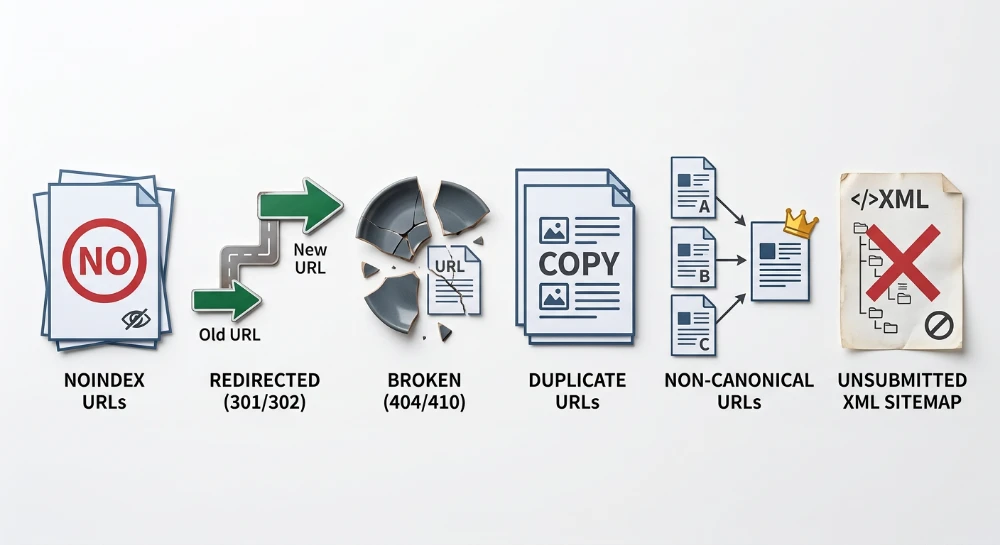
Validating XML sitemaps in Google Search Console requires more than confirming a successful initial submission. While a sitemap acts as a direct line of communication regarding a site's intended architecture, discrepancies frequently occur between the live contents of the XML file, Google's fetch capabilities, and final indexing outcomes. Resolving these gaps involves tracing the procedural relationship between the physical file hosted on the server and the diagnostic data processed within Search Console.
Effective validation relies on reconciling information across two distinct areas: the Sitemaps report and the Page Indexing report. The Sitemaps report provides feedback on whether Google can successfully access, read, and parse the XML syntax. However, a successful read status simply confirms file accessibility; it does not guarantee indexation for the contents. To determine how search engines handle the actual URLs contained within the file, webmasters must use the specific filtering capabilities within the Page Indexing report to isolate and evaluate submitted pages.
By comparing the raw sitemap inventory against Google's applied indexing statuses, it becomes possible to identify exactly where URL discovery drops off. This workflow separates surface-level access problems-such as intermittent server blocks or malformed XML syntax-from more complex indexing barriers like canonical conflicts, unintended directives, or crawling exclusions.
Validating live sitemap syntax and server accessibility
Before analyzing diagnostic data within Google Search Console, the physical XML file must be verified directly on the server. Search Console reporting can introduce processing delays, and relying solely on its interface may obscure fundamental file-level or server-level failures. Direct verification establishes a reliable technical baseline: if the file is malformed or inaccessible to a standard HTTP request, any downstream reporting will be inherently flawed.
The primary requirement is confirming the server returns a strict 200 OK HTTP status code when the sitemap URL is requested. A sitemap should be served directly; it must not rely on redirects. If the server responds with a 301 or 302 redirect, or encounters 403 Forbidden or 5xx server errors, search engine crawlers may abandon the fetch attempt. Testing the sitemap URL using an independent HTTP header checker ensures the file is immediately accessible without intermediate hops or firewall blocks.
Once accessibility is confirmed, the file itself must adhere to documented sitemap protocols. The XML file must use valid UTF-8 encoding. Sitemaps are subject to strict capacity limits: a single XML file cannot exceed 50 megabytes uncompressed and cannot contain more than 50,000 URLs. Exceeding either of these thresholds requires the webmaster to split the URLs across multiple child sitemaps.
Inside the file, the XML syntax must be well-formed and structurally complete. The most critical element is the location tag, written as <loc>, which must contain the absolute URL. Relative URLs are invalid and will prevent correct processing. If the optional <lastmod> tag is included to indicate when a page was last updated, the value must conform strictly to the W3C Datetime format. Acceptable formats include a simple date format, such as YYYY-MM-DD, or a precise timestamp with a timezone designation, such as YYYY-MM-DDThh:mm:ssTZD. Non-standard date formats frequently trigger parsing errors.
A common cause of reconciliation failure in Search Console is a mismatch between the URLs declared inside the sitemap and the expected canonical format of the site. The absolute URLs listed inside the <loc> tags must strictly match the protocol and subdomain of the property verified in Search Console. Discrepancies often appear in two forms:
- Protocol mismatches, where a site operates on HTTPS but the sitemap still contains legacy HTTP URLs.
- Subdomain mismatches, where the sitemap includes a mix of www and non-www prefixes that deviate from the primary domain configuration.
If these discrepancies exist within the physical file, Search Console cannot accurately map the submitted URLs to its internal index. Validating that the sitemap contains only the final, unified canonical URL format prevents data fragmentation before the file is ever submitted for processing.
Run a deep technical crawl to identify 4xx errors, missing meta tags, and indexation blockers.
Diagnosing "couldn't fetch" and parsing errors in GSC
When an submitted XML sitemap fails to process in Google Search Console, the resulting error typically falls into one of two distinct categories: a failure to retrieve the file from the server, or a failure to parse the file's contents. Accurately diagnosing the issue requires separating network availability problems from document syntax errors.
Interpreting "couldn't fetch" statuses
A "Couldn't Fetch" status indicates that a network, server, or permissions barrier prevented Googlebot from accessing the sitemap URL. This status commonly triggers under the following conditions:
- Transient server unavailability or 5xx HTTP response codes.
- A 403 Forbidden response caused by firewall rules or user-agent blocking.
- DNS resolution timeouts or configuration failures.
- A robots.txt directive explicitly disallowing crawling of the sitemap path.
It is important to note that a "Couldn't Fetch" label in Search Console does not always indicate a permanent or active server failure. The Sitemaps report is known to display this status intermittently due to internal processing delays or transient crawl constraints. If server logs show no failed requests from Googlebot at the time of submission, the error is often a temporary reporting artifact that resolves on subsequent automated fetch attempts.
Identifying parsing and read errors
In contrast, a "Sitemap could not be read" warning or a specific parsing error signifies that Googlebot successfully connected to the server and fetched the URL, but the payload was unreadable. Parsing failures happen when the document violates strict XML standards. This includes malformed XML syntax, unclosed tags, or unescaped characters such as ampersands within the URLs.
Another frequent cause of read errors is a server configuration issue where the sitemap URL returns an HTML document instead of an XML file. This scenario frequently occurs if a sitemap generation script crashes and the server serves a default HTML 404 error page, or if a caching layer incorrectly serves an HTML version of the request.
Testing live availability via URL inspection
To determine if a fetch error is an active problem or a cached reporting delay, use the URL Inspection tool directly on the sitemap URL. Bypassing the main Sitemaps report provides a real-time diagnostic view of how Googlebot interacts with the file.
Submit the exact sitemap URL into the Search Console inspection bar and execute a live test. The resulting report details the current HTTP response code, the page fetch status, and any robots.txt rules applied to the request. If the live test reports a successful fetch with a 200 OK status, the physical file is accessible, confirming that any lingering "Couldn't Fetch" warning in the aggregate Sitemaps report is likely a processing delay rather than a persistent configuration error.
Reconciling data across sitemap indexes and child sitemaps
Large websites manage scale by using a sitemap index file to group multiple child sitemaps. When a sitemap index is submitted to Google Search Console, it acts as a directory manifest. Googlebot parses this index to extract the URLs of the individual child sitemaps, which it then queues for fetching. The top-level Sitemaps report displays an aggregate count of all discovered URLs across the entire index, but relying solely on this aggregate number often obscures localized issues.
To isolate where URL discovery drops off, navigate into the specific sitemap index within the Search Console interface. Clicking on a successfully processed index row opens a detailed view that lists every nested child sitemap identified within the file. This drill-down view provides individual processing dates, fetch statuses, and discovered URL counts for each distinct XML file.
Comparing the discovered URL count of a specific child sitemap against the expected URL output from the content management system is a primary diagnostic step. For example, if a database contains 5,000 active product pages, the corresponding child sitemap should report a similar number of discovered URLs once successfully read. A significant discrepancy at this level indicates a problem generating the file, an incomplete database query, or a parsing failure halting the extraction of URLs midway through the document.
This reconciliation process relies on segmenting child sitemaps logically by content type, site section, or template rather than arbitrarily splitting files only when they reach the 50,000 URL limit. Common segmentation strategies include separating product pages, blog posts, category archives, and static informational pages into their own dedicated XML files.
When child sitemaps are isolated by content type, a sudden drop or stagnation in discovered URLs immediately points to a specific structural area of the site. If the main index reports 15,000 total discovered URLs instead of the expected 20,000, the aggregate view offers no clues. However, the drill-down view might reveal that the blog child sitemap and category child sitemap are processing perfectly, while the product child sitemap is returning a fetch error or reporting only a fraction of its expected URLs. This localized data directs troubleshooting efforts straight to the product page template or the specific script generating the product XML file, bypassing the unaffected sections of the website.
Bulk Google and Yandex index checker
Verify agency reports and track live SERP status in Google and Yandex to protect your SEO ROI.
Filtering the page indexing report for submitted URLs
While the Sitemaps report confirms that Google can successfully read an XML file and extract its URLs, it does not reveal how many of those URLs actually entered the search index. To measure the gap between requested indexing and actual indexing outcomes, the analysis must move to the Page Indexing report.
By default, the Page Indexing report displays data for "All known pages". This view blends URLs submitted via sitemaps with URLs discovered organically through internal links, external backlinks, and historical crawl data. To isolate sitemap performance, use the dropdown filter at the top of the report and select "All submitted pages". This action filters out the organically discovered URLs, restricting the dataset strictly to the URLs explicitly declared in processed sitemaps.
Once the filter is applied, the report divides the submitted URLs into two distinct categories: indexed pages and pages that are not indexed. The indexed count represents the submitted URLs that Google has successfully crawled, evaluated, and added to the search index. The unindexed count represents the submitted URLs that either failed to pass Google's inclusion thresholds or encountered a technical barrier during processing.
Inclusion in a valid XML sitemap does not guarantee indexation. A sitemap functions strictly as a discovery mechanism and a priority crawl request. Google continues to apply its standard indexing criteria-evaluating content relevance, canonicalization signals, and technical directives-to every submitted URL before deciding whether to retain it in the index.
When there is a significant discrepancy between the total number of submitted URLs and the total number of indexed URLs, this filtered view becomes the diagnostic tool for understanding the rejection. The detailed table beneath the main graph categorizes the exact reasons why Google excluded or deferred the submitted URLs. Reviewing these specific status categories under the "All submitted pages" filter allows practitioners to trace exactly where the sitemap's requests are failing and what technical adjustments are required.
Interpreting common "submitted but not indexed" statuses
When the Page Indexing report is filtered to show submitted pages, the status table isolates the precise reasons Google bypassed URLs explicitly requested in the sitemap. Addressing these statuses requires understanding whether the failure occurred before crawling, after content evaluation, or due to conflicting technical directives.
Discovered - currently not indexed
This status indicates that Google successfully read the URL from the sitemap but deferred crawling the page. The system added the URL to its known inventory, but an algorithmic decision or a crawl capacity limit prevented Googlebot from executing the HTTP fetch.
For submitted URLs, this often points to an overall site crawl rate limit or a protective measure by Googlebot to avoid overwhelming the host server. It can also occur if the URLs lack sufficient internal link support, signaling low priority despite their presence in the sitemap. The XML file successfully facilitated discovery, but the system did not allocate the resources to fetch the pages immediately.
Crawled - currently not indexed
Unlike the discovery phase failure, this status confirms that Googlebot successfully accessed the server and downloaded the page content. However, after processing the HTML payload, Google opted not to add the URL to the search index.
When a submitted URL receives a crawled but unindexed status, the issue typically lies with the page content or perceived utility rather than technical accessibility. Google may have evaluated the page as thin, identified it as near-duplicate content without explicit deduplication tags, or determined it did not meet current inclusion thresholds. This signals that while the sitemap successfully prioritized the URL for a fetch, the page itself failed the subsequent indexing evaluation.
Alternate page with proper canonical tag
This status highlights a direct conflict between the sitemap submission and the site's canonicalization signals. It indicates that Google crawled the submitted URL, found a canonical tag pointing to a different URL, and respected that directive by indexing the alternate page instead of the submitted one.
A strict requirement for XML sitemaps is that they must contain only canonical URLs. When this status appears under the submitted pages filter, it flags a configuration error where the sitemap requests indexing for a deduplicated variant. Practitioners must verify whether the sitemap is erroneously generating parameterized or duplicate URLs, or if the page itself contains an incorrect canonical tag. Resolution requires either removing the non-canonical URL from the sitemap output or updating the on-page canonical directive to align with the sitemap.
SEO structure and reciprocal link analyzer
Detect orphan pages, deep click depths, and toxic reciprocal links built by careless agencies.
Aligning sitemap contents with robots.txt and On-Page directives
A fundamental requirement of XML sitemap configuration is that the file must only contain canonical, 200 OK, fully indexable URLs. An XML sitemap serves as an explicit request for search engines to crawl and index specific pages. When the URLs listed in the sitemap are subject to server or on-page directives that contradict this request, it creates a diagnostic conflict that complicates how search engines process the site.
Resolving indexed though blocked by robots.txt
This status highlights a direct conflict between the sitemap and server-level crawl permissions. It occurs when a sitemap submits a URL for indexing, but a Disallow rule in the robots.txt file prevents the crawler from accessing the page. Because the URL was actively submitted and is likely linked elsewhere, Google may still add the URL to the index based on external signals, even though it cannot read the actual page content. The resulting search result typically lacks a descriptive snippet.
Resolving this error requires choosing a single intended state for the URL:
- If the page is meant to be crawled and indexed, the restrictive Disallow rule must be removed or modified in the robots.txt file.
- If the page is not meant to be indexed, it must be removed from the XML sitemap. Additionally, the page should serve a noindex directive. Implementing this requires temporarily lifting the robots.txt block so the crawler can access the page, read the noindex tag, and drop the URL from the index.
Purging noindex directives and redirects
Conflicts also occur when a sitemap contains URLs that serve a noindex robots meta tag or an HTTP header equivalent. Submitting a noindex URL sends diametrically opposed instructions: the XML file requests indexation while the HTML payload mandates exclusion. Google will ultimately respect the noindex directive, resulting in a submitted but not indexed status.
Similarly, including URLs that return 301 or 302 HTTP status codes violates the 200 OK requirement. When a sitemap points to a redirected URL, it requires the crawler to process an unnecessary network hop to discover the final destination, while the actual destination URL remains absent from the sitemap's priority list. To maintain accurate sitemap signals, practitioners should regularly crawl the sitemap file using site auditing tools to identify and remove any non-200 URLs or pages containing restrictive indexing directives.
Implementing the sitemap directive in robots.txt
While manual submission in Google Search Console allows for detailed reporting, relying solely on manual submission prevents automated discovery by other search engines or secondary crawlers. To ensure universal discovery across all crawling agents, the sitemap location must be declared directly within the site's robots.txt file.
This is accomplished using the Sitemap directive. The declaration requires an absolute URL pointing to the sitemap or the sitemap index file.
User-agent: *
Disallow: /internal-search/

Sitemap: https://www.example.com/sitemap_index.xml
The Sitemap directive operates independently of User-agent blocks. It can be placed anywhere within the robots.txt file, though positioning it at the very top or the very bottom is standard practice for clear configuration management. If a site utilizes multiple sitemap index files, multiple Sitemap directives can be declared on separate lines to ensure complete coverage.