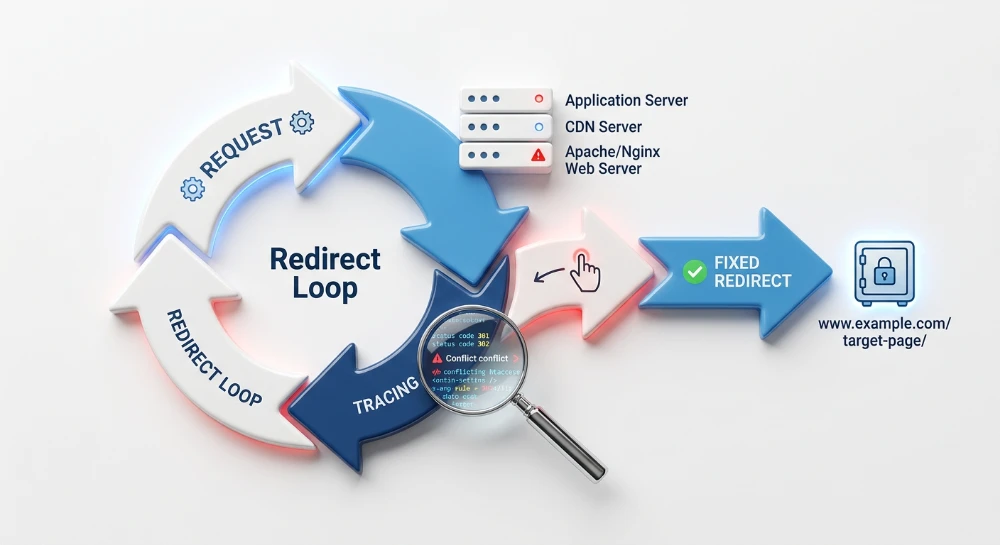
Auditing redirect rules across server and CDN layers requires mapping the exact path a request takes through modern web infrastructure. Rather than relying on a single configuration file, modern HTTP requests are processed through edge networks, web servers, and application-level routing. When a URL returns a 301 or 302 status code, that instruction could originate from a CDN page rule, an Apache or Nginx server block, or directly from a content management system.
This layered architecture frequently creates conflicting instructions. A common failure mode occurs when an edge network forwards a request under one protocol while the origin server enforces a conflicting rule, triggering an infinite redirect loop. Similarly, overlapping directives across different environments can generate long structural redirect chains. Because CDNs intercept and resolve requests before they reach the origin, standard server logs alone are often insufficient for diagnosing where the routing went wrong.
Resolving these conflicts relies on systematically tracing the HTTP response path to isolate the exact origin of each redirect. Pinpointing the specific infrastructure layer responsible for a hop makes it possible to untangle competing directives, eliminate redundant rules, and consolidate URL resolution into a single, efficient request.
Understanding the order of execution in redirect layers
When a client requests a URL, the HTTP request traverses a specific hierarchy of infrastructure before returning a response. Redirect instructions can be configured at any point along this path. Because modern web architecture follows a sequential execution model, the first layer to match a redirect condition will execute the rule, terminate the forward routing of that request, and immediately return the HTTP status code to the client.
This termination behavior dictates the diagnostic sequence for any URL routing issue. A request resolved at an outer layer never reaches the inner layers. If a content delivery network intercepts a request and issues a 301 redirect, the origin web server remains completely unaware of the event, and no entry will appear in the server access logs or the application database.
The edge and CDN layer
The edge network is the first point of contact for an incoming request. Systems operating at this layer evaluate requests at distributed points of presence before they can reach the origin server environment. Common examples include Cloudflare Page Rules, AWS CloudFront Functions, and Fastly VCL configurations.
Executing redirects at the edge is highly efficient because it eliminates the latency of traveling to the origin infrastructure. From a diagnostic perspective, however, edge rules are usually abstracted into cloud management consoles or infrastructure-as-code deployments rather than accessible text files. When an audit reveals a redirect that does not appear in server logs, the edge configuration is the primary suspect.
The web server layer
If the edge network does not intercept the request, it passes to the origin web server. This layer handles the routing logic defined in server configuration files before handing the request over to any application code.
Server-level routing typically involves Apache configurations, such as .htaccess files and virtual host directives, or Nginx server blocks. Redirects at this layer frequently utilize regular expressions to match URL patterns, file extensions, protocol conditions, or specific HTTP headers. Because these instructions are processed locally by the server daemon, their execution is logged directly in the server access and error logs, making them relatively straightforward to verify.
The application and CMS layer
When neither the edge nor the web server matches a redirect rule, the request is finally handed off to the backend application. This layer encompasses content management systems, web frameworks, custom backend logic, and dedicated SEO redirection plugins.
Application-level redirects are the most resource-intensive to execute. Processing a rule at this stage requires the infrastructure to invoke the backend language (such as PHP or Node.js), load the application framework, and query a database to check for matching redirect instructions. While CMS plugins offer a convenient interface for content teams managing individual page updates, relying on the application layer for global structural rules introduces unnecessary database overhead.
Tracing phantom redirects or untangling a redirect chain requires respecting this hierarchy. Auditing an application database for a persistent redirect loop is a waste of time if a CDN configuration is intercepting the request and returning a cached 301 response before the server environment is even contacted.
Run a deep technical crawl to identify 4xx errors, missing meta tags, and indexation blockers.
Tracing exact redirection paths with cURL and DevTools
Manual testing isolates individual URL behavior and reveals the exact HTTP response headers returned at each hop. Using command-line utilities and browser developer tools provides a transparent view of the redirection sequence before relying on bulk auditing software.
Command-Line inspection with cURL
The command-line tool cURL interacts directly with the network layer, bypassing browser caching, cookie states, and local security policies. Executing a cURL request displays the raw HTTP headers, making it the most reliable method for verifying the actual server or CDN edge configuration.
To trace a redirect sequence, use the following syntax:
curl -I -L http://example.com/old-pathThis command utilizes two essential flags:
- The -I flag instructs cURL to perform a HEAD request, fetching only the HTTP headers rather than downloading the full HTML document payload.
- The -L flag forces cURL to follow redirection instructions automatically, requesting each subsequent URL until it reaches a final destination.
In the terminal output, each hop in the chain generates a distinct block of headers. The two critical data points in each block are the HTTP status code and the Location header. The status code defines the rule type, typically appearing as a 301 Moved Permanently, 302 Found, 307 Temporary Redirect, or 308 Permanent Redirect. The Location header specifies the exact URL target for the next request. Tracing these sequential blocks allows you to map every discrete step the request takes before returning a final 200 OK response.
Analyzing browser behavior with DevTools
While cURL provides the unfiltered network response, testing via a web browser is necessary to diagnose how local cache states and client-side protocols alter the redirection path. The Network tab within browser Developer Tools records every transaction during a page load, showing exactly what a real user experiences.
When a URL redirects multiple times, browsers execute the sequence in milliseconds. By default, the Network panel clears its request history the moment the final destination document begins parsing. This default behavior deletes the record of the intermediate hops, masking the redirect chain.
To capture the entire sequence, enable the Preserve log setting within the Network tab before entering the URL. With this configuration active, the browser retains the log of all intermediate requests. You can then select each individual redirect row in the network log and inspect its specific response headers.
DevTools is the primary diagnostic tool for identifying redirects that execute locally rather than over the network. If a previous session encountered a 301 permanent redirect, the browser frequently stores that rule locally. Subsequent visits to the original URL will be redirected immediately by the browser without contacting the server. The Network tab flags these events by indicating the response was served from disk cache or memory cache.
Similarly, DevTools isolates local security upgrades. If a domain enforces HTTP Strict Transport Security (HSTS), the browser will intercept any HTTP request and automatically upgrade it to HTTPS. This appears in the Network log as a 307 Internal Redirect, confirming that the protocol switch occurred entirely within the client before any data crossed the network.
Diagnosing proxy SSL loops and HTTP/HTTPS conflicts
When redirect rules at the edge conflict with rules at the origin server, browsers encounter an infinite redirect loop, typically displayed as an ERR_TOO_MANY_REDIRECTS error. This failure mode occurs when two infrastructure layers repeatedly bounce the same request back and forth without resolving the final destination.
A frequent cause of this loop is a mismatch in SSL/TLS termination between a reverse proxy network, such as Cloudflare or AWS CloudFront, and the origin web server. In configurations often labeled as flexible or partial SSL, the content delivery network handles the secure HTTPS connection with the client but forwards the request to the origin server over unencrypted HTTP.
The conflict triggers when the origin server enforces its own security rules. The origin receives the proxy's forwarded request on port 80. Detecting an unencrypted HTTP connection, the origin server executes a rule to force a secure connection, replying with a 301 redirect to the HTTPS version of the URL. The proxy passes this redirect back to the client.
The browser follows the redirect by requesting the HTTPS URL again. The proxy intercepts this new HTTPS request, terminates the SSL connection, and forwards it to the origin over HTTP. The origin server again sees an unencrypted request and issues another 301 redirect. This cycle repeats instantly until the browser aborts the connection.
To resolve this loop, the origin server must stop evaluating the local port protocol. Because the proxy acts as an intermediary, the local connection to the origin will always be HTTP, regardless of how the client connected. Instead, the server must evaluate the client's initial protocol.
Reverse proxies inject the X-Forwarded-Proto HTTP header into the requests they send to the origin to communicate this information. When a client connects to the proxy via HTTPS, the proxy forwards the request to the origin with the header X-Forwarded-Proto: https.
You can configure the origin server to read this header and only trigger the HTTPS redirect if the original client request was made over HTTP.
For Apache servers, modify the RewriteCond directive in the configuration file or .htaccess to check the HTTP:X-Forwarded-Proto variable rather than the HTTPS environment variable.
RewriteEngine On
RewriteCond %{HTTP:X-Forwarded-Proto} =http
RewriteRule ^(.*)$ https://%{HTTP_HOST}%{REQUEST_URI} [L,R=301]
For Nginx servers, adjust the server block to evaluate the $http_x_forwarded_proto variable. Nginx automatically maps HTTP headers to variables by converting them to lowercase and replacing hyphens with underscores.
server {
    listen 80;
    server_name example.com;

    if ($http_x_forwarded_proto = 'http') {
        return 301 https://$host$request_uri;
    }
}
Implementing this header check allows the origin server to accurately enforce HTTPS for users connecting over unencrypted connections without trapping proxy-forwarded secure requests in an infinite redirect chain.
SEO structure and reciprocal link analyzer
Detect orphan pages, deep click depths, and toxic reciprocal links built by careless agencies.
Auditing regular expressions in Server-Level configurations
Web servers rely on regular expressions to evaluate incoming requests and execute routing logic. When auditing server-level redirects, reviewing the exact syntax of these pattern-matching rules is necessary to identify logic flaws that cause erratic redirection behavior.
In Apache environments, regular expressions are typically evaluated using
RewriteCond
and
RewriteRule
directives within
.htaccess
or main server configuration files. A condition checks a specific variable, such as the request URI or host, and the subsequent rule executes the redirect if the regex matches.
Nginx processes regex within
server
or
location
blocks, evaluating the URI against defined patterns to execute
rewrite
or
return
directives.
Identifying overly broad wildcards
Because regular expressions are inherently greedy, poorly scoped patterns frequently cause unexpected redirects by capturing unintended paths.
A rule designed to redirect an outdated directory might use a poorly constrained wildcard. If a rule specifies a pattern like
^/old.*
to redirect traffic to a new directory, it will correctly match
/old-section/
. However, it will also unintentionally capture and redirect active URIs like
/older-news-posts/
or
/old-contact-page.html
.
Auditing these rules requires checking the regex anchors. The caret (
^
) denotes the start of a string, and the dollar sign (
$
) denotes the end. Omitting trailing slashes or end anchors forces the server to match any URI that simply begins with or contains the specified string.
Preserving query strings
Another common failure mode during URL redirection is the unintentional stripping of query strings, which often contain analytics tracking parameters or session variables.
In Apache, if a
RewriteRule
specifies a new query string in its destination target, the server discards the original query string from the client's request. To prevent this, the
[QSA]
(Query String Append) flag must be added to the rule, instructing the server to combine the original parameters with the new ones.
In Nginx, relying on the
$uri
variable during a rewrite or return directive captures only the normalized path and omits the query string. To preserve tracking parameters, configuration files should use the
$request_uri
variable, which includes both the path and the original query string, or explicitly append the
$args
variable when constructing a new path.
Resolving conflicting rules and secondary hops
Servers evaluate configuration files sequentially from top to bottom. If multiple regular expressions match a single request, the server may execute them in sequence, creating a redirect chain.
For example, if a rule enforcing HTTPS is placed below a rule that strips trailing slashes, a user requesting an HTTP URL with a trailing slash will undergo a two-hop chain. The server first redirects to the HTTP version without the slash, and then evaluates the next matching rule to redirect to the HTTPS version.
Auditing requires tracing this execution order and ensuring that broad structural rules, such as HTTPS enforcement or domain normalization, are prioritized at the top of the configuration file.
Furthermore, execution must be properly terminated to prevent subsequent rules from triggering. In Apache, appending the
[L]
(Last) flag to a
RewriteRule
instructs the server to stop processing further rules once a match is executed. In Nginx, the
return
directive immediately stops execution, whereas
rewrite
directives require the
last
or
break
flag to halt further regex evaluation.
Identifying structural redirect chains at scale
While command-line tools isolate the exact layers responsible for a single request, detecting overlapping rules across an entire architecture requires bulk auditing. Structural chains occur when independent rules trigger sequentially across hundreds or thousands of URLs, often because edge, server, and application layers are unaware of each other's routing logic.
To map these sequences, run a site-wide crawl using a tool like Screaming Frog SEO Spider. The crawler must be configured to follow multiple hops to capture the complete path. Ensure the tool is set to always follow redirects and verify that the redirect limit is high enough to reach the final destination URL without abandoning the sequence prematurely.
Once the crawl completes, export the redirect chain data. The Redirect and Canonical Chains report extracts every hop in a sequence into a tabular format. The resulting export displays the originally requested URL, each intermediate redirect URI, the HTTP status codes for every hop, and the final destination URL.
Review the export for recurring sequences that indicate stacked routing rules. Instead of analyzing individual URLs, look for the URL transformations visible in the intermediate columns. These transformations act as signatures for specific configuration layers. A common multi-hop pattern might show:
- Hop 1: A protocol change from HTTP to HTTPS.
- Hop 2: A subdomain normalization adding or removing "www".
- Hop 3: A path modification removing a trailing slash or updating a legacy directory.
Group the exported chains by these intermediate steps to map the patterns back to the infrastructure. If thousands of URLs undergo a protocol and subdomain change before hitting a path modification, the configuration is split. The first two hops typically indicate edge-level or server-level rules, while the final path modification often points to a CMS or application-level rewrite.
To consolidate these chains into a single hop, the rules must be aligned to point directly to the final destination URL from the earliest possible layer. If an application rule redirects an old directory to a new one, but the CDN forces HTTPS first, the intermediate steps will persist. Resolving this requires updating the edge or web server configuration to intercept the exact legacy request and route it directly to the secure, properly formatted final URL, bypassing the application layer entirely.